Up next in 10

🔥 Bito AI VSCode Code Assistant is NEXT LEVEL! Better Than Copilot, Claude & Cursor??
Jul 24, 2025

Get the full source code of application here:
Show More Show Less View Video Transcript
0:00
Uh hello guys, welcome to this videos.
0:02
In this video, I'll show you another VS
0:03
code extension which is used for AI
0:06
coding.
0:08
It basically generate snippets right
0:10
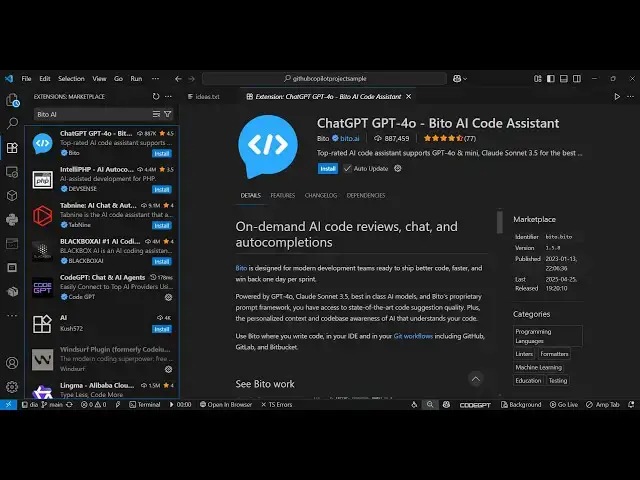
here. So this is the extension B IO
0:14
AI code assistant. It's this is the
0:17
title here chat GPT for BTO AI code
0:21
assistant. So it's got almost uh a
0:24
million installs and this is their
0:26
website. If you visit BTO
0:30
D- AI it's similar to copilot
0:34
claude and cursor all the top tools for
0:36
coding development in VS code. So this
0:39
is the website you can start a free
0:41
trial without any credit card details.
0:43
Simply click on that
0:46
and just log in and create an account
0:49
right here and uh
0:54
you can basically sign up. Just enter
0:56
the email address. Click on continue.
0:59
And it provides you with the AI chat in
1:02
your IDE code reviews, code completions.
1:06
And then it just need to enter the
1:09
verification code that it sends you.
1:21
So after entering it just create your
1:23
account here. Select the language and uh
1:27
once you create this just give it a
1:29
workspace name
1:35
and just click on next.
1:38
So now you will be redirected to the
1:40
dashboard where you can actually get
1:42
started. So after that you just need to
1:45
activate this extension. Click on
1:46
install. So once you activate this
1:49
extension
1:53
so it will be showing right here in the
1:58
you'll see this notification coming. So
2:00
click on setup and uh click left start
2:04
and then it will try to
2:09
welcome right here you will see once you
2:11
install this extension.
2:14
So these are some of the instructions
2:15
which are showing right here.
2:19
And right here you enter your
2:21
information.
2:24
The email address
2:26
to activate this.
2:41
So once you activate this you will have
2:44
this in the free plan. So
2:49
so this is the interface right here. You
2:51
will ask any sort of questions. So you
2:54
will see it has uh the chat box right
2:57
here. So here you will say
3:02
build a image to.
3:10
So now it is generating this code based
3:13
upon the question. Right here you'll see
3:15
it will give you step-by-step
3:16
instructions
3:21
and it also gives you autocomplete
3:23
suggestions as well as you activate this
3:25
now if you are in any sort of file. So
3:29
it will think right here and you can
3:31
press the tab key to accept the
3:33
suggestion.
3:35
So as you're writing it, it is giving
3:36
you the suggestion.
3:39
So automatically it tells you the entire
3:41
code. So simply tap to accept
3:45
and again if you go just write this
3:50
so automatically it is thinking what
3:54
sort of code that you want to write.
3:56
This will save you a lot of time similar
3:58
to GitHub copilot.
4:00
So you can try this extension for
4:02
totally free. So
4:06
you can see it generated the response to
4:08
you the actual explanation of the code
4:11
as well and you can even attach files as
4:15
well right here images as well.
4:21
So you can make it full screen so that
4:25
so at any time you can click the upgrade
4:27
button to upgrade the account here. So
4:32
now you are on the free plan. So
4:38
the pro plan start with $15 per month
4:41
and uh basically you can get the start
4:44
free trial, unlimited line by line
4:47
reviews, AI powered code suggestions,
4:50
oneclick apply for AI fixes, all this
4:53
stuff.
4:54
So click the start free trial option and
4:58
uh
4:59
once you click this option it will
5:01
activate your free trial. So now you
5:04
will see you are currently on free
5:06
trial. So after you activate this
5:10
so you just click enable and uh
5:14
now you can see your trial activate. Now
5:19
you are on the trial account. So here
5:21
you can
5:26
so in this easy way this is a setup for
5:29
setting of this extension similar to
5:31
GitHub copilot claude and cursor you can
5:33
decide
5:35
whether you want to use it uh in VS
5:38
Core. Thank you very much for watching
5:40
this video and also check out my website
5:43
freemediatetools.com
5:45
uh which contains thousands of tools.
#Software
#Development Tools