0:00
uh hello guys welcome to this video so
0:02
in this video I'll show you a vs code
0:04
extension which allows you to uh include
0:08
the link of Google phones directly
0:10
inside vs code you don't need to go to
0:12
Google phones website and directly copy
0:14
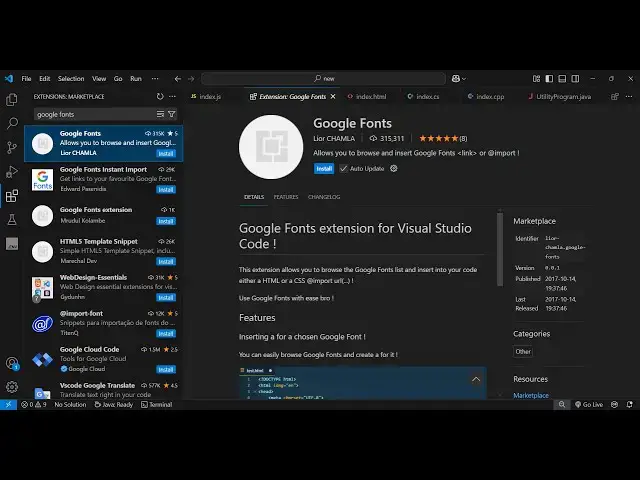
the link so this is actually the
0:16
extension Google phones it's used by
0:19
almost 315,000 people installs so if you
0:23
go just go to the extensions just type
0:26
here Google phones the very first
0:28
extension which comes right here
0:33
this I personally use this extension a
0:35
lot because just click install and
0:38
activate this and now come to the HTML
0:46
our if you want to include the CDN of
0:49
your Google font you can directly
0:54
this so let's suppose uh you just need
0:57
to push the go to the command pallet or
1:00
just type the shortcut key control shift
1:01
p and just write here Google phone just
1:05
type it so we have two options either we
1:07
can include the link or this directly
1:10
CSS import let me enter it and here you
1:14
will select the choices here you can
1:16
directly type your Google font name here
1:18
so let me type the or you can select it
1:22
so it has all the Google fonts in the
1:24
select list so you can select any font
1:27
here let me select this one so it will
1:29
automatic I Ally include the CDN of this
1:31
font here you will see that so you don't
1:34
need to go to the Google fonts website
1:36
every time if you want to include a
1:38
Google font you can do it directly
1:39
inside vs code and then you can directly
1:46
font and you can just test it out
1:50
directly in the browser you will see the
1:53
here and in the similar way you can
1:58
actually again choose any font here
2:12
one so it automatically includes the CDN
2:22
can so you can see that the font is
2:25
changed here and the second method is
2:28
actually you can directly include them
2:31
in the CSS so again type Google phones
2:34
and it has also the insert CSS import as
2:39
so it will actually import the font from
2:43
the URL and include directly in the CSS
2:45
code here so now then you can directly
2:53
font so this will save you a lot of time
2:57
before I was not using this extension I
3:01
always go to Google phone's website and
3:04
browse the phont here and then you need
3:07
to include the actual URL so this
3:11
saves me a lot of time because I don't
3:15
need to do that I can
3:17
directly you can right click code to
3:19
command pilot just type Google phones
3:22
and you can select your favorite font
3:24
here from this select list or if
3:27
you know the name you can directly
3:29
include the CDN so it will automatically
3:33
this it will give you this URL and here
3:37
you can directly attach
3:46
it so this was the extension guys you
3:49
can directly use this extension just
3:51
activate and start using it inside your
3:54
projects and thank you very much for
3:56
watching this video and also check out
3:58
my website free Med tools.com which
4:01
contains thousands of tools regarding
4:02
audio video and MH and I will be seeing
4:05
you in the next video