Up next in 10



Have questions? Ask in the Chat!
Don't forget to check out Odyssey Custom Vans latest build currently For Sale here: https://www.odysseycustomvans.com/
Whenever you’re ready, there are 2 ways we can help you:
1. If you need a vetted parts list, download our → FREE DIY Van Build Cheatsheet to help you save time and money on Van Parts and Gear: CLICK HERE: https://vanbuilderhq.com/
2. If you want to get Done-For-You Van Build help, book a → FREE Consultation with my Calendly Link: CLICK HERE: https://calendly.com/odysseycustomvans/intro-call
Show More Show Less View Video Transcript
0:01
[Music]
1:43
hey guys welcome to the live stream we
1:44
are working on John and Susan's van
1:46
today getting really close to delivery
1:48
day so all we have to do is uh um
1:52
actually let's hop in the van and I will
1:54
go through a checklist
1:57
here all right let me get my camera
1:59
working
2:03
first yeah so we're working uh on the
2:06
build got a couple more things left um
2:08
what we're picking up from today is
2:10
we've filled the whole entire water tank
2:12
up and we've done um I've let it it's at
2:15
the very top and it's been sitting for a
2:18
little over 24 hours so no leaks on the
2:21
bottom end uh now water tanks are not
2:25
pressurized so typically you're not
2:27
testing to make sure that they hold
2:29
pressure
2:31
um but just in case I went ahead and uh
2:35
pressurized it just to see if uh John
2:38
and Susan are filling it up with a city
2:41
water pressure I didn't want any of the
2:43
seals to leak if they did accidentally
2:45
put that pressure on there and uh at the
2:48
very top vent fitting we have like a
2:51
little bit of a weep uh uh leak so that
2:55
is just a very small drip um that
2:58
fitting I think think we can do one or
3:00
two more turns so I'm going to redo that
3:02
fitting and retest um but we need to
3:05
knock that out uh that's an easy fix but
3:08
today we're going to pause on that and
3:10
we're going to move on to finishing up
3:12
the um electrical enclosure and give me
3:16
one
3:16
second my camera is being weird give me
3:21
one
3:22
second there we
3:26
go so what we're going to be doing today
3:28
is uh
3:30
finally organizing all these cables
3:32
we've already got a plan uh of attack as
3:35
far as how we're going to organize
3:37
everything so the first thing that I did
3:40
uh was make sure
3:43
that um all the electrical systems were
3:47
working and
3:49
uh hold on one second I think the stream
3:51
is choppy John and Susan are filling it
3:54
up with the city water pressure I didn't
3:56
want any of the seals to leak if they
3:59
did put that pressure on
4:01
there anyway we'll keep going so we're
4:04
going to move on to the back of the van
4:05
here
4:07
and uh went through all of the
4:10
electrical
4:11
wiring uh tested all the circuits so we
4:13
got the lighting we've got the 12volt
4:16
reading lights uh we've been using Shore
4:18
power a bunch so we've been actually um
4:23
guess the camera's over here uh we've
4:26
been Shore power charging so we've had
4:28
three full Shore power charging Cycles
4:31
on the van so we've taken it all the way
4:33
down to 10% three times and fully
4:36
charged it up and uh it it charges uh
4:39
very quickly um again this is the first
4:42
48 volt system that I've used and uh it
4:47
it just seems to charge much faster than
4:50
a 12vt system so uh yes still learning
4:53
about that but as far as plugging it in
4:56
as soon as you plug it in the system
4:57
takes over uh you don't have to do many
4:59
settings you can go into the menu and
5:02
you can set how many amps you wanted to
5:04
pull from the household Outlet so if you
5:07
don't want it to pull 15 amps uh and
5:09
you're running something else on that
5:11
outlet um you can move it down to 10
5:13
amps so that's what I did and it still
5:15
charges very fast uh it's 10 amps now
5:18
you can make it more if you have a
5:20
different circuit but 15 amps is the max
5:23
that I would want this system to be uh
5:25
that the plug that I have for them to
5:27
use to charge
5:30
uh so we went through all the wires uh
5:33
we checked everything I mean everything
5:34
is working fine so the
5:37
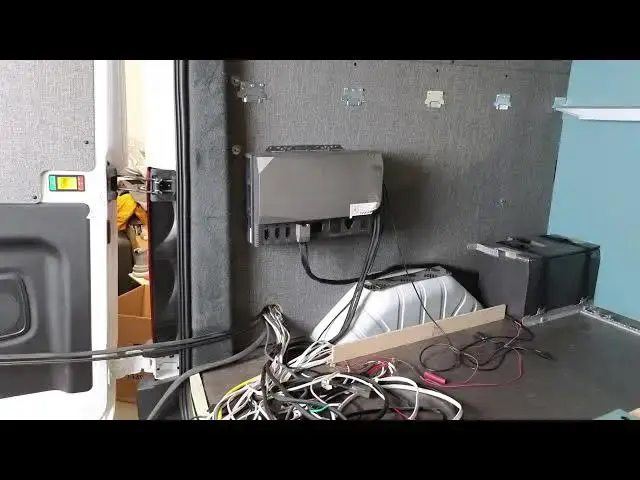
main uh box is this one right here so
5:40
this is the main uh fuse panel and
5:44
breaker system so the breakers over here
5:46
are for the
5:47
110volt and over here on the right hand
5:50
side is the 12vt uh fused connections so
5:54
I've already been playing around with
5:55
this connected all this I even used the
5:57
wireless controls so you can use them
5:59
with with the ecoflow app or on the
6:01
touchcreen and the first six circuits
6:03
are controllable that way so we're going
6:05
to make sure that we put uh the interior
6:07
lights um and then all of the reading
6:09
lights and then um we'll have one more
6:13
circuit um I'm trying to think what we
6:16
might put on that not
6:18
sure but we've got options so this box
6:22
is going to if you can imagine let me
6:25
get some pieces of wood in here so you
6:26
can see uh
6:30
this is a very simple enclosure this
6:32
just going to be a nice low profile
6:34
enclosure over here so here's the wheel
6:37
well and essentially what we're going to
6:39
do is we're going to come in here um
6:42
we're going to do the same you know 2x4
6:44
construction we've been doing with the
6:46
the water system and then we're going to
6:48
come off of this we're going to build up
6:50
a box over this wheel well so we're
6:52
going to make sure that we use our sound
6:53
deadening uh we'll do our havlock wool
6:56
in here to
6:57
insulate um but what nice is we'll have
7:00
this cavity here so that these wires
7:02
from the interior of the van can start
7:04
to come
7:05
through and then we can organize these
7:07
other cables now we have the ecoflow
7:10
system uh turned off um and the only
7:14
Quirk that I've found out so far with
7:16
the ecoflow system is there's a certain
7:19
startup sequence and shutdown sequence
7:21
that makes it happy so if you don't
7:23
follow that um it's going to take care
7:26
of of itself and protect itself uh
7:31
so don't start using this system like
7:33
you already know what you're doing you
7:35
need to uh do everything step by step uh
7:39
it just has a bunch of redundant safety
7:41
features so it won't turn this box on
7:44
unless it sees that everything else is
7:47
good to go for
7:49
example uh when you turn the system on
7:52
for the first time and this is just my
7:54
experience you need to turn on the AC
7:57
system first then the DC system
8:00
and then once those two lights are on uh
8:02
then you can actually turn off the AC
8:05
system um not sure why that's the the
8:08
order of operations that's just what I
8:10
found to not have the DC system
8:14
automatically shut off on you uh it's
8:17
wanting to to see that startup sequence
8:21
in just my experience so once you got
8:24
the AC system running um if you're not
8:26
using it then you can turn it off keep
8:28
the DC system running
8:30
and just let that go um but what's most
8:34
important about this system uh that it
8:36
doesn't like is it wants anything that's
8:40
drawing power or giving it power to be
8:43
turned off before the system is fully
8:45
shut down so if you have uh if you're
8:50
getting ready to shut this system down
8:52
either you want into storage or you just
8:53
don't want the system to be on at all
8:56
what you're going to have to do it's
8:58
really easy it's just you know um it's
9:01
kind of a quirk uh what you want to do
9:04
is go to the the DC uh go to the panel
9:07
and then you're going to make sure that
9:08
any circuits are off so you want to turn
9:10
all your light switches off you want to
9:13
turn off your water pump so all 12 volts
9:15
circuits off at the source and then
9:19
you're going to want to turn all your AC
9:20
systems off so you know don't leave a
9:22
water heater running and then shut this
9:24
system off so you want all the power to
9:26
be shut off switch wise then you're
9:30
going to come over here and then you're
9:31
going to make sure that all your input
9:32
power is disconnected so the shore power
9:36
you're going to make sure you want that
9:37
unplugged if you are unplugged then
9:40
you're going to want to come over and um
9:43
you're going to want to unplug the solar
9:46
because solar is always on so you're
9:48
going to want to unplug the solar and uh
9:51
now again you're not doing this every
9:53
day this is if you're taking the van
9:55
parking it for storage or you're not
9:57
going to be using the van for a long
9:58
time you want to shut the system down
10:00
this is not a daily task this is
10:03
only for storage but you're going to
10:06
unplug the uh the
10:08
solar and then you're going to want to
10:10
unplug the alternator uh ports so no
10:15
power is going in all the circuits have
10:17
been turned off and then as soon as that
10:20
is done then you can hold down the
10:22
button wait for the lights to show up
10:25
and then all of a sudden the lights will
10:26
fade and then as soon as the lights have
10:29
fad ated the system is off and then you
10:32
can go ahead and plug unplug the uh the
10:34
battery
10:36
cable so hopefully that helps some
10:39
people that have been having these uh DC
10:43
issues uh I'm going to put in even
10:46
though uh I've resolved it and it you
10:48
know it hasn't happened before since I'm
10:50
doing that sequence um I'm still going
10:52
to put a help ticket in just so I can uh
10:55
record this um
10:59
just to have that on record so if
11:01
anything happens down the road you know
11:03
it's noted in in our
11:07
account um so moving on let me make sure
11:11
I get my phone with me in case you guys
11:13
have any
11:17
questions for storage but you're going
11:20
to unplug the uh the solar see the
11:23
internet's kind of slow today I see my
11:25
stream
11:26
is a little jittery um
11:31
see I'm GNA go turn this off over here
11:33
turn this computer
11:36
[Music]
11:40
off yeah but anything like that you're
11:42
just going to want to make sure that you
11:45
uh you know tell whoever you bought it
11:47
from about
11:50
that that would be my recommendation
12:00
okay let's head back to the
12:06
van so we're multitasking today I'm
12:08
actually got the uh kitchen gy panel
12:11
that is finalized and is being painted
12:14
but getting back to this uh Power
12:18
System let me change the lighting up
12:21
here so what we're going to be doing
12:24
is uh these cords are going to be
12:26
exposed it's just the way the system is
12:28
designed so we want to do this in a neat
12:31
you know design focused way so what
12:34
we're going to be doing is over here on
12:37
the right I'm
12:38
organizing uh the shore power cable
12:43
the solar input cable and I'll just give
12:46
you an idea
12:47
of what this is going to look
12:50
like so essentially we're going to have
12:52
a simple Box covering that I mean that's
12:55
kind of straightforward it's just a box
12:57
so we'll have the you know 2x4 coming
12:59
this way going this way one coming over
13:02
here and one over here so we've got a
13:04
nice structure and then we'll size the
13:08
height so we'll pretty much
13:12
have go get some 2x4 pieces
13:36
so what we're going to have
13:38
is I have a piece coming in like
13:43
this and so this a Prett pretty much be
13:45
our base
13:48
height and then we'll have our box like
13:52
that and then we'll
13:55
probably um and I'm just doing this for
13:58
ease of install that's pretty much what
13:59
this
14:00
is uh so we'll either do
14:05
this and then up here uh we need this as
14:09
you guys can see how much cable we have
14:11
we need the room back here to actually
14:14
uh house everything so I know it kind of
14:18
looks a little Overkill that we're
14:20
building so big but we need that we need
14:21
the space so we're going to build this
14:24
box out there's a nice cover plate that
14:25
goes on here and then that way we're out
14:29
just about where our you know behind
14:33
where our battery box
14:37
is um but what I'm going to do right
14:40
now I just turned the camera on so you
14:42
guys can kind of see how I'm organizing
14:45
everything but the plugs so we'll have
14:48
each one of these plugs for this is the
14:50
AC in so this goes down here and so the
14:53
plugs what we're going to do is we're
14:55
going to plug them
14:56
in and I've got everything disconnected
14:58
but these plugs they snap in really easy
15:01
so this is actually going to come behind
15:04
here like this and then we'll have two
15:07
really nice uh cable ties and they're
15:11
going to be bolted into the back panel
#Hybrid & Alternative Vehicles