live_tv
Livestream Starting Soon
00
Hours
:
00
Minutes
:
00
Seconds
Up next in 10



Check out the iFLYTEK AINOTE 2 and use discount code AINOTE50: https://bit.ly/49LDkOu
AINOTE Official Store: https://bit.ly/49LDkOu (Discount Code: AINOTE50)
AINOTE Amazon Store: https://amzn.to/3WR2iV6 (Discount Code: AINOTE50)
#AINOTE #AINOTE2 #AINOTEAir2 #iFLYTEK #iFLYTEKAINOTE @theainote https://www.youtube.com/@theainote
Thanks to iFLYTEK for partnering on this video.
FOLLOW ME IN THESE PLACES FOR UPDATES
Twitter - http://twitter.com/unboxtherapy
Instagram - http://instagram.com/unboxtherapy
TikTok - http://tiktok.com/@unboxtherapyofficial
Show More Show Less View Video Transcript
0:00
So I got a couple cool gadgets from a company called iFly Tech
0:04
This one is the AI Note 2. This one is the AI Note Air 2
0:08
Different sizes. Air, obviously, more portable. You can see based on the box that we're going to have pen input
0:14
and apparently it feels a lot like paper. We're, of course, going to try it out
0:18
We've also got a bunch of accessories, including the typefolio keyboard. To start, I'm going to do the little one
0:24
Ooh, okay. Very thin. And obviously because we've got an e-ink display here
0:29
We have much better battery life and it's going to be better for eye fatigue and strain
0:34
And now, of course, as the name implies, you have AI built in, which kind of pairs well with these E-Ink devices
0:40
because now we can record with them. We can transcribe. We can take notes on top of transcriptions
0:46
And so I think students, I think there's a target there for students
0:50
This one actually has a document scanner on it as well. Type C connection, power switch in the top right corner
0:55
So also in the package here, our paperwork and a cable. and the pen. So the pen is using Wacom technology, which means it doesn't need its own battery. It
1:08
doesn't need to be charged, which is beautiful for a device like this, especially something that has
1:12
an extended battery life. The wobble at the pen's tail is for eraser pressure. See that
1:18
So now we're in and check out the contrast, the E-Ink contrast, gentle on the eyes. You're not
1:24
distracted. You're not having the whole abundance of games and things that could take you away from
1:30
your reading or your work. We have this notes section, a schedule section with a calendar
1:34
We've got reading, of course, where we can load this up with our variety of e-books. Look at this
1:40
Just writing right on top of the user manual. Now, this displays 8.2 inches, 1440 by 1920 for a PPI
1:48
of 293. It's got Wi-Fi, Bluetooth 5.0, quad speakers, and a microphone. There's 32 gigs of
1:55
local storage and four gigs of RAM. So let's move over now to the AI Note 2. So this is a more
2:02
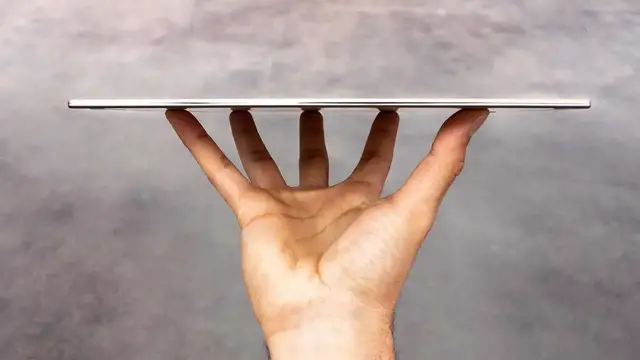
typical tablet size. This one is light given the footprint. Whoa. Actually, speaking of thinness
2:09
apparently the AI Note 2 is the thinnest in the world. Like they got a Guinness world record or
2:14
Very, very light and very, very thin. And I didn't even realize this
2:18
but if you look at the unique shape of this pencil it so that it aligns better with the side of the tablet Now that actually the pen from the Air model
2:29
Let me see if it's exactly the same. Oh no, it's not, it's different. The pen for the AI Note 2 is bigger
2:34
It has more texture to it and I might prefer it, honestly
2:39
Same thing. Stronger hold, holy, stronger hold. Can I use this one with this one
2:47
Yeah, do that too. a couple of extra tips for the pencil
2:51
a USB cable as well. Now let's move over to the Folio keyboard
2:55
So this case is gonna give you a keyboard. It's also gonna give you a place for your pen
3:01
to go beyond the magnetic connection if you wanna keep it more secure
3:05
Oh, nice. So it detects the keyboard immediately. Our pen we can still just stick if we want to
3:11
or we can slide it in. It slides in and out very nicely
3:16
Can I just go, oh yeah, I can go down like this, close the whole thing up
3:20
and that's your travel scenario right there. Very small, lightweight. Now, some other interesting things I'm noticing
3:25
about the keyboard here, we have a dedicated AI button on there to get your GPTs going
3:30
Typing experience, let's try a new note. Surprisingly decent, like for something that small
3:38
the only thing that would require some adjustment for me is this smaller backspace button up top
3:44
and I can also see that the direction buttons up and down are a little smaller
3:48
I mean, you gotta squeeze everything in because the form factor is so tight anyway
3:55
Not bad. If you want something more basic, you can also pair it with the original protective case
4:01
and it's way thinner, obviously. It doesn't need to have the keyboard. Look how thin that thing is
4:05
So you can either fold this part out and keep the pen external or you can just leave it attached magnetically
4:12
Ooh, that's pretty clean. Look at that little guy. Even with the cover on, it feels impossibly thin
4:19
Okay, so we have the device booted up now, and it's gonna be capable of reading books
4:24
Like, you can use it as a reader, and it's one of the most comfortable places to read
4:28
because of the fact that there's no eye strain or less eye strain, because it's not emitting light
4:32
but instead it's reflecting it. Once I have a book, it shows up on my bookshelf over here
4:37
Within a particular book, of course, we can also go ahead and circle things and take notes
4:42
If we wanna select a big area we can highlight it We can also inquire Inquire will end up looking for a definition translation You can also utilize the AI search which may provide more context
4:53
than the initial definition that's provided. We can take notes and there's a variety of different shapes
4:59
and tools to choose from. So maybe we wanna use our brush here
5:03
in order to select something. And we can pull these little tabs
5:07
if it doesn't completely get the section that we're looking for. So that's inside of the reader portion, but these tools kind of apply to whichever document you might be looking at
5:16
So here we have a transcription from a podcast in audio form
5:20
And if I hit play here, you can see it moving through the podcast, which has now been transcribed and is now available in text
5:27
Jump into text editing and see the entire document in text form
5:30
So it's not just podcasts. Obviously, you can use this for lectures, not have to worry if you're going to have everything down and not have to only have the audio recording
5:38
but instead have the transcription in the same device that recorded it. So the other option you have here, because of that built-in AI
5:45
this feature called Meeting Minutes, which will summarize the content from a meeting
5:49
Now, this is a podcast because we didn't actually have a meeting, but we wanted to have a bunch of text
5:53
And if I continue from here, it will actually take all of this text
5:57
this huge wall of text, and attempt to create a summary. On the back end, you can see here that the thinking is GPT-5
6:03
Point form, which might be a little bit easier to digest, and maybe it's not the most compelling topic
6:07
and you really just want to condense it down to the key points. So if I create a new note, there are many ways that I can start that note
6:14
I can either begin to draw or I could hit this microphone. And now I could begin to input my new note and say
6:22
by the way, I need to remember to do five different things today
6:26
including pick up the dog from the grooming, shoveling the pathway. I have to stop by Home Depot in order to pick up a candy
6:30
And after that, I can't forget that I have a dinner party
6:34
and I'm supposed to bring potatoes. Stop. We have our real-time transcription
6:41
and then I wanna go ahead, make this into a summary. So we'll dial in the GPT-5 here
6:49
Look at that. Isn't that prettier? It's just a lot cleaner, obviously, and bring the potatoes to the dinner party
6:54
How could I forget now? If Tuesday the 9th, I need to remember to bring the potatoes
6:58
it'll convert my writing into OCR, so into actual text, and then that becomes part of the schedule on the 9
7:05
So now that another item on the calendar Another cool choice is the ability to change between optimal display quality or speed And it does And I may choose the speed version not sure
7:19
But it does feel a little bit faster. Well, anyway, you have the option
7:23
if you go for image quality or speed. Very smartphone-like, pull down from the top
7:27
and you have quick toggles for wifi, Bluetooth. Security, so it does actually have
7:32
a fingerprint reader built into it. Let's go ahead and register a fingerprint
7:35
Try to unlock it with a different finger. No good. Let's do it with the right one. Unlocked
7:39
And actually pretty quick. So that's kind of a nice thing to have. You may see this little dot floating around
7:44
This is sort of like a quick menu button, which is gonna allow me to either go back home
7:49
multitask, or bring up the dropdown menu. There's also a dedicated hardware button on the top
7:54
for AI functionality. So if I click that and my AI aid is now active
7:59
so I can go ahead and ask questions like, what is the capital city of Cambodia
8:04
You want to take a crack at the pronunciation here? Phnom Penh. Phnom Penh? Maybe it's all silent at the front. Is that even right? It got it right. Okay, sweet. Just fact checked. Capital of Cambodia. Now, what if we want to get more specific? Can you please highlight every single time that the word gut was mentioned in the Andrew Huberman podcast that I recorded
8:28
So the word gut, I guess, showed up four times, it looks like. If you eat a large volume of anything, it diverts blood to your gut
8:36
You will feel lethargic and have less blood going to your brain during sleep
8:40
The AI, even though I'm not even in the document or the transcription
8:44
is capable of looking through this one. So if you prefer to simply open a chat with ChatGPT, have like a Q&A type scenario
8:53
you can use the quick bar here by sliding over and check it out
8:57
Explain black holes in a simple and understandable language. Sure. And then GPT goes to work
9:02
I can stop the generation at any point, and it keeps a history of our variety of conversations
9:07
And then it will also let you open quick notes for instant handwriting input
9:11
That's if I pull from the bottom right corner and just take a note, and it'll go to your quick notes section
9:16
The texture here is that kind of matte finish with a little bit of grit
9:21
so you can feel the resistance of the display when you draw on it
#Computers & Electronics
#Gadgets & Portable Electronics