live_tv
Livestream Starting Soon
00
Hours
:
00
Minutes
:
00
Seconds
Up next in 10



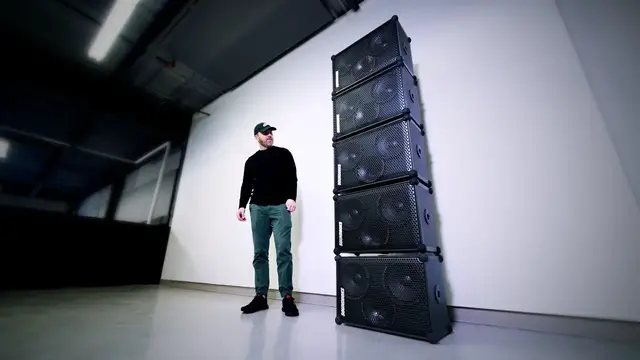
This is the new Soundboks wireless bluetooth speaker. The Soundboks 3 is the loudest I've tested especially when daisy-chained.
FOLLOW ME IN THESE PLACES FOR UPDATES
Twitter - http://twitter.com/unboxtherapy
Facebook - http://facebook.com/lewis.hilsenteger
Instagram - http://instagram.com/unboxtherapy
Show More Show Less View Video Transcript
0:00
You got some twos going on here
0:02
Another one. If you watch one of those, this is... That all it takes
0:10
You get all worried about a clap. And that's all it is. It's a little clap
0:14
Alright, so today we have an exciting endeavor. That's five boxes. That's a lot of boxes
0:20
Well, they're called boxes. They're called sound boxes. And for those of you that have been around
0:24
the channel for a while, you probably remember a video. I don't remember what
0:28
what it was called, but it might have been the loudest Bluetooth speaker. They put out a new version a little while back and sent us a tremendous number of these things
0:46
And the reason is because you can actually daisy chain them together. We have five of what are
0:51
already incredibly loud Bluetooth speakers on their own. The loudest Bluetooth speakers on their own times five
1:00
I got to blame Willie Do mostly. I'm pretty sure he's somewhat responsible for this
1:05
I think he just got fired up one day, decided he was going to go complete overkill on something
1:11
Yeah, might as well, you know. The rules of YouTube are that you get something good
1:18
and you multiply it by a thousand. So we are gonna unbox one first and we'll listen to it
1:24
The last version had a couple of different options on it for listening environments
1:29
A lot of people, they like to take this on the picnics, Jack, to the tailgate-type parties, Jack
1:33
You wouldn't know about it. When they go camping, as you would. And so we need to evaluate one on its own
1:39
and then we get crazy after that. It's got some durability built into it too
1:43
since it's, of course, meant to be portable. So it had bumpers along the edges
1:47
Just one question. Where should we go first? Inside the box, I assume
1:58
You've never seen this presentation for your treat, Jack. I would throw it at you, but Casper might pick it up
2:04
Oh, okay. So I feel like this unboxing experience has changed a little bit
2:08
Look at these little trays that you pull out. That's kind of cool
2:13
Battery box. Power everywhere. So yeah, you can use this either plugged into the wall
2:19
or completely portable like other Bluetooth speakers. So this little guy slots into the sound box itself
2:28
You make the connection you can see you have the readout here for how much battery is remaining 99 watt hours Never mind milliamp hours We talking watt hours And power brick and see the pass through on that
2:40
So you could power the device, charge the battery. I assume this is what you do. Could do. Should do
2:48
Holy. That's a big boy. Alright, looks like we got the black one
2:52
This has like a nice matte black type of look to it. that's like on its way to avanta black that's a very black i appreciate that power on turn up team
3:02
up team up that's the daisy chain aspect you don't even need to tether these together with cables
3:08
these are wireless tethering you have the volume readout all the way to 11 these go to 11 stickers
3:16
allen key quick start look at this look at this partying to 11 and beyond there you go jack
3:22
we started as a group of friends who wanted to simply take our party experience
3:27
it's like sort of like you and your friends jack oh look at this okay make it yours you can now
3:32
customize the appearance of it let's see you put some different colors on there oh this has your
3:36
og inputs you have a 3.5 millimeter auxiliary input to connect the device oh you have two of
3:42
those so you could daisy chain using the old-fashioned cable if you don't want to daisy
3:47
chain via bluetooth or if you need the daisy chain to some other og audio output two balanced xlr
3:54
combo inputs to connect a microphone and other pro equipment and then on the front of the device
4:01
woofer town look at that holy moly back in the 1990s you took the grill off because you needed
4:08
people to see your woofers this little guy will slide in like this and then you just simply connect
4:17
it right here you get the benefit of not having to bring the whole speaker to charge it yeah we'll
4:25
make like a little pyramid i think So I discovered there's an app for this stuff
4:45
It lets you configure pretty much everything that you would need to configure
4:49
It also is where you're going to handle your daisy chaining, wireless daisy chaining over Bluetooth
4:54
Just based on my previous experience, I am certain that for this space
4:59
one of these would be sufficient. Where you would actually daisy chain more than one of these together is in a very big venue or outdoors or you just crazy and you have a YouTube channel and then you have five of these and then you use five of them in a space like this and the police show up and they shut down that YouTube channel which actually happened once before but I can go into that entire story for the time being
5:22
I'm gonna start low just for you. Took a second to charge up the batteries
5:31
After all, these are meant to be completely mobile devices. And believe it or not, I kind of think they function better off the batteries
5:40
which is the reason there's that kind of special tail adapter on the charger
5:44
I tried to run one of the boxes off just the wall power
5:48
and it only went up to a certain volume. Then I tried it on a battery and all of a sudden it went up to 11
5:55
Once you get them all hooked up, they pop up in the Soundbox app and each one independently is numbered and has its own controls available to you
6:04
There's three modes, solo, host, and join. Solo is the single speaker working on its own
6:10
Host allows other speakers to wirelessly join the audio source that's being sent to that one particular speaker
6:18
And that's what we're obviously going to do here. and then join is what you want to set the other speakers to so that they can grab what the host
6:25
is spitting out. Let's just start with this speaker up top. I'll put it into solo mode. So you have a
6:31
bass enhance, you have your power settings, which will allow you to limit the loudness at max
6:39
Remember, these things are each capable of 126 dB. You can also do a left right channel setup if you
6:44
have two of these or just run a singular one in mono
6:48
Three various configurations, indoor by default, it's gonna give you better battery life
6:53
It limits at 117 dB. They used to call it outdoor, but power is just your max power
6:59
regardless of where you wanna use that. But for the purpose of this test
7:02
course we gotta do base plus. Phone all the way up. All right, wonderful
7:07
And this is a two volume. Three, four, five, six, Seven. Okay, now you can tell it's getting loud
7:18
It's starting to get loud. I mean, I have to speak louder. All right, what's that? That's an eight
7:24
I'm going to check your app real quick. Yeah, that's about, that's an eight or a nine on there
7:32
All right, we're going to go. Oh now it really now it starting to get properly loud And you can see when I make a change to it whether it on the app or on a knob it updated there that a levit okay that a loud speaker now because I gotta speak like
7:47
this to get over top of it I'll let you hear it on my microphone
7:51
Now it's kind of crazy that that type of sound is coming off a battery
8:09
Keep in mind, there's no cables here. None of these are connected. Not one, not any
8:14
And so that's why you have such a big battery unit inside powering
8:18
I'll put the bottom one in host and I'll put the rest that's already in host. I'll put the other ones on join and I'm gonna just turn this down a bit. Got that
8:26
Got that. Yeah. Yeah. Okay The craziest part about this, you could just pick this up
9:00
You could just, it's completely portable. Look, I'm just walking with that kind of power
9:06
I can pull one, I can just take one. This one over here
#Computers & Electronics