0:00
So this thing here just showed up and at first I was like, what is that? Is that just a mouse pad
0:04
But it turns out it's kind of a combination scenario. Now, on this channel I've looked at so many different mice
0:10
In fact, it's a specific area of interest for me. Constantly upgrading from one to the next
0:16
And usually that's in the Logitech performance range. Alright, but it's got all these new-age features, but one of them is not extensive battery life
0:27
When I looked more closely at this box right here, that is an interesting concept
0:30
The best of CES 2018, this is a combination scenario. The pad charges up the mouse
0:38
Am I right about that? Is that what's actually going on here? Razer Hyperflux Wireless Power Technology for Seamless Uninterrupted Power
0:46
So you've got the gaming mouse. You're gonna have a gaming mouse pad anyways
0:50
but now you're not tethered by any kind of cable at all because the pad itself is wirelessly charging up and powering the mouse
0:58
That's not really where it ends because it is a Razer product, so you know they're going to go overboard with the RGB colors
1:04
powered by Razer Chroma. 16.8 million customizable color options, so it's going to glow on your desk, fit into your whole gaming aesthetic
1:13
It's got a 16,000 DPI 5G optical sensor. Hyperflux wireless power. Ooh, there is the mouse
1:22
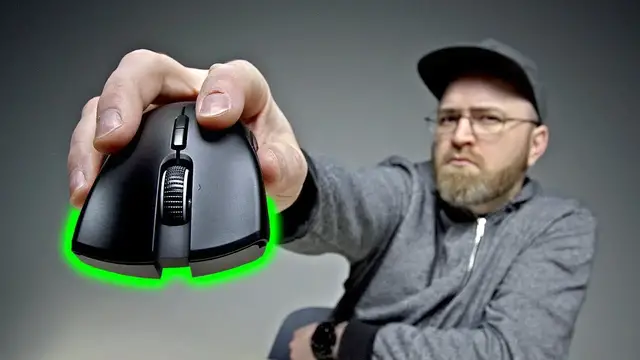
Mamba Hyperflux Some nice grip on it Actually quite comfortable You have your forward back button Or whatever you choose to map that to Still has a micro USB port Textured scroll wheel as well Something very satisfying about that there A micro USB cable which is braided
1:38
Oh cool. Alright, so here's the mouse pad. It's actually a pretty generous size as well
1:44
Oh. Oh! Very cool the way they did that. So reversible. So if you like the softer, more classic mouse pad feel, that is very soft
1:55
Then you have that option. Flip this up and go for the harder surface as well, if that's more your style
2:02
Quite satisfying in fact. Well, which one you like better? You like the soft surface
2:07
Most gamers aren't even dealing with wireless. Lack of latency, lack of potential lag and so on that could be introduced from wireless
2:14
This piece here will be plugged into your PC or your laptop
2:18
Doesn't really matter. Perfect. Okay, cool. I've got the blade system here, the 17-inch, the big one
2:24
Let's see what we're working with here. Some yellowish green along the edge. I like it. It's more subtle than I expected
2:30
Congratulations getting your Razer Mamba Hyperflux connected. Wow, that is a nice smooth mousing experience so far
2:38
Expand your arsenal by doubling the number of customizable buttons with Razer HyperShift technology
2:43
Now the mouse has its own RGB coloring as well on the Razer logo over here
2:47
As well as up on the scroll wheel. LED indicator here as well when it's on the pad and then that goes away when you pull it away
2:56
Let me give the other surface a shot. Oh man that like a soft pillow Much quieter as well You wanna give it a shot Will Oh that smooth That quiet too It crazy Yeah Very smooth
3:09
Give that one a shot there. This one's not bad. I like this one. Mmm. Mmm
3:13
It's good. Mmm. Now I wonder if we should turn off some lights here to really experience the RGB effect
3:23
Oof. Wow. Look at that glow. Oh my goodness. Aggressive. So here we've got the Razer Synapse software and the whole goal here is to make it easy to customize your experience with your Razer peripherals
3:36
So we can see the Mamba Hyperflux over here. If I click on that, we can go in here and customize all kinds of aspects about the mouse
3:44
And we can create different profiles for different devices. We can adjust the brightness of the overall lighting
3:49
It's at normal right now. I'm going to boost this up to bright. The effects available to you are everything from spectrum cycling like it's doing right now, changing colors, to breathing, reactive setting here
4:01
This mouse and mouse pad integrates really well with this particular laptop. I mean, it looks good collectively, prompts the software right away
4:09
The question is for somebody like me, can this replace my current mouse setup with the MX Master 2S
4:16
That one actually has a couple of extra buttons that I use frequently. This idea of the mousepad powering the mouse so that it remains wireless is something I'm really into
4:26
I don think competitive gamers are going to be the first ones to shift over to this type of setup A lot of them are very particular For me the thing is smooth and quick This thing is cool and they going to be really happy with the overall fit and finish and the fact that they never have to manually plug their wireless mouse in anymore I think it kind of cool That my take
4:45
Today's episode of Unbox Therapy is brought to you by the Vast 35 inch curved display
4:52
Did you just die? Did you just die? Yeah, I was trying to build it. Here, we're right in the middle of it and you're dead already
4:58
This is a gaming monitor on a budget. This thing is $599 on mass drop
5:02
It's got a 3440 by 1440 resolution. It's got three HDMI ports and a display port
5:08
The display is 100 hertz. It has an internal power supply, so there's no power brick
5:12
Also, the power cable plugs in on the side here and it has cable management at the back
5:17
It also has a headphone jack. It can actually go into portrait mode
5:21
Obviously not the ideal scenario for video games. Possibly for productivity, you can stack up a couple of these together
5:28
2 millisecond response time. You can get your Fortnite in there and hopefully do better than Ryan has done here
5:33
He placed 70th. We called on him for this one thing, this one time
5:38
That is not representative of his actual skill level. We were playing this game last night
5:42
Ryan finished fourth. Quite impressive for a man of his stature. Anyway, it's on MassDrop
5:47
The link's going to be down in the description. I mean, that's a budget deal. You've been waiting
5:51
You got that ugly monitor on your desk. Maybe you're going to get a performance advantage here
5:55
You see a little bit more. All right, you look around the corner. You catch an extra kill or two
5:59
You make it to the final five. I've come third. I'm going to win a game though
6:03
Tonight. Tonight I'm going to win a game