0:00
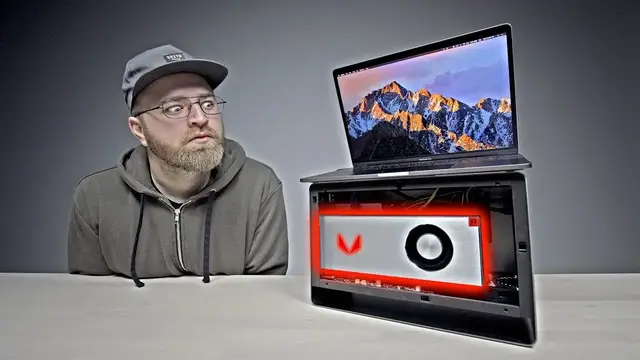
This is gonna be a fun one. Look at this. Multiple components on the table
0:04
I'm undertaking a little project here today. Well, we are. This is a thing called the Mantis
0:09
Experiment with the idea of an external graphics card on your MacBook Pro
0:14
Anything that supports Thunderbolt 3. It's referred to as an eGPU, an external graphics unit
0:21
The reason you would hook something like this up to a laptop is to get desktop-grade graphical performance on a system that can be mobile
0:29
Razer, they have their own unit that you can add to their Blade laptops, which kind of operates in a similar fashion
0:36
But up until this point, there haven't been too many options for people on Mac laptops
0:40
There's a wide variance of MacBooks, some of them more powerful than others, some that can really benefit from a setup like this
0:47
This thing is not really meant to go with you anywhere. It acts as a hub for not just your graphics, but also some other important peripherals
0:55
This is for the graphics card. three USB 3s, an ethernet port, a Thunderbolt 3. Not just for data connectivity, it also can provide
1:05
the 87 watts of power that your MacBook Pro wants to charge. This is a single cable setup. You simply
1:12
detach that one cable, don't need to worry about a power brick or anything extra. Two more USB 3
1:18
ports So that a total of five USB ports on this thing So you can keep your peripherals connected to this not have to worry about running out of ports on the laptop itself Now you probably noticed this amazing looking box over here Graphics cards always have the coolest boxes
1:32
A Vega 64 card. These are the units that are going to ship in the iMac Pro
1:37
And therefore, they should work on the latest macOS software without any driver
1:43
Will, how much did I pay for this? I think I paid like $600 maybe. I'm going to show you how this thing works
1:48
This side panel, it just pops off. No screws. Just like that. the power supply unit that's for mounting either a 2.5 inch hard drive or an SSD and the SATA connector for that drive is located right over here
2:00
Now I've heard that this fan can be a little bit noisy for some of course you could swap that out
2:05
and then you have your graphics card slot right here that's the important spot
2:09
some of you might not know but you can also install Windows you could do a boot camp situation on a MacBook Pro
2:14
Whoo, look at that. Oh my. Jack attack. Even you love something like that
2:21
Three display ports and an HDMI. This thing will beef up the graphical performance of your laptop without being connected to an external monitor
2:32
So we have the card installed over here now and then a single Thunderbolt 3 cable which was included in the box going to this MacBook Pro right here
2:44
Now this one is running Mac OS High Sierra 10 There a lot of talk about compatibility issues with devices like this But on this version here We got a prompt immediately external GPU detected log out to begin using the external GPU
3:01
It's charging up too. So as of right now, we are running off that desktop grade graphics rather than the internal graphics in this MacBook Pro
3:12
Alright, so you may have noticed I've got a different laptop now I was using wills and now I'm using mine a little bit of time has passed because I've been playing with this thing tweaking it a little bit
3:22
I really wanted to place it on my desk and use it for a slightly more extended period before
3:28
Reporting back this graphics card setup that I have here about as native as you can get when running
3:34
10.13.2 this card right here the vegas 64. It's very power hungry
3:39
This is a 550 watt power supply in here How is that really going to work with this particular card
3:44
This card can want more power than what that's capable of. So I've actually gone ahead and ordered another power supply
3:51
an 800-watt power supply to deal with this. I'd recommend going with the Vega 56 instead of the 64
3:57
It's a little less power-hungry and therefore slightly more supported. Anyhow, I've got Geekbench up here on the display
4:03
I can actually test each GPU independently. To start off, let's do the Intel HD Graphics 530 that's in my laptop
4:11
Here we go. It scoring 19 on the OpenCL score MacBooks without discrete graphics without their own AMD cards just the Intel graphics are going to benefit the most from a setup like this because they working with relatively weak graphics to begin with
4:29
Next up, we're going to move to the Radeon Pro 460. Let's see what this can do
4:35
48,251. All right, now last up and the most exciting AMD Radeon HD Vega 10 XT prototype
4:44
Who cares what it's called? Let's see what it can do. Okay, boom. I've got as high as 170,000 on this particular score
4:51
A huge improvement here with desktop-grade graphics. And the reason why it will be meaningful for a lot of users
4:58
You want the portability of a laptop, but the graphics performance of a desktop, this kind of gives you both
5:03
So there's a reason that these have become popular on systems like Razer
5:07
And now through products like this one, they're trying to bring a more universal approach
5:12
Not just for Windows computers, but in this case on Mac as well
5:16
This is still a bit finicky. It's not completely supportive. You're doing this at the moment at your own risk
5:22
There you have it. That's the Mantis Venus with an AMD Vegas 64 working on a MacBook Pro
5:28
I think it's pretty cool. And quite frankly, it's destroying the figures that my laptop can produce on its own
5:34
I'll have the details down in the description. And also let me know. Did you guys like this type of video
5:38
Did it get too technical? Or are you into it? Would you like to see more? Let me know with your thumb down below and I'll catch you on the next one