live_tv
Livestream Starting Soon
00
Hours
:
00
Minutes
:
00
Seconds
Up next in 10



Gaems Sentinel Pro XP (USA Link) - https://amzn.to/2YhX6dc
Gaems Sentinel Pro XP (International) - https://geni.us/M7W0U
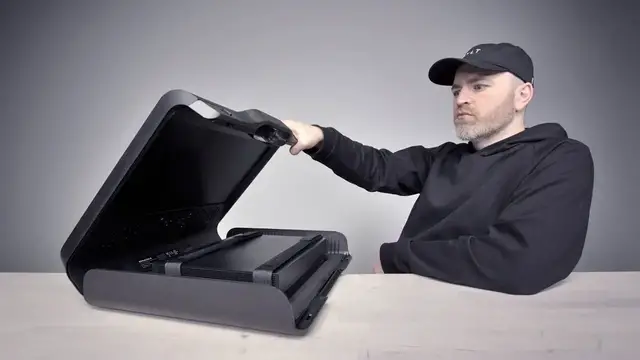
Google Stadia recently launched promising AAA gaming on the go. In honor of that announcement I decided to showcase the ultimate portable Xbox One X gaming setup. This setup features the Gaems Sentinel Pro XP which will work with either Xbox or PS4 (Playstation 4).
ME IN THESE PLACES FOR UPDATES
Twitter - http://twitter.com/unboxtherapy
Facebook - http://facebook.com/lewis.hilsenteger
Instagram - http://instagram.com/unboxtherapy
Show More Show Less View Video Transcript
0:00
So there's been a lot of news lately about, you know, the new gaming service from Google
0:06
Google Stadia. You just have your controller, your smartphone, your tablet, your laptop
0:13
You can play games anywhere. Of course, that's not a real product yet. And many of you doubt that it will ever be a reality the way that Google was showing it off
0:20
So, I decided to make my very own version of gaming anywhere
0:25
but with the more traditional approach of using an Xbox. So this guy right here, the Games G170 Sentinel
0:34
this is a like suitcase looking package that lets you jam in an Xbox
0:41
and you get a monitor and it all folds up. Almost like a console in a laptop
0:47
So I'm calling this creation the Xbox Stadia. The Google Stadia killer
0:53
You know, you can just plug it in and start going no matter where you are in the world, even if you're camping
1:01
You don't have power when you're camping. Maybe you like to camp with power
1:10
Ooh, look at that. Wow. $350, so it's, I mean, it's a few dollars, but keep in mind you've got the display built in
1:19
So you're getting a display. You're getting a speaker set up. It's all designed around this idea of just flip it open and play and this whether you like PlayStation or Xbox
1:29
You can pick Okay, this is uh, what do you put in a bag
1:48
Controllers and stuff? It's factory fresh right there. Oh, okay, a remote control
1:57
They give you a short HDMI cable with a right angle connector
2:02
So that should be convenient. It's nice that they included that. A power brick, obviously
2:07
Ooh, here we go. It really is like a suitcase, sort of, or a briefcase
2:12
Oh here we go We getting a big peel here Are you ready It a big peel coming up
2:26
Woo! Willie Do, you're a big fan of that. Hey, the big peel? Like that? The orange peel
2:32
Once again, factory fresh. Alright, yeah. Up like this. Ooh! So once again, that's 1080p
2:40
It's an LED panel. It's got a matte finish on it. It's not glossy, so that should be good for reflections also
2:46
A lot of controls here on the front. Power switch, volume up, down, brightness
2:51
And I like that they have those without going into the menu system
2:56
Because that can be a bit of a nightmare for the frequently used buttons. So you could just reach up and you got them straight away
3:03
Power goes into this port right here. You can see the speaker units right underneath the display
3:08
Two headphone outputs, very convenient. and then of course the HDMI in that I mentioned
3:13
This whole region over here is like a neoprene wetsuit kind of material
3:20
And it's padded, it's got like a memory foam underneath so hopefully it's gonna treat your console very nice
3:28
and protected and comfy and whatnot. This will do an Xbox, this will do a Playstation and these straps hold it in place
3:37
Okay, so here's how it goes. This is an Xbox, obviously. So all we're gonna do is slide a bit of slack through here
3:46
Actually this one fits really good. Get the straps going, tightened up
3:54
Two. Simple. Doesn't move around too much. Now you might be thinking like, who is this for
4:00
Why aren't you just gonna get a, I don't know, a gaming laptop or something
4:04
something. I think the idea here is a bit more social. Like maybe you show up, got a couple
4:09
controllers, maybe you're into sports games or something. You can have a little versus mode
4:14
And maybe you already have an Xbox to begin with. But again, this isn't the kind of thing you're
4:18
going to bring with you every day. You're not going to bring this to class in college, could you
4:24
You just pretend it's a laptop? You know where they take notes? In the auditorium? You just flip
4:29
I'm gonna flip this open. I don know if you can get away with that these days I not sure I not advising you do it I just Let see how we close it down That what it like okay It smaller than I expected it to be
4:44
When you see it unfolded, it seems huge. But like this, you can get away with that
4:50
You show up. You pop it down. You flip the switch. Look at you
4:58
We're gonna hit the, what, the right angle one over here, you think? like that that's a nice setup this guy
5:05
goes right over here so you can have two power cables coming out of this keep
5:10
that in mind you do have some cabling showing and of course if you have
5:14
headphones that'll be showing as well but it's not terrible so it's a pretty smooth
5:18
setup nonetheless okay oh all right we're 100 sound just for a quick test 100
5:28
brightness now keep in mind very brightly lit environment we're in. So that's gonna affect the appearance of brightness
5:36
on this display as well. Man, I haven't played a Capcom game in a while
5:40
Oh, by the way, we're playing Resident Evil 2. This is Will's recommendation
5:45
What does it say? Saving requires an ink ribbon, no auto saves, stronger enemies
5:49
Normal gameplay, assisted, it has aim assist. Recover health automatically, that's rude
5:55
There's no way I'm doing that. There's no way I'm doing that. I'm definitely doing standard
5:59
Come on, man. Will's hitting the lights to spook me out over here
6:03
Wow, this looks pretty good. Oh, this is nice, man. This is spooky
6:27
Jeez. Is that doing anything to him? I'm wasting my bullets right now
6:37
Wow, he took a lot of bullets. I think I only got one bullet left now. Now I'm dead
6:48
Oh! Yeah I gone Oh yeah
7:04
Oh, I got another bullet for that purpose. I discovered another bullet
7:09
I'll take the cutscene right now. Get me out of here. That's the thing I'm always wondering with the zombie situation
7:17
The amount of time between you getting bit and you going zombie
7:21
It's always up for dispute. Sometimes it's like instant, other times it takes an hour
7:27
Like that dude is gonna emerge from the truck. He's obviously zombie mode
7:31
Maybe not after the explosion. You know, you wanna know something? I, uh..
7:38
I kinda like this thing. It's kind of, it's cool. It's not the brightest screen I've ever seen, but I do like that it has the matte finish
7:47
And 1080p at this size at 17 inches is plenty of pixels
7:51
You don't really need anything more than that. I surprisingly ended up immersed
7:55
I wish the speakers were a bit louder. But that said, you have the dual headphone jack so you can use those
8:01
And really, you're talking about a package that's just unique in and of itself
8:05
Like, if this is what you want to do. I understand the potential criticisms, obviously
8:11
It is a bizarre device. But that's kind of why I like it
8:15
Because it's a bit unusual. As far as like the different gadgets that you see out there
8:19
You know, you hear about like athletes, for example, that go on road trips
8:23
They want to bring their video games in a hotel room. Things like this
8:28
You can take it to a party. Load up Madden, NBA, NHL
8:33
Have a couple controllers. And you just, you have some instant fun. All you do, you unplug, right
8:38
You unplug this. You unplug this. You take your little cable out
8:43
It goes into the bag. and then the whole thing closes up look at that i mean you're like a secret agent
8:53
console gamer i call it the xbox stadia that's what i just named it i coined it the package
9:02
together it's the xbox stadia obviously i'm just joking with that it's not the same thing at all
9:08
But nonetheless, if you ever wanted to have a portable Xbox, this has got to be the best way to do it
#Computers & Electronics
#Consumer Electronics
#Computer & Video Games