Up next in 10



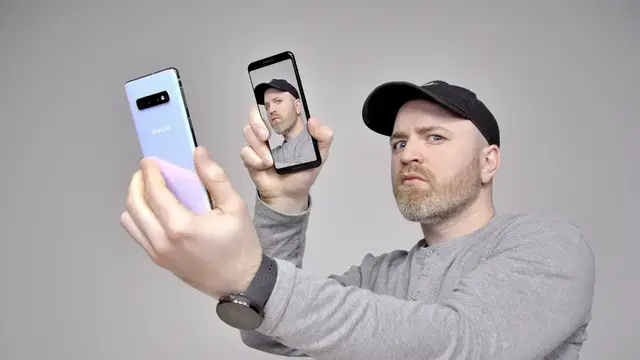
The Samsung Galaxy S10 features in-display fingerprint unlock and face unlock. After some testing I'd suggest using fingerprint unlock exclusively. The simple hack in this video defeats the face unlock security. If convenience is your priority face unlock will work but understand the potential consequences. Which unlocking style would you use on the new Samsung Galaxy S10 and Galaxy S10 Plus?
FOLLOW ME IN THESE PLACES FOR UPDATES
Twitter - http://twitter.com/unboxtherapy
Facebook - http://facebook.com/lewis.hilsenteger
Instagram - http://instagram.com/unboxtherapy
Show More Show Less View Video Transcript
0:00
Alright, so uh..
0:01
Got some... Not so great news. Not that surprising, really, because I kind of speculated, I knew that this was a potential problem
0:11
But still, nonetheless, not so excited to find out that it turns out, Face Unlock on a new S10, S10 Plus
0:18
not so secure, and probably less secure than I had hoped for
0:22
Now, when you set up the Face Unlock on this device, it does tell you, it warns you
0:27
hey, this is not that secure, you should probably use the fingerprint. The fingerprint scanner on here, it's a little bit hit and miss
0:32
it's not the best I've ever tried, it's in the display, so you kind of adjust your expectations for that
0:38
but it's nowhere, it's not on the level of confidence that you have, say for example, with a capacitive fingerprint scanner on the back of a device
0:45
it's not on that level, in my opinion. So the face unlock then becomes kind of a compelling option
0:52
I use it on the OnePlus device, I've used optical-based face unlock
0:56
for a while. But then all of a sudden, Will comes in and he's like, you know, I'll just crack your face unlock. I don't care what your face unlock
1:01
I'll go on your phone if I want to. And I'm like, geez, Will. First of all, aggressive. Not your typical character
1:07
that you bring to the table, but okay, fine. Give it a shot. So he opens up. This just happened. He opens up
1:13
an unbox therapy video on YouTube holds it up to my phone I did not readjust or redo my registration of my face and boom it unlocks my phone Way easier than I happy with to the point where now I questioning even having face unlock enabled because obviously
1:29
There are videos of my face in particular all over the internet
1:34
So anyhow, we're gonna try and do the demonstration I'm gonna try to show you here and replicate what just happened downstairs and show you how
1:41
face unlock is less secure than you might expect and how you can use a simple video
1:45
In fact, I'll use one of my own videos from YouTube on another phone to unlock the S10 that I've been using
1:52
The current one that has my face registered, okay, so this is the Galaxy S10
1:57
Standard version right there. I have face unlock enabled fingerprint also enabled and then this is Will's phone over here
2:03
Okay, he's got the pixel three nice little setup going on Okay, so I'm gonna launch this particular video here put it into full screen
2:09
Ok you can see it's my face. It's not even the greatest image of my face actually because
2:14
it's kind of in shadow. There's a hat involved. So I was surprised when he was telling me he
2:19
could just unlock my device. I'm going to make sure brightness is up. Yeah it's up
2:23
Ok cool. And then now I'm going to lock this phone. I'm going to hold the video up to it
2:29
Hopefully Jack can capture what's going on here. So I'll hold the video up like this and
2:33
put them relatively close together How close did you have it Will Was it around here There you go Did you get that Jack Okay look I gonna spin this around real time A video on my face There fingerprints on the display for that matter
2:49
And the phone is now unlocked. Now if you follow that you saw it went straight from the lock screen. We'll do it again
2:53
Keep it on that angle. Okay. Boom
3:03
Got it? Face unlocked. Now my face is moving around a lot in there as well
3:10
I mean, it's a simple video. Jack wants to do it one more time. That's twice now that it's done it
3:15
Here we go. Boom. Again, immediately off the video
3:27
Not very hard to do. And this is a video that's publicly available online
3:32
It's just on the YouTube channel. I mean, obviously there's plenty of people that have video of their face that exists somewhere in people's photos and video folders and on YouTube and on Facebook and various other places
3:44
So I knew it was possible. Of course, I had read in the past that this particular technology was not all that secure
3:51
Definitely not as secure as what Apple's doing with Face ID and so on
3:56
but I suppose just seeing it in action and watching a video of myself unlock this device first of all as well that video I have a longer beard in it It was a long time ago Weird lights reflections shadow from the hat
4:08
You're like, wow, man. That's a, it almost seems a bit too easy where you start to get a bit concerned about using the technology at all
4:16
Now, some individuals might not have that much video of themselves out on the internet
4:21
You may not be as concerned about this potential. But for those of you that are kind of exposed in that fashion, there's a lot of footage of yourself out there in public
4:29
You know, maybe you're a bit concerned. If somebody got a hold of my phone, knew where it came from, and knew that it was mine
4:36
they could unlock it just by launching a YouTube video on another phone. No matter who you are, I think that's a bit scary
4:42
So, I guess this is just a warning. This is a convenience thing. Understand that if you go for the convenience of the speedy face unlock
4:49
that you can get an S10, S10 Plus, phones like the OnePlus and so on
4:54
there is this downside that it's pretty easy to crack it. So if you use it, be aware
5:00
Otherwise, go for the alternative authentication in the form of the fingerprint scanner
5:05
in this case, in display. It does work, but it's a bit of a bummer that the face unlock is so easily cracked
5:11
I knew it was possible, but seeing it in action, it's a bit rough
5:16
I got to be honest. It's a bit unfortunate
#Computers & Electronics
#Consumer Electronics
#Technology News