Up next in 10



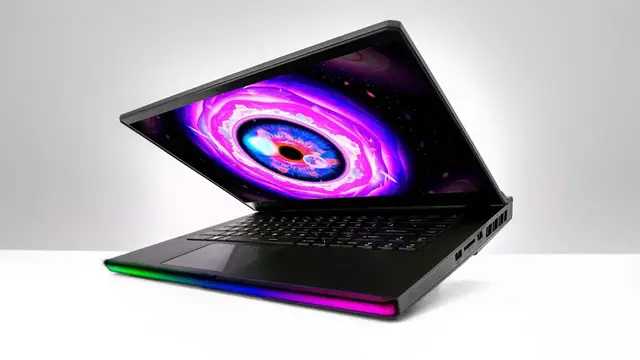
Unboxing the latest gaming laptop from MSI featuring an OLED display.
Sponsored by MSI: https://msi.gm/raiderhx_unbox
Toyota Supra: https://www.monacomotorcars.com/
Nouhaus Chair: https://www.nouhaus.com/collections/all-products-except-extend
FOLLOW ME IN THESE PLACES FOR UPDATES
Twitter - http://twitter.com/unboxtherapy
Facebook - http://facebook.com/lewis.hilsenteger
Instagram - http://instagram.com/unboxtherapy
Show More Show Less View Video Transcript
0:00
so today we're checking out the latest laptop from msi and look how we have matched the color
0:06
gradient of the logo to the ceiling isn't that special this is the raider ge67 hx and as you can
0:14
see on the web page here it says light them up we have rgb happening as you would travel through
0:19
time and space with ultimate performance and irresistible design the raider ge67 hx comes
0:25
with up to the latest Intel Core i9-12900HX processor and NVIDIA RTX 30 series graphics
0:32
I expect this will be a popular choice amongst people who just wanna have a powerful laptop in general
0:37
MSI over boost technology, unleash the power, 165 Watts on the GPU
0:43
and 55 Watts on the CPU, 220 Watts total power. True to life display OLED 99.9 watt hour battery
0:51
We have Thunderbolt 4 on here. We have PCIe Gen 4 SSDs, tons of rgb going on our audio is courtesy of dyne audio high res audio capable wi-fi 6e is in there
1:04
graphics up to 3080 rtx ti 3080 ti i think my model has that in it 240 hertz refresh whoa
1:13
let's crack into the box for true gaming the laptop itself not too heavy considering that spec sheet gunmetal titanium looking charcoal
1:31
coloring the msi logo the dragon badge over here some msi branding over there a usb type a port as
1:40
well as a charge indicator a type c beside that and a dedicated headphone jack over here on the On the other side we have another type A and then another type A and then an SD card slot On the back that Thunderbolt 4 right there We have a dedicated
1:54
ethernet jack, full-size HDMI to output more stealth fighter-esque, Batman-esque shapes and
2:01
things happening. MSI Raider GE with the transparent plate, your power. And it's going to have to be
2:08
fairly substantial because we're talking up to 220 watts. Kablamo. Look at this beast. 330 watts
2:17
Let's go. We got the OLED on this one. OLED 15.6 QHD, wide angle, 240 hertz. Damn. There's a
2:26
microfiber cloth in here. You need to wipe your screen if you choose to. I don't know if I've
2:31
Look at a 240 hertz OLED. You have MSI futuristic fonts going on
2:37
Steel series indicated here. There's not much flex going on. The whole thing feels really sturdy
2:47
Not that I'm surprised. 5.24 pounds. It's very planted. Jeez
2:58
Nothing. Okay, so I've got the device booted up now and you can see the theme, the background, very fitting
3:07
This is definitely the first QHD 240Hz OLED display that I've seen in the studio
3:11
Now you have something called MSI Center in here, which is going to let you kind of tweak the system depending on what you're doing
3:17
By default, it's in this smart auto mode. So if you're just like browsing the web or reading a document or doing email
3:23
system performance is going to prioritize power consumption and fan noise and so on
3:28
But then there's also extreme performance, which is like, you wanna go all the way
3:33
and have a serious gaming session You have balanced silent That interesting let try that Quietest system under ambient noise and then super battery which is gonna enhance your battery life it is
3:44
getting quiet and the other thing i'm curious about is the rgb stuff oh look at this msi aurora
3:56
MSI per key RGB keyboard. Oh man, we can tweak everything. At the moment, you can see the setting for the front zone
4:06
Look at this, look at that on the front edge illuminating. Steady color shift, multi-color breathing
4:13
and then we can go in and tweak it even further for exactly what we want. If we go to the keyboard, we have an RGB setting
4:19
It looks like it's going from blue, yellow, varying right now. Click on illumination, steady
4:24
Let's do multicolor breathe on the keyboard. And maybe let's try reactive key
4:36
Oh yeah. So you can actually do this on a per key level. I like that slow fade of the reactive key
4:54
All right, all right, all right. Yee-haw! We are flying maximum performance setting
5:05
Overwatch gaming laptop. Let's go! Why is it that everybody just wants to play damaged characters
5:53
What was that? Am I burning? What's going on? That's crazy. I was playing the game in silent mode, so like the fans were not on at all
6:05
And I was still like well into mid to high hundreds frame rate
6:11
Obviously I could lock it at the 240 and get the fans going a little bit more, but obviously for the purpose of this video, I just wanted the audio
6:16
I'm happy with that. I actually did healing, see, because I used E
6:21
I got some healing credit over there. Listen, it's a nice little package
6:25
15.4 is kind of a sweet spot. You don't get like this enormous footprint
6:30
It's a comfortable spot for gaming. And it is my first experience with 240 Hertz OLED
6:35
which is kind of amazing to look at, to be honest. It's the best of both
6:39
I've been an OLED fan for a really long time, but you just didn't see it really adopted on gaming laptops
6:45
And now it's here in the form of the Raider GE67HX from MSI
6:52
kind of a nice little package
#Computers & Electronics
#Laptops & Notebooks
#Gaming Reference & Reviews