Up next in 10



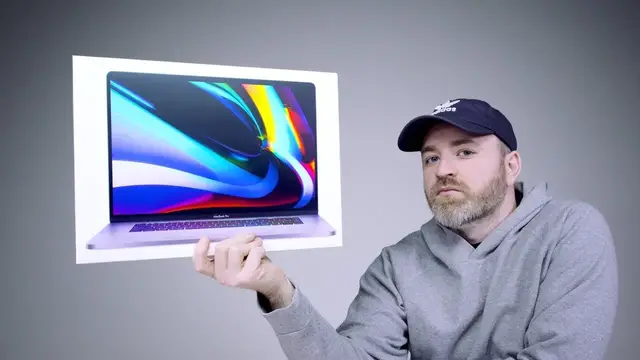
The new MacBook Pro 16-inch is here and Apple has addressed many customer concerns. The 2019 Apple MacBook Pro 16-inch features a new keyboard moving away from butterfly switches (MacBook Pro 15, MacBook Pro 13, MacBook Air) back to a traditional scissor switch keyboard. This is my 2019 MacBook Pro 16-inch unboxing.
FOLLOW ME IN THESE PLACES FOR UPDATES
Twitter - http://twitter.com/unboxtherapy
Facebook - http://facebook.com/unboxtherapy
Instagram - http://instagram.com/unboxtherapy
Show More Show Less View Video Transcript
0:00
New MacBook Pro! Of course I'm very interested in the new keyboard design because I have problems with the old one
0:05
I have a huge stack of laptops over here. Get ready for a mega keyboard comparison
0:10
This is the base model 6 core 512 gigs of storage. The spec right there of my exact model. Of course it's in the space gray and obviously it's a premium laptop
0:22
No matter which specification you go for it is a bit bigger than the old version
0:27
measuring at 16 inches. They apparently also improved the sound. That is a thick box, Jack
0:33
I just want you to know there's a little extra there. Robusta. Ladies and gentlemen
0:39
welcome to your Apple unboxing experience. It's very, it's very, that's a $2,000 sound, Will. Can't afford that
0:49
that's at least two grand for that sound it's a tiny bit fatter and it's a tiny bit heavier correct me if I'm wrong Will
1:01
also it comes with a bigger charger or at least a more capable one this is now a 96 watt
1:08
by the way this is like a paper now that used to be a plastic that's got something to it
1:14
type C connector on this side over here this is a two meter type C cable so you get a little
1:19
bit of reach away from the power adapter. You could also remove this piece and put your
1:24
own extension in there. That's a little pro tip. Stickers as usual. I know you're a big
1:28
fan of the stickers, Will. Ooh, these are different. Okay, so here we are for the old 15-inch MacBook
1:36
Pro. Hmm, it's a tiny bit fatter. You see that Jack? Little edge there. A little more
1:42
depth like this. You see how that shoots out right there a tiny bit? As far as the ports
1:46
are concerned it's identical two type c connectors on the right hand side with the headphone jack you
1:52
spin it around it's two more type c connectors so a lot of people they had their requests with this
1:56
particular device they were saying maybe apple is going to give us an sd card reader they didn't do
2:01
that so it's all type c you're still living in dongle land no versatility in the port department
2:06
it's the same as the old generation all right let's flip this baby open you pull the paper
2:11
from the display. And it kicks on because Apple knows the experience
2:16
No power button necessary. The touch bar no longer extends all the way across
2:21
The touch bar on the older model extends the entire length of the keyboard
2:25
A fingerprint scanner on the far right-hand side, which also acts as your power switch
2:29
On the new model, it is a dedicated key on its own, so it should be a little easier to distinguish
2:34
Has a dedicated escape key, an actual physical escape key, whereas you only had the virtual escape key on the touch bar version What do you think Will You been using a MacBook pro for a long time Are you happy to have the physical escape key Do you really care
2:48
I do. I do like it. It's also, you could tell right away, it's slightly less low profile
2:54
And we expected that because of course we no longer have the butterfly mechanisms in here
3:01
So there was the word that there was going to be a really aggressive screen to body ratio
3:05
Yes, it's an improvement over the previous version, but it's not some crazy overhaul
3:10
It's obviously more iterative. In almost every way, this sort of seems like the old one
3:16
And then the changes are kind of more subdued. They're under the surface
3:20
They also said they reworked the audio. Trackpad, as far as I'm concerned, still pretty much best in the business
3:25
You have this giant glass trackpad, super precise. This is still the top tier as far as I'm concerned
3:32
The keyboard, it's been the topic of conversation. I personally have had failure in the butterfly key switches on more than one model
3:42
This keyboard on the new 16, obviously there's more travel here than the butterfly key switch
3:47
You're kind of more aware of having hit a switch. With the butterfly, you relied a lot on the clicking noise
3:53
Some people liked it. Willie Do doesn't mind clacking over there. He's clacking all day
3:58
So we'll do a clack test right now. I'll show you. Okay
4:09
This is a clock. This is a thud. Yes. So, the volume level just went down
4:19
Some people care about this because Google made a big deal about it on their latest device, the Pixelbook Go
4:25
So let's do a comparison to that right now. Obviously, the old MacBook Pro is very loud
4:29
Here's Pixelbook. Ooh, okay. Okay, so the MacBook is still louder
4:45
Yeah, the MacBook has a thump to it. I don't think anyone's going to complain about the noise level of either of these, obviously
4:50
But it's worth mentioning. It's worth trying. The motivation for changing back is obviously durability because there were so many issues with the butterfly mechanisms
4:59
This is the latest generation MacBook Air. This is the famous one from the video in which I believe I was getting E. I was getting the letter E
5:06
I was getting double E's. I was in the double E zone. Now this one, and it was quieter
5:12
But this one failed on me within a week and a half, maybe two weeks
5:16
Now funny enough, I brought one more laptop here just to compare with this real quick
5:20
The new Surface Laptop 3 because I think the implementation could probably it very similar at this point
5:33
For what it is, for something this streamlined at this profile, this Surface Laptop 3 is a very rewarding keyboard to work on
5:41
And I'm putting this new MacBook Pro keyboard in the same wheelhouse. This space bar on the Surface Laptop 3 has got a little more volume to it
5:51
So a couple comparisons aside, let's take a closer look at this laptop
5:55
We got a few more pixels on the display. Obviously, there's more room to work with there
5:59
How many nits are we working with here, Will? Same as the old one, 500 nits
6:03
Kind of a fan of the new wallpapers as well. Let's go ahead, launch a browser here
6:07
And first, we'll do some dialogue. Then I'll do some music. Pro 16
6:12
Okay. Coming at you. Okay. In RAM, you can take up to 64 gigabytes, which is actually an increase over the previous
6:21
The pixel density didn't change that much. It went from 220 to 226
6:25
It's a nice, rich audio. It's not stupid loud or anything, but it's got some low end to it
6:36
Let's just have a moment together. Can we just have a moment to just appreciate
6:46
technology. Yeah, speakers sound good. I'm happy with the speakers. All right, here is the first
6:57
audio test of the new studio microphone inside of the MacBook Pro 16. Will it sound even better
7:07
than our actual studio audio? Better than you would normally get on a laptop. So like the webcam
7:16
quality is not it's not really there it's very grainy now granted there's not much room to work
7:22
in the bezel of a laptop the audio here is also going to be improved if it's using the same
7:29
techniques and the same hardware and the same processing that it did within the voice memo
7:35
then you could have a real mobile video update studio maybe on the next one that could be really
7:43
interesting if you could put a decent quality webcam in conjunction with that
7:49
audio performance now for a lot of people they could film a quick video
7:53
right there. Alright now let's type a little bit more on this keyboard we gotta get to the bottom of that I only had one error in here I hit an O before an R over there I think people can be satisfied with this keyboard I don think anyone gonna miss the butterfly thing as much as Will might like clacking around on it just because there that thing in the back of your head especially if you been around a lot of these systems or you seen them fail there this thing in the back of your head where you questioning the reliability based on other people experiences or even your own even yours comes and goes It failed for a little bit and then I guess whatever dust was in there got dislodged and it started working again but you never know that particular design has had its issues
8:33
This is evidence of that, obviously. You can spec it out with tremendous hardware all the way up
8:39
8 gigs of video RAM, 8 TB storage, 6,100 USD. I think it might be a little bit overkill for the average person at that price point
8:49
Now, the last comparison I want to do is to the current laptop that I'm using
8:53
I'll just recap the backstory. I was using MacBook Pros. Well, even before that, man, PowerBooks
9:00
I was using PowerBooks, Will. my first Apple laptop was a 12-inch PowerBook
9:05
How crazy is that? So that's how far back I was using Apple laptops
9:09
And every single PowerBook generation from there up until the current MacBook Pro
9:14
I was using as my daily laptop. But when they started to fail a little bit on the keyboards
9:20
I opened my eyes a little bit to the wide variety of Windows laptops
9:25
But the main thing was this right here. This stinking keyboard. all day. It's confidence inspiring. It's a wonderful time. If you get a chance to type
9:39
on something like this, you see what's possible if you give up a little bit on the profile
9:44
if you're willing to take something a little chunkier. So this unit I'm using, SD card slot
9:49
two traditional USB ports. You flip around to the other side, you've got two more Type-C
9:56
Thunderbolt 3's, a full-size HDMI port, an Ethernet breakout, and a headphone jack. So
10:03
there's other things you get that are kind of nice to have in a pro-style laptop that Apple
10:10
has basically said, look, we've gone beyond it. We're past it now. So I'll probably throw this
10:15
on the desk for a bit, see where we're at, see how I adapt. And this is one of those rare cases
10:20
where it really feels like Apple's listening. I mean, maybe it's becoming less rare. Well
10:26
where it feels like Apple is paying attention to the noise on the internet
10:31
we can say goodbye to a technology in the case of the butterfly key switches
10:35
that we developed, that we made a big show about. We can put it down and move on
10:40
Even if that means going back to the old and basically admitting that it didn't work out
10:45
And I think that's actually a good move for a tech company. Yeah, let's cater to the users
#Arts & Entertainment
#Computers & Electronics
#Computers & Electronics