Up next in 10


Linux - Case esac statement
Show More Show Less View Video Transcript
0:00
now here we are going to talk about your
0:02
case ISA case ASIC is again and we can
0:06
say we can use in spite of using if-else
0:09
statement like if our program is very
0:11
big and we have lot of confusion while
0:13
creating on nested-if case statement so
0:16
we can go for case inside where we can
0:19
use this case ik e six fate statements
0:21
when we do not have officiant resources
0:24
or we can say efficient statement where
0:26
we have repeated with your F L self so
0:29
we can go for State case or we can say
0:32
case e SEC's very generally act as your
0:34
switch cases where you will have the
0:36
options what you need to select so
0:39
automatically like the previous example
0:41
I have taken you have a virgin on which
0:43
two options when you select non-base
0:45
then you will get the list of non wages
0:47
you have then you can select one of it
0:48
so you will be having a different cases
0:50
different statement which works
0:52
individually and just we need to use
0:55
this particular case define a case so
0:57
that ultimately automatically the
0:59
decision will be taken individually so
1:02
you know this will create an easy
1:04
programming for you while you are
1:06
creating any particular codes or any
1:08
particular scripts and easily you can
1:10
maintain the huge or bigger programs as
1:13
well which have a lot of condition so
1:15
let us check how we can use case e SEC
1:17
in spite of your if-else statement so
1:21
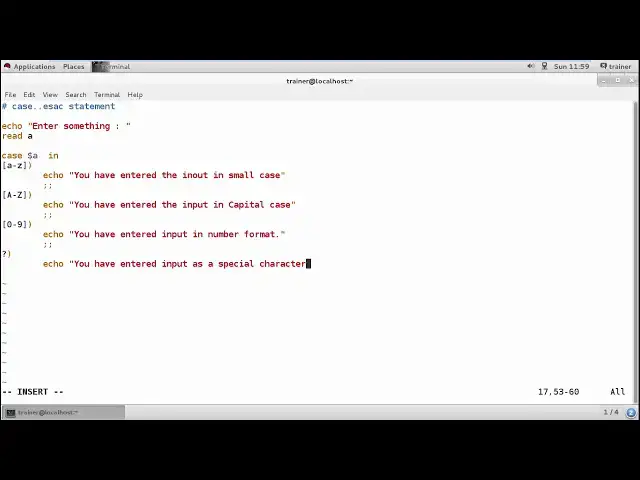
here we are going to use cases SEC which
1:24
is much you know efficient to use if
1:27
either then using your nest set you know
1:29
decision making statements so here I'll
1:32
be using and case statement that's
1:35
reason I'm just going to define the name
1:37
as K start as such and here I am going
1:40
to add a comment here we will be using
1:43
case is SEC
1:48
statement which would be much better to
1:51
use so I'm going to create a program
1:54
where I'm going to fetch a any entry
1:58
from the user enter something
2:03
like and
2:09
this I want to reach in a variable
2:13
called s in okay the same way I'm going
2:16
to get the value from the user and I
2:18
want that it should be accepted into the
2:21
variable a now I'm going to start my
2:23
case I'm going to start the case with my
2:27
variable a into bed I'm going to add a
2:32
different kind of cases like my case can
2:38
be started with your for example I just
2:41
want to check what the user has entered
2:43
so I'll be starting with a two set in a
2:47
small case and this is the case one we
2:51
are going to start so in case one when
2:54
you add any particular value into small
2:57
letters so you should get the message
3:01
you have entered the alphabet or the you
3:13
know input and small case right once
3:22
done with that what you will be doing is
3:24
to come here and this case by giving
3:27
double semicolons once done with that
3:31
we'll start with the other case
3:33
now here I'm going to add I'm going to
3:36
enter the value and capital case echo
3:41
you have I need to define
3:49
yes and I'm opening the case where I can
3:52
define the case output else you have
3:58
enter the input
4:07
capital case select so we can define
4:12
such a way
4:19
post that again I need to close this
4:23
case
4:23
and start with e under keys now for
4:26
example now here I'm going to add the
4:28
value from 0 to 9
4:33
and start the kiss and here I can define
4:37
you have entered and put in number
4:45
format right so this is the Keaney case
4:49
we have added I want to end it so I can
4:53
end it in such a way in the next case
4:55
which we are going to start right you
4:57
know I can define the question mark so
5:01
like it will show you whether you have
5:03
entered any special characters so I can
5:07
define you have entered of input s
5:25
special characters right again end it I
5:33
want to get again whatever the things
5:37
you have entered if you have entered
5:39
more than one value so you will be able
5:42
to get the value printed and you should
5:47
get echo you have entered more than one
5:58
value so you can take this example and
6:02
this and again I'm going to end the same
6:08
using the come on the sack done with
6:11
that save the file run the case file I'm
6:17
going to enter
6:26
okay same way again I'm going to run the
6:29
file here small I'm going to turn number
6:34
so just showing you entered inputting
6:36
their number format same I'm going to
6:38
run a file I've entered in a percentage
6:43
that is showing you you have entered a
6:44
special character now the same file I'm
6:47
going to run I'm going to enter small e
6:51
that is showing you you have entered
6:52
into the small case same thing if I
6:56
enter the file and more than one
7:03
character I am going to add like for
7:04
example and we're going to add number
7:08
one such showing you how you have
7:11
entered more than one value it's time
7:14
right so this is what exactly how we can
7:16
add different cases so it is easy for
7:19
you
7:19
do you know create multiple parameters
7:22
and the decision making is very easy as
7:24
well as you know the command
7:26
configuration and the configuration of
7:29
complete cases are attained better than
7:32
the other cases so this is what exactly
7:34
we have seen like how we can use the
7:36
cases how we can you know get the inputs
7:38
so these are the cases which have
7:42
created so you can perform different
7:44
cases with taking different examples and
7:46
check how we can create here so the best
7:49
example you can also take and create a
7:52
menu card of Animoto so you'll have
7:56
multiple options whether you want the
7:57
whole rings and you know when you define
7:59
a cool ring name or you define the food
8:02
items names for that you can add the put
8:04
items into the variables so this is what
8:07
exactly or we have seen into this
8:09
complete East KC sex statement where we
8:13
have used a decision making done by this
8:15
so into the next video I'm coming up
8:17
with your more you know advanced
8:21
programming into these shells which is
8:24
called as a loops
#Programming
#Programming
#Java (Programming Language)
#Software
#C & C++