Up next in 10



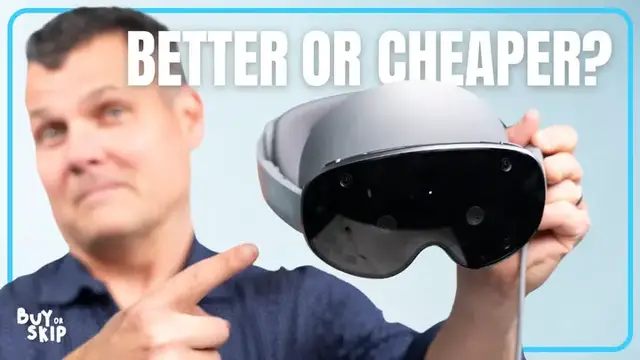
Mark spent a week testing Samsung’s Galaxy XR headset and found that it’s lighter, smarter and way cheaper than Apple’s Vision Pro. But it’s also a little rough around the edges.
From comfort and design to the displays, controls and Gemini Live AI, in this video Mark breaks down what works, what’s buggy and whether it’s worth spending $1,799. He also dives into apps, battery life and even using it as a PC display.
If you’re curious about mixed reality, early adoption or just want to see how the Galaxy XR stacks up against the Vision Pro, this Buy or Skip review is for you!
Show More Show Less View Video Transcript
0:00
Tilt planet up. Ah! I feel like I was just dropped out of a plane
0:05
Today we're talking about Samsung's brand new Galaxy XR headset. Yeah, it looks a lot like the
0:10
Apple Vision Pro, but it also does a few things better. It's lighter, cheaper, and smarter
0:15
at least on paper. But do I think you should go out and spend $17.99 on Galaxy XR? After testing
0:21
it for the past week, I'd say the answer isn't so simple. I want to start off with the good
0:27
First off, the Galaxy XR is way more comfortable than the Vision Pro. It weighs just 545 grams
0:33
and that's about 200 grams lighter than Apple's headset. And I'm telling you, it makes a big difference with how long this thing is on my head. There's also no strap
0:40
digging in across the top of my head, so I was able to wear the headset for hours without wanting
0:44
to rip it off. Some parts feel cheaper. We've got plastic arms and a plastic battery
0:48
and the buttons aren't anything special either. But no question for the price, I'll take those trade-offs any day. Looking a little bit closer
0:56
the Galaxy XR packs dual 4K micro OLED displays. They're crisp and colorful, and watching Netflix
1:02
flipping through Google Photos, or exploring 3D spaces, it all looks fantastic. The pass-through
1:06
video isn't quite as bright or clean as the Vision Pro's, especially in low light, but overall
1:11
the visual experience on Galaxy XR is solid. Now let's talk about controls, because that's
1:16
where the Galaxy XR starts really showing its rougher edges. The hand and eye tracking work
1:20
mostly fine, but it's not nearly as seamless as the Vision Pro. Sometimes, I'd look at the bottom
1:25
of an app to move it and nothing. Or I'd overshoot what I was trying to click. I found that I had to
1:31
be pretty deliberate, especially with my eyes, in order to navigate to whatever app or menu I wanted
1:37
But just like Vision Pro, you can pair a controller. I'd say that's a good idea
1:41
especially if you plan to use this for playing games. Yeah, so the eye tracking is definitely annoying me. So like, I'm trying to aim with my eyes at a
1:51
specific item and I keep like having to look down and I feel like I after
1:56
calibrating I shouldn't have to do that. The good news is that you can recalibrate
2:01
at any time The bad news is that I feel like I need to If eye tracking isn working the way it should you do have the option of hand control which is basically turns your hand into a mouse And there a line that goes from your hand to the screen to select that what you want But I feel like you shouldn have to do that And it not
2:17
something that you ever have to do on the Vision Pro. One big selling point of Galaxy XR and the
2:22
Android XR operating system is Gemini Live, the built-in AI companion. This is where the Galaxy
2:27
XR starts to feel genuinely smart. Can you pull up information on this flower and open up a separate
2:33
window in Chrome? I've opened a Chrome window with information about light purple hibiscus flowers
2:39
Gemini can answer questions or carry out actions based on pretty much anything I have open on my
2:43
screens. Things like identifying flowers in Google Photos or giving in-game advice in Diablo Immortal
2:49
It's not perfect, though. DRM-protected stuff like YouTube TV? Gemini can't see it, so it's
2:54
basically blind there. But either way, it still leaps and bounds ahead of Siri and Apple Intelligence
2:59
and Vision Pro. There are a few things you could try. You could check your quest log or map for
3:04
clues or look for any quest markers or highlighted areas in your current location. You could also try
3:10
talking to the villager you just freed. They might have some information for you. I feel like Gemini
3:15
on something like this is not as attractive or compelling as it will be once it comes to smart
3:19
glasses, but this gives you a taste of that future. I mentioned YouTube TV. That's a good segue to the
3:25
Galaxy XR's app selection. It's okay, I guess. You do notably get YouTube with 180 and 360 videos
3:32
which are really compelling, and a native Netflix app, which the Vision Pro still doesn't have
3:38
Movies. Okay, so House of Dynamite, right? So if I click on that
3:42
and then I go into Gemini. Can you pull up movie reviews of this in a separate window
3:48
I pulled up the movie reviews for House of Dynamite in a separate window. So that's actually useful because I didn't need to tell it what movie this is, right? And then so
3:59
I could just scroll through and I could see all the reviews here and I could have said Rotten
4:03
Tomatoes. But in this case, I could see the ratings on this side and then I can decide if I want to
4:07
watch it or not. There's also Google Maps with immersive mode, which lets you fly through cities
4:12
It genuinely awesome once you get the hang of it Tilt planet up Ah feel like I was just dropped out of a plane You can game with XR titles like Demio or play regular Android games from Google Play
4:27
but I wish there were more native apps. There's about 70 to start and more to come. One of my
4:31
favorite apps on the Galaxy XR is Asteroid, which thrusts you in the middle of a 3D movie
4:35
where you're mining an asteroid for riches, and you can talk with the AI version of the main
4:40
character. This is DK Metcalf. Got a moment to chat? Powered by the Snapdragon XR2 Plus Gen 2
4:47
chip, the Galaxy XR runs most of these apps and tasks smoothly. But I did run into some bugs. I
4:52
had apps freeze, menus lag, and that fan? Yeah, you'll hear it kick in when things heat up
4:57
Is some of this probably fixable via software updates? Sure. But if the goal was to get the
5:02
best of Vision Pro from the jump, these hiccups don't really help the Galaxy XR's case
5:07
Battery life hits at around two hours, which again is fine, but it's not better than the Vision Pro
5:12
I was getting closer to three hours on the new Vision Pro M5. Speaking of which, let me know if you'd want to see a video dedicated to my experience testing Apple's refreshed headset
5:22
If you did see some of my older videos here on the channel about Vision Pro
5:25
you might remember that using it as my MacBook display is pretty much my favorite feature or use case
5:31
So of course, I was really curious about how that would work for the Galaxy XR
5:35
If you want to bring your PC desktop into the Galaxy XR
5:39
you can, but it takes some effort. You have to install Samsung's second screen app
5:43
on a Galaxy Book, sign into your Samsung account, and then find the PC link option in quick settings
5:49
Once you're connected, performance is fine. I know, I feel like I keep saying that in this review
5:54
but it really is true. Again, it works, but not just quite as well as I wish it did
5:58
For Apple setup, you just look at your Mac and click connect. It's that simple, and that alone is just a classic case
6:05
of all of Apple's stuff working better together. Before I get to my verdict, I just have to say mixed reality is still a developing product category
6:17
Even with companies like Samsung Google Meta and Apple all in the game these headsets still have a long way to go before they feel truly ready for the masses With the Galaxy XR it the little thing that break the illusion the occasional bugs and performance hiccups hand and eye tracking
6:33
that isn't always precise, and the app library that's still pretty limited, at least for now
6:38
If Samsung and Google really want people to buy into this vision of mixed reality and spend $1,800
6:43
to do it, all that friction needs to be addressed. This product needs to be smoother, more intuitive
6:48
and more connected to the rest of your devices. Don't get me wrong, it's been exciting to see this launch
6:53
and have it undercut the Vision Pro price-wise by pretty much half, but there's no question this category is still finding its footing
7:00
That also makes you wonder, will we ever really be ready for full mixed reality headsets
7:04
Most people don't want to strap something big on their face. Instead, they want glasses that are lightweight, stylish
7:09
In a few years, the real winners might not be these bulky headsets at all
7:13
It could very well be smart glasses that do a lot of what XR does
7:17
but without taking over your whole head. And Samsung and Google have promised their take on smart glasses is on the way
7:26
For now, if you're curious about mixed reality and want to save money over the Vision Pro, buy
7:31
But only if you're okay being an early adopter. If you want something polished and stable right now, skip it
7:36
Or at least wait for Samsung and Google to iron out the bugs. That's my take on the Galaxy XR
7:42
But I want to know what you think. Would you trade the Vision Pro's polish for a headset that costs half as much
7:46
or are you waiting for the glasses version instead? Let me know in the comments and don't
7:50
forget to subscribe to the channel for more buy or skip reviews. For Tom's Guide, this is Mark Spoonhour
8:04
I would say the pass-through on the Galaxy XR is pretty good and I can definitely like walk around
8:09
but it's a little bit blurry and there's a little bit of motion blur as you walk around so you just
8:14
have to be careful of your surroundings, but I can do simple everyday tasks
8:18
Not that I would do this in real life, but you can. There you go
8:30
Wait, am I getting it wet? No, that's not going to work
#Arts & Entertainment
#Computers & Electronics
#Computers & Electronics
#Games