Up next in 10



In this video, I test out the Check it out here Otterbox Case: https://geni.us/RbKtSN iPhone 16 Pro Max: https://geni.us/QBvPLv DISCLAIMER: This video and description contains affiliate links, which means that if you click on one of the product links, I’ll receive a small commission. This helps support the channel and allows us to continue to make videos like this. Thank you for the support!
Show More Show Less View Video Transcript
0:00
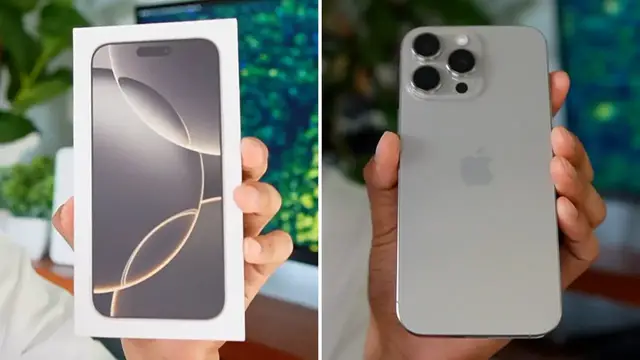
So yesterday I went to the city to pick up my brand new iPhone 16 Pro Max
0:03
So today I want to showcase it. And for starters, here's what the bag looks like
0:08
Here's the phone itself. So I end up getting the silver version because when I pre-ordered it
0:13
they ran out of the desert gold looking one and then the black and then the white
0:19
So I went for the silver one and I didn't have the 256 gigabyte version
0:23
So I end up going with the 512 gigabyte one. So I want to do a quick unboxing and also show you what the OtterBox commuter case looks like
0:31
So let's take a closer look at this. So that's everything that comes in the box. We're going to have the iPhone 16 Pro Max
1:07
the USB-C to USB-C charging cable, and this of course is going to be braided
1:12
And then one more thing I missed is going to be the booklet. And apparently there's no Apple
1:17
stickers in here, but let me just double check. And yeah, there's no stickers. In fact, there's
1:23
really no booklet this is just two pages so this is fairly small and this right
1:27
here is a thicker paper and here it says you no longer need a physical SIM card activate your e during iphone setup let have a closer look at the phone so this is my current phone iphone 12 pro max and
1:38
let's see how it compares with the iphone 16 pro max physically and when i first got this back in
1:44
2020 i actually wanted the blue version i ended up getting for the gold because the blue was sold out
1:49
and just like this year the other one i wanted was sold out so now i got the silver one but regardless
1:55
it still looks really nice and clean and honestly this doesn't give me a silver vibe it gives me
2:02
more of a grayish vibe and so here's both phones the new 16 pro max on the left and the old 12 pro
2:10
max on the right now i'm not going to go too technical just based off what i see and for
2:15
starters the most obvious one is lightning so lightning has been discontinued for a while now
2:20
so it's currently usbc which you probably already knew by that and now let's take a look at the
2:25
speaker grills there's one two three four five six and then four on the other side whereas here
2:32
i think we have the same amount one two three four five six and then four there although this one's
2:38
much dirtier on the 16 pro max there's going to be two buttons one we have the power button and
2:43
then the other special button here which i forgot the name of and then power button and this is
2:49
really nothing this is no button although it kind of looks like a button from a distance and now on
2:53
On the other side we got the bands here and both buttons for volume and then there's no
2:58
more vibration switch there no more of that switch this is just going to be the physical button Now let look at the top side both cameras So of course cameras on the new 16 Pro Max are going to be bigger I think they been bigger for a while now but since this is four years old
3:15
you could definitely see a much bigger difference. And now let's take a look at the front of the screens
3:20
And there's the infamous Apple logo. Hello. OK, slide open. We got English, United States
3:29
That's good. Appearance, I'll leave it at default so continue, quick start
3:36
I do want to set up with a device so it's looking for nearby devices
3:40
Maybe because Bluetooth wasn't on so let me turn that on. And there it is right there, set up new iPhone so continue
3:48
Let me lock it with Face ID. And there it is now it's connecting
3:53
Alright hold your new iPhone up to the camera. do that now it's setting up iphone so i'll give it a little bit and i'll come right back all right
4:05
so this is taking a little bit longer than expected so while i wait for this i'm actually
4:10
gonna take a look at my outer box commuter case which is going to be right over here here's what
4:15
the case looks like it's going to be two parts we're going to have the rubber part on the inside
4:20
to keep it nice and soft and there is going to be a cutout for that additional button for the
4:24
the camera that slider and here's this this is going to be MagSafe compatible so I can
4:31
charge this as well too and this is going to be the plastic portion and they just combine together same thing like my other commuter case except this one has like a frame on top as opposed to this other piece plastic at the other side this
4:47
is like connected so let me put this let me put my iphone in here so this can stick right here
4:54
just like so and then the other one pops right in and there yeah that was actually pretty easy
5:02
to put on so here's what it looks like with the case and it feels kind of naked because of this
5:08
because of this notch here so that part doesn't feel fully protected but this is how most cases
5:13
are going to be just to give you access to this new feature and I can also put my phone back in
5:19
its original case putting it like this all right I finally finished the setup but I just ended up
5:24
doing it as a new phone because I didn't want to wait the three hours to transfer everything
5:28
and unfortunately the important stuff I couldn't transfer which was like contacts messages
5:34
apps I can always do that again photos it's fine I'm keeping my other phone so I'll store my old
5:39
photos here but now this is just a blank phone so I got to figure out a way how to port my old
5:44
contacts here so I'll do that and then I'll be back but in the meantime here's what the phone
5:50
looks like so the edges I can already tell the screen is much much bigger than this other one
5:55
and here you can even tell like the bezels of this is like i think it's like maybe twice as thick
6:02
yeah you can be the judge for yourself all right let's check on the progress so about 54 minutes left and it is 7 0 8 p.m right now
#Computers & Electronics