Up next in 10


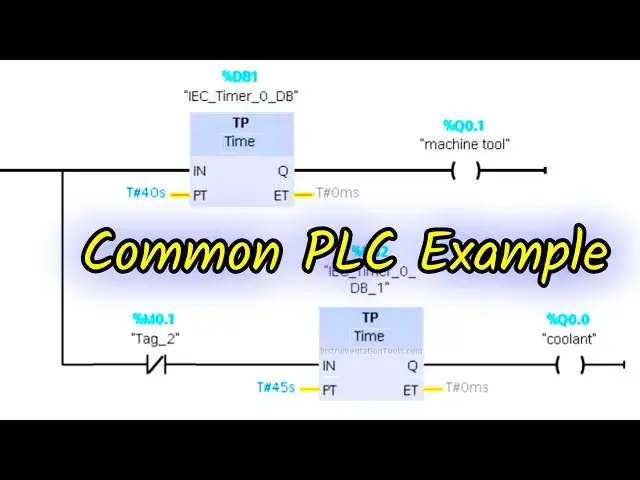
Learn common PLC programming examples using Siemens TIA Portal. Ideal for beginners to understand basic logic, timers, and automation control functions.
Siemens PLC Course:
https://learn.automationcommunity.com/courses/siemens-plc-tia-portal-training-course/
Tags:
PLC programming, Siemens TIA Portal, Common PLC examples, PLC training, Ladder logic, Siemens PLC tutorial, Industrial automation, PLC logic basics, TIA Portal tutorial, PLC examples for beginners, TIA Portal ladder logic, PLC engineering, Siemens logic blocks, TIA Portal examples, Digital I/O programming, Timer and counter PLC, S7-1200 programming, PLC control logic, Siemens automation, Engineering tutorials, Learn PLC programming, TIA Portal for beginners, Automation training, Control system design
Show More Show Less View Video Transcript
0:11
hello everyone welcome to automation
0:14
Community today in this video we are
0:17
going to discuss an example which will
0:19
be about Machine Tool and coolant so
0:22
let's look at the example first machine
0:25
tool coolant control the coolant should
0:28
activate when the Machine Tool starts
0:30
and continue for 5 seconds after the
0:33
tool stops the Machine Tool will operate
0:35
for 10 seconds with a break of 5 Seconds
0:39
so for this example we will use some
0:41
normally open contacts and normally
0:43
close contacts we will be also using
0:46
some memory bits and timers like TP and
0:49
T on so let's move to TI portal where we
0:53
will draw a ladder diagram for this
0:55
example this is the interface of di
0:58
portal firstly we we will go to PLC tags
1:01
and then default tag table so here we
1:04
will add our inputs and
1:07
outputs the first input is start button
1:11
and then we have some outputs the first
1:14
one is
1:17
coolant so this is an output so its
1:20
address will be Q
1:23
0.0 and then we
1:28
have Max
1:31
mhen
1:33
tool and its address will be K 0.1 so we
1:37
have two outputs and one input after
1:40
that I will double click on program
1:43
blocks and then main
1:47
ob1 so here we will draw the lateral
1:50
diagram so I will zoom into it like this
1:53
so firstly I will insert a normally open
1:56
contact and a coils this normally open
1:58
contact will be used for the start
2:00
button and the coil will be the Machine
2:05
Tool and this machine tool for 10
2:08
seconds so there will be a timer
2:12
operation used and that will be TP and
2:15
the preset value for TP will be 10
2:19
seconds and after
2:28
that the cooler
2:31
will be used I will open the branch and
2:34
then add a coil so this coil will be
2:36
used for the coolant and this coolant
2:40
will operate for 15 seconds so for that
2:43
we will use a TP here and the preset
2:47
value for TP will be 15
2:53
seconds and after
2:57
that I will use Network 2 and use a
3:00
normally open contact for the start
3:03
button and then we will insert a coil
3:06
that will be a memory bit M
3:09
0.0 and this m
3:15
0.0 the masching tool should operate for
3:19
40
3:21
seconds and then the
3:24
coolant will operate for 45 seconds
3:30
because the coolant should operate even
3:32
if the co machine tool is off so it will
3:34
be on uh for 5 seconds mode and then
3:40
here this m 0.0 will be used here so
3:44
this m 0.0 gets on after every 10
3:47
seconds so this will be uh t on will be
3:50
used here and the preset value will be
3:52
10
3:54
seconds and then this m 0.0 will be used
3:58
here as normal close contact so I will
4:02
write the address as M
4:04
0.0 and then this m 0.0 will be
4:09
used again so we'll use Network 3 where
4:13
we will use a normally open contact and
4:16
this normally open contact will be a
4:18
start button and then here will be a
4:22
coil and this Quil will be one more
4:25
memory bit let's say m
4:27
0.1 and this m 0.1 one gets activated
4:31
after 5
4:33
seconds so there will be t on and the
4:35
preset value will be 5 5
4:38
seconds and then it will get on when the
4:41
coolant is off so here we will use a
4:43
normally closed contact and this will be
4:47
coolant and also we will use a normally
4:50
closed contact and this will be M
4:53
0.1 and this m 0.1 will be used here for
4:58
coolant here as normally closed contact
5:02
and this is M
5:04
0.1 with that this
5:07
m.0 should get on when the Machine Tool
5:11
is
5:15
off so this is Machine Tool so what
5:19
happens is that when start button is
5:22
pressed this machine tool gets on for 40
5:25
seconds and then after 40 seconds after
5:30
40 seconds when Q 0.0 gets off the
5:34
coolant doesn't get off when start
5:36
button is turned on both gets on the
5:38
Machine Tool gets on for 40 seconds and
5:41
coolant for 45 seconds with that when
5:44
Machine Tool gets off when Machine Tool
5:47
gets off the current flows through this
5:49
and this m 0.0 is also true in the is
5:54
also falls in the beginning so the
5:56
current will flow through this and this
5:58
m 0.0 get gets through after 10 seconds
6:01
and after 10 seconds when this m 0.0
6:04
gets through this m 0.0 gets through the
6:08
current will not flow through this and
6:09
as a result this
6:11
m.0 gets
6:13
off and
6:20
then so when this m 0.0 gets through
6:24
here we'll use a normally closed contact
6:26
for M
6:27
0.0 so first ly it gets true it gets
6:31
true the current doesn't flow through
6:33
this and as a result this gets true and
6:35
this gets false and as a result this
6:38
timer again starts after 10 seconds so
6:41
again Machine Tool gets on for 40
6:44
seconds then again gets off and then M
6:47
0.0 gets through then it gets through
6:50
then it gets off and it gets off and
6:52
with that this gets on and off then
6:54
again making the machine tool to operate
6:57
for 40 seconds and with that the coolant
7:01
the Machine Tool operates for 40 seconds
7:03
but coolant operates 50 seconds 5
7:06
Seconds more that means 45 seconds and
7:09
then when this m0 this start button is
7:12
on and the coolant gets off after
7:14
operating for 45 second this m 0.1 gets
7:17
through after 5 Second and when it gets
7:20
through it gets through and it gets off
7:23
and when it gets off then here this TP
7:27
once again starts and the coolant gets
7:29
on again so I will start the simulation
7:33
here the process is automat automatic
7:36
the whole process is automatic and it
7:38
will repeat this process again and again
7:41
so the Machine Tool will operate for 40
7:44
40 seconds and then a break of 10
7:46
seconds will be there 40 seconds on
7:48
click on load 5 Seconds uh 10 seconds
7:51
off 40 seconds on 10 seconds off and
7:54
then for the coolant it will be on for
7:57
45 seconds then off for 5 seconds 45
8:00
seconds on for uh 10 second 5 Seconds
8:03
off I will start the CPU
8:06
here and then start simulation start
8:09
monitoring and after that I will switch
8:11
to project
8:16
view let's create a new project
8:53
after that I will go to simulation
8:55
tables and then simulation table one
8:58
right click here and and load project
9:00
TXS so here when I turn on the start
9:03
button you can see here when I turn on
9:06
the start button Machine Tool started
9:09
working and it will work for 40 seconds
9:13
and with that the coolant will also
9:15
operate so the Machine Tool will uh turn
9:19
off after 40 seconds but the coolant
9:22
will be on for 5 seconds more
9:43
so after 40 seconds Machine Tool gets
9:46
off but the coolant gets on so M 0.0
9:49
gets to gets off and then with that
9:52
machine tool again starts working but
9:54
the coolant St for 5 seconds after that
9:58
machine tool and coolant also got
10:01
on and the Machine Tool will operate for
10:04
40 seconds and then will stop the
10:06
coolant will continue for 5 seconds more
10:09
and both will stop for 5 seconds and
10:11
then again Machine Tool and coolant will
10:14
work it was all about this example thank
10:17
you for watching
10:19
[Music]