Up next in 10


Embark on a journey into the world of effortless video creation in this tutorial! Discover the magic as the creator showcases how to make an AI video without the need for traditional editing software. Whether you're a content creator, vlogger, or someone looking for a simplified video-making process, this video guides you through the steps of harnessing AI for seamless video production. Say goodbye to complex editing tools and hello to a new era of simplicity. Don't miss out on this innovative approach—watch now and learn how to make captivating AI videos with ease! ?✨?
Show More Show Less View Video Transcript
0:00
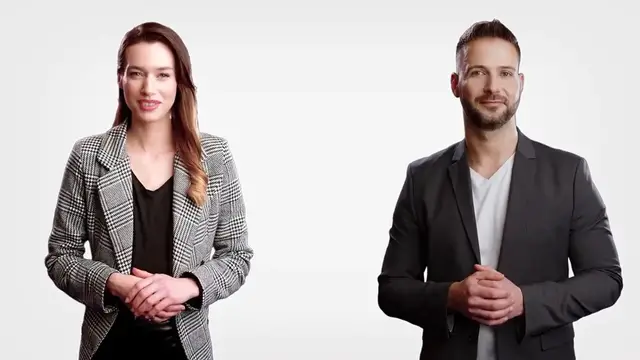
So you've probably seen the video on my channel that features two AI's discussing why artificial intelligence won't replace teachers
0:07
In this video, I'm going to show you how I created it. And I did it on this site at Colossian.com. Let me show you how
0:16
So the first thing I had to do was to write a two-person script
0:20
So I went to chat GPT and I generated this prompt. Write a two-person conversation about why AI
0:27
won't replace teachers. From here, I logged into Colossian. Now the reason I used Colossian creator over some other options is because it gives you this option to create a
0:39
conversation. So the first thing I need to do is to select my actors. I'm going to choose one of these actors
0:46
Let me go ahead and choose this one. I'll take Emily. And now I'm going to add another actor. How about Ryan
0:56
I'm just going to move him to this side. Now the next thing I have to do is to select the voice that I want my narrator to have. So if I select Ryan
1:06
I can preview how several of these voices will sound. Hello everybody
1:16
My name is Alfie. Hello, I am Anthony. I have an American accent. Okay, so I'm going to use Alan for this character
1:25
And now for my other avatar, let me hear some of these choices
1:30
Hello, my name is Alana and I have an American accent. Sounds good. So now that I have my two avatars, the next thing I need to do is to create a script
1:40
So I just have to go back to chat GPT and copy and paste each line into the speech bubble
1:47
So this is Emily's line. This is Ryan's line. So Emily is person one. Ryan is person two
1:56
So next I just have to go back to Colossian, select the plus. It's going to have me select an actor
2:01
I'm going to choose Emily this time and I'm going to paste. I'm going to do the same thing. Add actor
2:08
Scroll down. Let me choose my actor. It's going to be Ryan and I can paste his line
2:13
So I'm going to do this until I finish all of the script that's in chat GPT
2:19
So I'm just about done. I followed that same format of the script with Emily as person one, Ryan as person two
2:27
It was really easy to just add a new dialogue box, select the actor and then copy and paste the text from chat GPT. Okay, so my video is finished
2:38
Now I can preview to get an idea of how this will sound. The other thing I can do as well is add some music
2:45
Colossian does give you some options for adding music in the background. Of course, if I wanted to change this background
2:52
I could do that. I could also add things like shapes, bring in my own media, add text if I wanted to, that kind of thing
3:00
I'm just going to leave this the way it is because it has a really nice clean look to it. Okay, so I am finished
3:06
I'm going to select generate. I want to give this video a title. Let me go ahead and generate and
3:13
in a few minutes, this video will be done processing and then I'll show you how you can download a video file
3:19
Okay, so it looks like our video has been generated. So now let's go ahead and take a listen for a couple seconds
3:27
Have you heard about the latest advancements in artificial intelligence? I've been hearing a lot about how AI is going to replace teachers in the near future
3:36
I have but I don't think that's going to happen. Okay, so it sounds pretty good and it looks good
3:43
Now what I want to do is select this button to download an MP4 file of this video
3:49
Hey, create with AI. So what I like about this feature by Colossian is that I was able to create a dialogue, a conversation between two characters by just copying and pasting the script
4:04
There was no editing involved. It didn't require me to download files and upload them in a video editor like I had done in the past
4:11
This makes it quick and easy and if you haven't checked out Colossian, you can find it at Colossian.com
4:18
This feature is the conversation feature. Thank you so much for watching this video
4:22
If you have any questions, leave them in the comment section below. Learning style
4:29
While that may be true, I think the role of a teacher goes beyond just providing lessons
4:34
Teachers provide mentorship, support and encouragement to their students. They act as role models
Multimedia Software
Email & Messaging
Voice & Video Chat
Distance Learning
Intelligent Personal Assistants
Computer Education