Up next in 10


How To Set up Customer Support on Shopify - Tutorial
Show More Show Less View Video Transcript
0:00
Welcome everybody into this new video of Techpress. I'm going to be showing you how to add the customer support into your store
0:06
There are several ways that we can do this. I'm going to be showing you that there's actually two of them
0:10
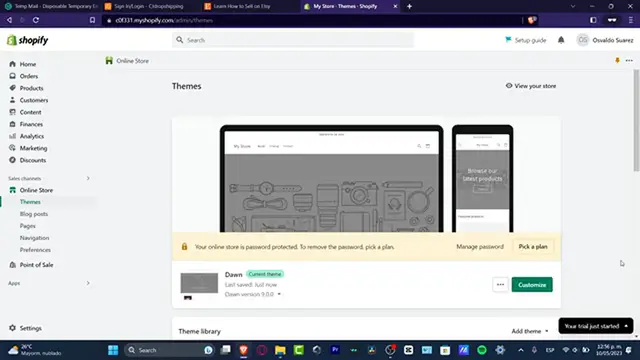
If I go into my actual DAW theme, as you can see, I can go into customize
0:15
There's a new header section of the theme. I can go and add a new section here
0:20
So if you wanted to add like a chat support or you wanted to add like something like a blog, for example, like a customer support
0:28
You can add those here into the theme section. Now there are a few places where you are not able to do this
0:33
But if you go into the exit plan, there's always but there's truly always the apps section
0:40
So here into apps, there's a lot of apps that we can use totally for free
0:44
So I can go into Shopify app store. And here this is the part where I wanted to go for customer support
0:51
Always look out for the keyword support is free plan available and high chances of downloads
0:59
For example, this one that has a thousand and almost five stars and free plan available
1:04
So I click this one. I go into the application. I install the application
1:09
Let's go for tech support. The color scheme. I wanted to do something greener like this
1:16
And here you can upload your own avatar if you wanted to. The language should be English
1:21
I hit now into continue. And my main focus in is like I want to solve customer problems
1:27
No more supporting any let's say for five customers and hit now into continue
1:33
And you can customize these measures if you want to like either if you need any assistance. I'm always here or you can customize the message as you wanted to
1:39
So then you have to set an actual passcode. And there we go
1:43
You have the chat with us. So I'm going to click here. And let's go for. Hey, I need some help
1:50
And present it yourself. Let's say that I am. I don't know. Maybe. Hello. Did you mail.com
1:56
And there we go. So this one should be taking us now into the panel where I can see that I have a new message here
2:03
This is how guys we can start to have some live stuff into our actual store
2:08
So with that being said, guys, we have not reached into the very end of the video. So thank you so much for watching the video. Hopefully it was very useful for you
2:14
Of course, don't forget to like and subscribe, guys, if you want to see more stuff from a stop here to Shopify
2:19
Thank you so much again. And I'll see you on the next video. See you soon
#Enterprise Technology
#Consumer Resources
#Helpdesk & Customer Support Systems