Up next in 10


How To Reset Binance 2FA Google Authenticator (Step by Step) Binance 2FA Reset
Show More Show Less View Video Transcript
0:00
How to reset Binance Two-Factor Authenticator
0:05
Hello guys. Welcome into this new video. In today's tutorial, let's see if we can recover our two-factor authenticator. Now
0:11
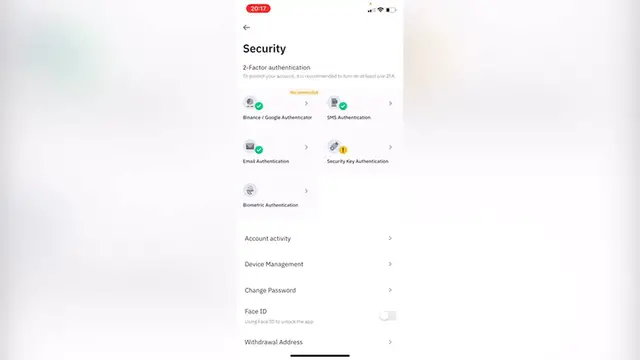
as you can see, I'm already into my Binance account using my phone. So if I go into my profile and go into the section that says security
0:19
I have my Binance Google Authenticator right here. So if I want to change my Binance and Google Authenticator
0:25
I just need to select this option that says, Are you sure you want to change your Binance Google Authenticator
0:30
And I just go ahead and click into continue. But let's say that you don't have access into your account because you're not
0:36
able to look for the two-factor authenticators. I'm going to log in
0:41
Then what I want to do is to continue and put my information here. And here we have the security verification. Now
0:46
if I select the option that says Binance Google Authenticator, I'm going to use the option that says security verification on an unavailable
0:55
So the way that I can reset my security verification is through my phone or
0:59
through my email. So you can select which one that you want to
1:05
you can select whatever you want to, you can select your phone or you can select your email
1:09
I strongly recommend that you select your email because the first time you
1:13
created your account, you needed an email as a mandatory. So if you select the option of an email
1:19
you're going to go into confirm reset, and then it's going to be sending us a code through our phone and through our email
1:27
And lastly, what you have to do is to go into your Google Authenticator again
1:31
and try to add this enter a setup key and go into Binance again
1:36
So you can set up again, your two-factor authenticator, or if you want to leave it like that, it's up to you. And there you have it guys
1:44
Now I have access to my account again, and I can go into security and I can see the Binance Google Authenticator
1:51
If I want to add it again, I'm going to enable it. As you can see this one is already enabled
1:55
but if you're going to keep it disabled and leave it like that, it's up to you as I just said. So there you have it guys
2:00
Don't forget to like and subscribe to the channel. If you want to see more about Binance application
2:05
thank you for watching the video and I'll see you guys on the next one