Up next in 10


How To Deposit Money in Coinbase (Step by Step) Coinbase Wallet Tutorial 2024
Show More Show Less View Video Transcript
0:00
Hey everybody, welcome back to this new video
0:02
So in this coinbase tutorial, I'm going to show you how you can buy cryptocurrencies
0:07
So I strongly suggest you guys real quick that if you want to buy some cryptocurrencies
0:11
inside coinbase, you need to do that inside the coinbase application because sometimes
0:17
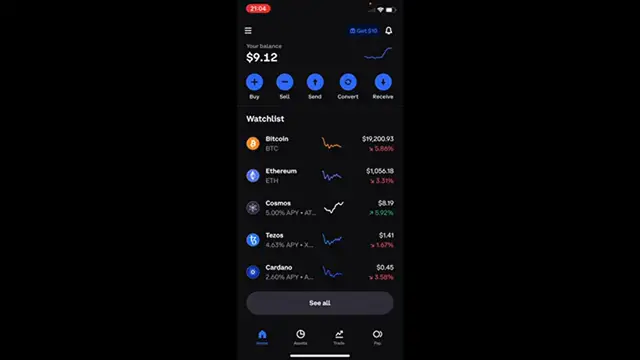
it just won't work in the desktop in the website. So I strongly suggest you guys to have the coinbase application as I do right now at
0:26
the moment. So once you are in here into your account, you want to select this option that says buy
0:31
and there are a bunch of tokens that we can buy. As you can see, there are plenty of those
0:36
So if you want to select a specific one, you can select, I don't know, maybe Adam
0:41
Select this option in here. It's going to be asking you if this one is going to be just a one-time purchase or you
0:46
want to make the purchase like daily or weekly or monthly. In our case, it's just a one-time purchase
0:53
And here's going to be asking you for a payment method. So as you can see in my country, it's only available the credit or the debit card in
1:01
order for making the payment. So if I select the credit debit card option, it's going to be asking for all my information
1:07
so I can make the trade really, really simple. And if you ask me guys, if you have a credit card, it will be really, really easy and fast
1:16
to trade and receive your tokens inside coinbase. So once you've done that, you want to select the option that says preview your buy
1:25
And here we have the add-on price, the payment method, our purchase and the coinbase fee
1:31
As you can see, the coinbase fee is really, really low. The MXN is a little bit less than the dollar
1:37
So this one is like a quarter of a dollar. So it's actually really, really cheap
1:41
So last thing you want to do is to go into buy now. And I want to go into my assets and here it says your assets
1:48
You can see that my Cosmos is not available in here. I can filter that from buy lands or the price so I can see which one is a little bit more
1:57
higher than other ones. So there you have it guys. It's really, really simple how we can buy tokens
2:04
And if you want to swap from another token, you can always go into the convert section
2:08
and look for a specific token and trade that for another one
2:12
You can do that in really seconds guys. It's really insane how you can do that in this application really, really quick and simple
2:19
So let me know if you have any questions guys. Don't forget to like and subscribe to this channel if you want to see more about the
2:23
Coinbase application. Thank you for watching this video and I'll see you next time
#Consumer Electronics
#Banking
#Investing
#Currencies & Foreign Exchange
#Mobile Payments & Digital Wallets