Up next in 10


How to Convert BTC to USDT on Trust Wallet (Step by Step)
Show More Show Less View Video Transcript
0:00
How to convert your bitcoins into USDT on TrustWallet
0:03
Hello guys, welcome to this new video, in today's tutorial I'm going to show you
0:10
how you can convert your tokens or bitcoins into USDT using TrustWallet
0:15
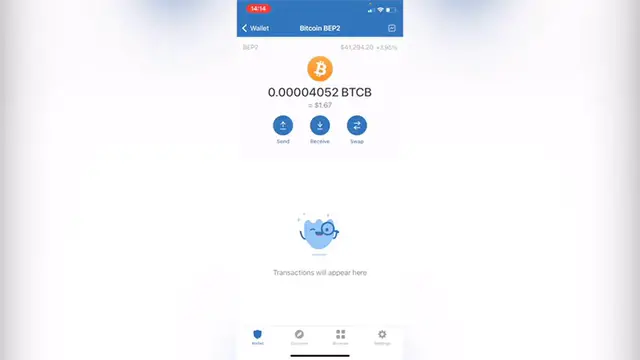
So the first thing you want to do is to enter into your TrustWallet, as you can see now
0:19
I am in here and you might notice there are a few tokens that can't be swapped within themselves
0:25
So it might be a little annoying if you select your bitcoin, in this case I have a bitcoin
0:29
that runs with the BEP2 networks and I wanted to swap this one into USDT
0:35
So if I select what I'm going to pay, which is this one, I'm going to select what I'm
0:41
going to get. But the thing is that I can only pay using Ethereum, GrabEthereum, so this is the few
0:49
tokens that I can use for making the exchange and if I wanted to select bitcoin, I am not
0:57
able to see bitcoin in here, so I'm going to see another bitcoin that runs with another network
1:02
So what we want to do is to go back, we want to go into browser and in here you want to
1:06
tap pancakeswap.finance.swap. As you can see I have it here in my history, so you just need to go in here
1:13
Now that we are in here we want to go into connect and let's connect our TrustWallet
1:18
let's click in here. Now as you can see I'm already in here, you can make a profile if you want to
1:22
Now let's go into this part that says trade. Now what you want to do is to select the token that you want to convert, in this case
1:30
that would be the bitcoin. I'm going to select Binance coin so you guys see what happens in here
1:36
And then after you make the confirmation you just hit on to confirm swap
1:40
Now the price is updated, I'm going to go into accept, confirm the swap and this one
1:44
is going to write our address into our TrustWallet, we just need to confirm the transaction, ok
1:50
So now that we've finished we want to get out of the browser and go into our wallet
1:55
I'm going to go back and you can see that our tokens are in here
1:58
This is the new price that I've just created and if you can't see the Theta, you have
2:02
to go in here where it says manage tokens and you select USDT and you enable this one
2:08
So you're using Parligo network or you're using another network you just have to enable
2:12
this one and go into Don and you might see a Don in here guys
2:16
So there you have it, really really simple. Don't forget to like the video and subscribe to this channel if you want to see more about
2:22
this kind of stuff. Thank you for watching the video and I'll be seeing you guys on the next one