Up next in 10



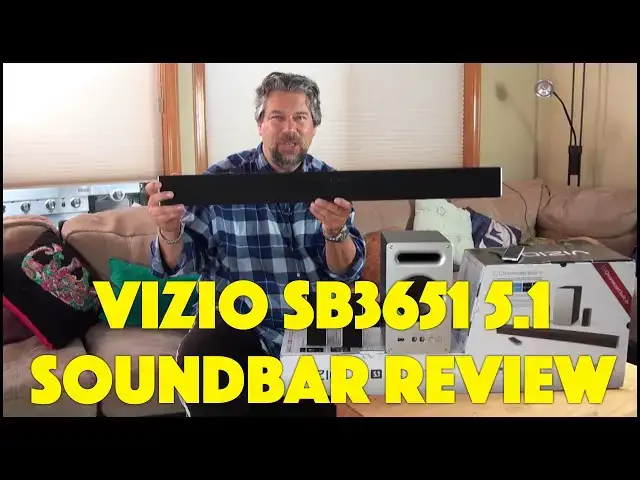
The Vizio SB3651 5.1 TV Soundbar? Yup. If you're using the built-in speakers on your TV for audio, whether you have a fancy 4K UHD unit or an older unit, you're just not getting the audio that you should. Enter soundbars. They look complicated, but they aren't, as I explain in my extensive review of the 2017 Vizio 36" Soundbar with both Chromecast and Bluetooth.
Comprised of four different pieces, it will dramatically transform your listening experience with speakers throughout your room, including a rockin' subwoofer. And it works great for music from your computer, tablet or smartphone, along with working great with Google Home too.
Tech expert Dave Taylor of https://www.AskDaveTaylor.com/ walks you through all the features of the Vizio SB3651-E6 soundbar, including offering some cool demos too.
Learn more: http://amzn.to/2eUIE9r
#vizio #soundbar #hometheater
Show More Show Less View Video Transcript
0:00
are these the heart of your next great
0:01
Soundbar let me tell you all about
0:04
[Music]
0:10
it Dave Taylor here and I want to talk
0:13
about Soundbars I want to talk about TVs
0:15
and Sound Bars because I want to tell
0:18
you that if you're using the built-in
0:20
speakers on your TV I don't care how
0:22
fancy your TV is you're not getting
0:24
Great Sound the reality is that even
0:27
with the nicest televisions in the
0:29
market you really need to upgrade and
0:31
get a soundbar that gives you that full
0:34
5.1 experience so you get a center
0:37
channel you get left and right front and
0:39
you get back channels and you get a
0:42
subwoofer that's what all these pieces
0:44
are and this is the Vio brand new for
0:47
2017 Vio SB
0:50
3651 E6 super friendly name right
0:54
whatever the name just make sure you get
0:56
the right one this is a 36 in 5 5.1
1:01
smartcast Soundbar so let me give you a
1:04
quick tour of the pieces this is the
1:06
heart of it this is actually the
1:08
Soundbar that sits just under your TV
1:11
you can wall mount it if you want to and
1:13
let me spin it around and on the back
1:15
and I'll give you some close-ups but on
1:17
the back is all the different input
1:19
ports so it turns out that on this
1:22
Soundbar let me turn it around again on
1:25
the Soundbar you have HDMI in and out so
1:28
you can just daisy chain it to your TV
1:30
if you want you have RCA Optical aux you
1:34
can literally plug in your iPhone or
1:36
something if you want here um there's
1:38
better ways to do that we'll get back to
1:40
that ethernet so if you can go directly
1:43
online if you want and USB and you'll
1:46
notice there are stealthy cats in the
1:48
background that have nothing to do with
1:49
my soundbar but that's okay so this is
1:52
sort of the heart of it all and then
1:55
there's a wireless connection that gets
1:57
you to the subwoofer that's this guy and
2:01
the vios come a long way with making
2:03
their subwoofers sound great but not be
2:06
quite so big as they used to be this is
2:08
not my first Vio Soundbar this one
2:11
actually generally you just s to hide
2:12
these somewhere in the room I put this
2:14
behind my couch and you can see there's
2:17
some various inputs on the front and
2:19
such but mostly the point of this is
2:21
that you plug it in to these which are
2:24
the little satellite speakers which you
2:26
put behind you so now imagine when
2:29
you're watching a t TV show or a movie
2:31
or something then you have sound in
2:33
front of you three different speakers
2:35
and you have sound behind you and you
2:38
have the subwoofer giving you that great
2:40
Rumble and this subwoofer goes down to
2:42
20 HZ so it can probably get lower than
2:44
you can hear so great effects now it
2:48
comes with one more piece along with a
2:50
boatload of cables that one more piece
2:52
is this remote but you know what this
2:55
remote you don't really need to use
2:57
because Vio has some called their
3:00
smartcast app this is for Android or iOS
3:04
and using that you get way more controls
3:07
so for example it's much easier in the
3:10
app on my iPhone for me to connect to
3:12
the Soundbar and tweak how much I want
3:15
the treble or the bass or how much I
3:17
want the subwoofer so all of those
3:20
controls are great cuz it can really
3:21
help you fine-tune your audio experience
3:24
but it does come with the remote and you
3:25
can use this if you're so inclined now
3:29
it also the like the key super great
3:32
things about this is number one it has
3:34
Bluetooth so I use this not infrequently
3:37
just to like connect with my computer or
3:40
something and then I can be watching a
3:42
video on my computer from YouTube and I
3:45
can actually be using the Soundbar for
3:47
the sound but where it gets even more
3:49
cool is it also has built-in chomecast
3:51
so it works great with any apps any
3:55
devices anything that works with Google
3:58
chomecast so for for example your Google
4:01
home so you can actually have your
4:03
Google home send audio directly to the
4:06
Soundbar once you get it all configured
4:07
correctly so that's super cool and I
4:09
actually use it a lot that way so I'll
4:12
just grab my phone I'll go into Spotify
4:14
or something and then I'll cast it to
4:16
the Soundbar and then I have this nice
4:18
enveloping sound throughout the room he
4:21
very nice so comes with DTS and doly
4:25
support which is important um the base
4:27
goes down to 20 HZ the volume goes up to
4:29
101 DB it gets pretty loud probably
4:32
louder than you're going to be
4:33
comfortable with um works with Google
4:35
home all of this the you know these
4:38
connect via wires but there's no wire
4:42
that you have to get the subwoofer
4:43
connected to the Soundbar so that's nice
4:46
because I don't really want a big mess
4:47
everywhere um the cables it comes with a
4:50
just a box of cables including HDMI
4:53
Optical coaxial RCA a 3.5 to 3.5 mm AU
4:59
and an RCA to Au so there's lots of ways
5:03
you can put all these pieces together
5:05
but what I really want to do is I really
5:07
want to give you the experience of
5:08
hearing this so give me a minute let me
5:11
get everything all back connected
5:13
together and then we'll send some music
5:15
to it and as best we can we'll be able
5:18
to check out what it sounds like so just
5:20
a sec all right I have it all set up the
5:22
problem is I can't really show you much
5:24
television because I don't have license
5:26
right for B broadcast but let's go ahead
5:29
and start out and I'm just going to use
5:30
the Soundbar for music by pushing play
5:33
on my
5:36
[Music]
5:39
phone and as my daughter would say oh
5:42
dad there's so much bass it sounds
5:44
awesome actually I don't know if she
5:46
would use the word awesome but let's go
5:48
ahead and pause that cuz I am using that
5:50
through chomecast which is super easy
5:53
and instead I'm going to just switch
5:55
inputs and we're going to get back
5:58
to the TV
6:01
and this is what we recognize as
6:03
standard R so we're actually watching
6:06
Torchwood though I'm not showing you
6:08
Torchwood and I'm talking over this but
6:11
suffice to say that the sound you get
6:14
out of TV shows particularly if you
6:16
really crank the volume but because this
6:18
one is pretty fantastic because it's all
6:21
around you and I really like that before
6:24
we go back on camera I want to point out
6:26
that the Soundbar itself has a bunch of
6:28
buttons on the top as you can see in
6:30
this closeup so you can control it
6:32
directly from the bar or with the Vio
6:36
remote or with the app so there are lots
6:38
of different ways that you can interact
6:40
with this system but let's go back to me
6:42
being on camera so you can see why I
6:45
like it so much it's really just a great
6:47
addition to my audio visual system
6:50
because I want to be able to have a
6:52
really great experience with my viso TV
6:54
actually so they work well together but
6:56
I also want to be able to have good
6:58
audio I want to be able to listen to
7:00
music and when I'm watching movies or
7:02
anything I want to really have that
7:04
experience of sound happening all around
7:06
me not just all coming from that front
7:08
speaker and the Soundbar does a TR you
7:11
know a fantastic job really terrific and
7:14
what's great about it is it's actually
7:16
at quite a reasonable price so this
7:18
setup with everything we've talked about
7:20
including all the chomecast support and
7:22
everything this is a
7:24
$249 Soundbar you can pick up directly
7:27
from vizio.com so again it's the SB
7:33
3651
7:34
E6 and that's important because you
7:36
don't want to pick up last year's model
7:38
because hey latest newest greatest All
7:41
That Jazz so this is Dave Taylor I'm
7:44
getting back to my music actually so
7:46
I'll catch you in my next
7:52
[Music]
7:58
video
8:10
he
#Consumer Electronics
#Audio Equipment
#TV & Video Equipment
#Media Streaming Devices