Up next in 10



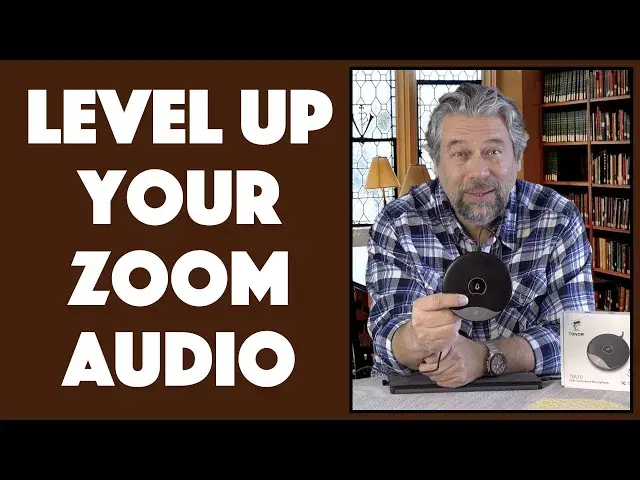
You don't have to spend 24x7 on Zoom calls to realize that your microphone makes a huge difference in how you come across to attendees. But it's just as true on other systems and on audio calls too, which is why the Tonor USB Conference Microphone (model TM20) is a smart update and improvement to your setup. Tech expert Dave Taylor of https://www.AskDaveTaylor.com/ spends a lot of time on Zoom too, and demonstrates just how much better audio sounds with the Tonor TM20 Conference Mic. It's worth checking out, for sure!
Find it on Amazon at https://amzn.to/3rQNZhL
Show More Show Less View Video Transcript
0:00
Dramatically improve your sound with this external microphone. Let's check it out
0:13
Dave Taylor here, and if you're like me, you're spending a lot of time on video chats
0:18
Now, there's two things you really need to look good on a video chat. Number one, a good webcam. But number two, you need a good microphone too
0:25
And the reality is, a lot of computers, a lot of laptops, don't have very good microphones
0:30
So every time you talk, you don't sound very good. Solution? Well, that's this. This is the Toner USB conference microphone
0:39
And it's a really slick little device. As you can see, it's basically like a hockey puck
0:44
And on the end, it has USB-C. The top is actually a mute button
0:50
It's just tap sensitive, so it's super easy to work with. And it comes with a nice six foot cable
0:56
And on one end of the cable, as you would hope, is USB-C to plug into the external microphone
1:02
And then the other end, unfortunately, is USB-3, and there's no adapter
1:07
It is incredibly inexpensive. So, the good news is, you can buy yourself a USB-3 to USB-C adapter like this for under five bucks
1:17
So if you really need that adapter, as I do with this Dell computer
1:21
you can pick one up the same time you acquire this, and now you're ready to go USB-C to USB-C
1:28
Super easy. Now, the microphone is omnidirectional, which means that it'll work just as well regardless of where someone is around this
1:36
Which means it's perfect to put in the center of the table if you're having a meeting and you have four people in the room
1:42
or if everyone just wants to cluster around and talk to grandpa, right
1:46
It does have a noise reduction system. You'll hear that. I'm going to give you a demo of all of this in just a second
1:51
And as I said, the mute button's really easy to work with. It is plug-and-play with Mac, Windows, Linux, and Chrome OS
2:00
So, super flexible. You don't have to get any drivers. There's nothing special you have to do
2:06
You just plug this thing in, make sure that's chosen as your input device, and you're good to go
2:11
Now, 48 kilohertz at 16 bits, 20 to 20,000 hertz frequency response
2:17
So, it's actually pretty good. You could probably use this to record music or something if you were so inclined
2:22
That would work, too. Size-wise, it's about 6 inches across and 1.3 inches
2:28
I don't feel like their measurements are correct. That doesn't look like 1.3 inches to me
2:32
Be that as it may, it's 9.5 ounces. It's kind of heavy because it's made of a zinc alloy
2:38
So, this is not plastic. This is made out of metal, and it feels like it's going to last forever and survive a whole lot of falls onto the ground as needed
2:47
The cable is 6.5 feet long, as I said. So, you can have your computer off up to a side, and you can still have this all the way on the center of your table
2:56
It's going to sound great. So, what I want to do is I don't want to just talk about it
3:00
I want to demonstrate it. So, I'm going to use a program called Audacity, which is an audio recording tool
3:07
And I'm going to use it on my Windows laptop, and I'm going to record the built-in Dell microphone
3:13
Then we'll switch to this, and I'll record that audio sample. So, give me a second, and let me get everything set up, and I'll come right back on camera
3:21
Okay, got it all set up. So, first thing to notice is that now the center of this is blue, and if I tap on it to mute it, it turns red, and I tap, and it turns blue again
3:32
So, that's the mute function, and it's a nice, bright, cheery light
3:37
Now, I'm going to use this Audacity program, and what's going to happen is you're going to still see me here
3:42
but I'm going to switch the audio source from the microphone I'm using with my camera
3:47
and this first sample will be actually the audio recorded by the Dell laptop itself
3:53
So, to do that, I press the record button, and now you're hearing the audio directly from the microphone on the Dell laptop
4:01
Not great, but survivable. So, what's it sound like if we switch to the Toner device
4:07
Let me switch that up. Ready? I'm going to switch now. So, now, right this second, I'm still using my regular microphone with my video system, and now we're going to switch to the Toner
4:19
And this is an example of the sound the Toner gets as I use it as my external microphone with my Windows system
4:27
And I don't know about you, but I think it sounds a whole heck of a lot better, and that's pretty darn nice
4:33
Great. Now, let me switch back one more time. If you're wondering what the actual Audacity program looks like, here's a screenshot
4:41
I didn't show you the screen as it was recording. It's not very interesting, actually, and it's really all about the sound
4:47
Now, the real thing is you can now answer the question, does this actually make you sound better than using the built-in microphone on your computer
4:55
And the answer is, oh, heck yeah, it does. And it can work because it's actually omnidirectional. It also has a better range
5:02
So, if you were sitting on this side of my computer and talking, it's going to be very poor audio pickup
5:09
But if I put this device here and everyone shared it around the table, then they would all actually sound really good
5:16
And, in fact, no one would be particularly louder than anyone else, which is actually a nice feature
5:21
So, there's really a lot to like about this. This could be perfect if you're doing something like Zoom calls while you're cooking
5:29
Use this as your microphone, even just right by your computer. And then when you turn around and you're cooking and you're doing other stuff in the kitchen, people will still be able to hear you really well
5:40
So, really nice. No hassles with clipping it on your body or anything
5:44
And that six-foot wire gives you a lot of flexibility. So, I really don't have any negatives. I don't have any criticism
5:50
And when I tell you the price, you're going to be pretty blown away. Well, I guess the only comment I would make is I wish that the company included that USB 3.0 to USB-C adapter
6:01
Or maybe just included two wires. They had one that was USB-C on both ends and the other one that was USB-C and USB-3
6:10
Because the world is changing and our computers are moving towards that USB-C connection
6:17
And having to use an adapter, not super glamorous, but entirely functional
6:22
Anyway, so, let me talk about the price. But before I get there, can I ask for you to subscribe to my channel, please
6:28
Just a click or a tap on that little red subscribe button on the lower right and boom, we're connected
6:33
Really do appreciate that. All right, this is the Toner USB Conference Microphone
6:40
And it is an extraordinarily inexpensive $29.99 at Amazon.com. That is a pretty super affordable price to make your audio sound way better
6:52
If you're a student, if you're a teacher, if you're doing a lot of meetings for work online or something, this is a no-brainer solution
7:00
And it also gives you that secret benefit that you can walk and move around and get further away from your computer and you're still going to sound good
7:10
So, it gives you a little more freedom too. And that's a pretty cool thing to check out also
7:15
So, that's all I got. I'm going to go back to a call that I have in actually just a couple of minutes
7:21
So, I'll catch you in my next video. Bye
#Online Media
#Audio Equipment
#Voice & Video Chat