Up next in 10



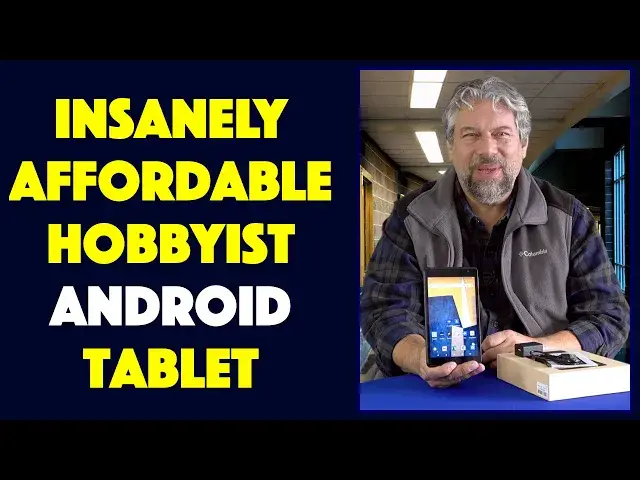
Imagine an Android tablet with a crisp 7-inch HD screen and Android 11 Go for about the price of dinner for two. The Tibuta MasterPad T100 features just such a 7-inch HD screen, Bluetooth, WiFi, internal storage, MicroSD card slot, even a 3.5mm audio plug. But, as tech expert Dave Taylor highlights in this candid and honest review, the Tibuta MasterPad T100 is also slow and has a variety of significant limitations too.
Check them out at: https://www.TibutaPad.com/
or on Amazon:
T100 -- https://amzn.to/3Jw5PQP
T100+ -- https://amzn.to/3sPWhKA
Check out Dave's Q&A Web site at: https://www.AskDaveTaylor.com/
#tibuta #masterpad #android #androidtablet #hobbyist #askdavetaylor
Show More Show Less View Video Transcript
0:00
A 7-inch Android tablet for $50
0:03
Let's check this out. Dave Taylor here, and I'm checking out this
0:14
This is the Tabuta Masterpad T-100. And yes, it's about $51. But while it has Android and it's a 7-inch LCD screen
0:26
there are a lot of limitations to it too. This is what I call a hobbyist device
0:32
So basically what it means is that when you look at an Apple iPad or a Samsung Galaxy tab and you wonder
0:40
why are they charging 300 bucks for $50 worth of components? This answers that question because this is one of those factories that makes these sort of devices
0:51
And it is all of those components running Android 11 Go, which is a light, slimmer version of Android
0:59
And it has all the features and it checks off all the boxes
1:03
but it's a really interesting experience to use. It can be frustrating
1:08
There are things that just aren't available. There are apps like Spotify that just won't load
1:14
And it seems to randomly turn off at fairly, you know, it's hard to sort of ascertain what's going on
1:21
But sometimes you can't wake it up and you have to wait a few minutes, right? And battery life, well, let me just go down all the specs
1:29
I'll give you a demo. So it is definitely something you could check out if you want to just play with a little Android tablet
1:36
If you mess it up, you mess it up. So this is powered by an A133 quad core CPU, but don't be fooled, it's slow
1:45
You'll see what I mean. Seven inch LCD display screen. It's a nice screen at 1200 by 1920, so it's a full HD screen
1:54
And Bluetooth 4.2, that is pretty much old school Bluetooth. not anything even vaguely modern
2:01
Five point touch screen, so you can touch more than one spot at a time, and I can show you
2:06
that we can move around a little bit. And so I'm going to just have the actual screen next to me the whole time
2:14
32 gig built in, there's a microSD slot on the top. I've dropped in a 64 gig microSD or TF card, and you got to really sort of fiddle with it
2:26
to get it to fit in properly, because that's again. they have the component but they haven't necessarily beautifully engineered it like you would have from Samsung or Apple
2:36
But you can access and view files using Google files. In fact, let me go ahead and I'll get to Google files and then Google files
2:47
And you can see here I've used the camera. I show you that in a second But if we go to SD card then there a lot of folders that show up but below all that there are some videos So let just go to an episode of Blade Runner Black Lotus
3:04
and what I'm going to do is I'm going to turn it sideways so you can see it on camera
3:09
but of course it's going to look a little weird next to me. But as you can see, it's eminently watchable, and in terms of the sound
3:17
well, let's see, I think I turned the sound off. Let's turn the sound back on
3:27
There we go. I told you I can't remember anything. So I don't have the rights to share this terrific animated series
3:35
It's really cool, actually. Highly recommend it. It is on Adult Swim, and it's basically an animated version that takes place after Blade Runner
3:47
but before Blade Runner 2049. Definitely one worth hunting down. Okay, so done that, let's go back and while we're at it
3:55
let me just show you that if you want to use it for like an e-book reader
3:59
well, I've logged into my Kindle app, and I do have a book that I've been reading
4:04
so it should get there. And you can see what I mean about performance
4:10
This is a slow tablet. But here we are. So this is a book called All the Gen Joints
4:16
It's a novel of World War II Hollywood by Martin Trumbull, and it's really fun
4:20
And this is eminently readable. This is a perfectly fine ebook reader
4:25
And you scroll sideways, you get to the next page. It's exactly what you would expect it to be
4:32
So all of that is really good. Now, along the top, it has USBC for charging
4:38
That's good. It has that microSD slot. It also has a 3.5 millimeter audio jack
4:45
So you can plug in and listen if, for example, you're watching a video or something
4:49
So that's really cool. Now, it has a 28-m-a-amp, sorry, 2,800-m-a-hour battery, which is small
4:58
And that gives you somewhere around three or four hours in real life
5:02
And if you're using really pretty intense software, then you might find that it's even less
5:08
which I'm sure would be highly disappointing for people. Let's just go back to that home screen there
5:12
But, you know, again, it's a hobbyist device. This is so inexpensive
5:19
It's basically like a bunch of components. And that's actually kind of fun to play with if you go in with those expectations
5:26
Now, it does have an 8 megapixel rear-facing and a 5-megapixel forward-facing camera
5:33
I did not find them particularly spectacular. Here's a rear-facing photo. And then here's a rear-facing video
5:40
All right. This is in 720. and I just doing a slow pan so you can see just how much snow we received in the last two days That my daughter car and it completely covered in snow
5:56
And here's a photo that I took on the front facing camera
6:00
So like I said, really nothing to write home about. Your smartphone probably does a much better job
6:06
But imagine if you have nothing. Imagine if you just don't have the money to buy one of these expensive devices
6:12
Imagine if you have a teenager who likes to tinker with things and mess around and drop on their own operating systems and do all sorts of stuff
6:20
This is exactly the perfect device for that. And they can also go to somewhere like log in and have a Peacock account or Netflix or Disney Plus or whatever, HBO Max, whatever
6:32
There's hundreds of streaming channels now. But if we can get to Peacock, then, as I said, it is not breaking any speed records here on this device
6:45
Well, while it's doing that, let me give you a tour of the sides
6:51
So on the left side, there's nothing. On the bottom, there's just cutouts for the single speaker
6:59
And on the right hand side, there's a power button and then volume up and down
7:04
Pretty typical stuff. And on the top, you've already seen, there is USBC for charging, the micro sd slot, and
7:11
the 3.5 millimeter audio jack. And it does come with a USBC to USBA charging cable and a charging plug, which they say only
7:25
use that. I've used other stuff. It hasn't been a problem. And it comes with instructions and actually quite a nice looking box
7:33
And you'll notice that the box graphic matches the wallpaper, who matches the wallpaper
7:40
on the device itself. So that all works pretty well. And then here we go. So finally, we're on Peacock and I definitely don't have rebroadcast rights for any of this
7:48
But you can see that, you know, it's entirely a functional device if you can wrap your head around the fact that it is a pretty unstable environment
8:01
But if that's all you got, then this is insanely affordable. It really, I can't imagine how a company could sell this technology with a seven-inch screen
8:13
and Bluetooth and a 3.5 millimeter jack and Wi-Fi and sell it for anything less than what they're selling it for
8:20
So that's actually really cool. And let's see. We should talk about dimensions
8:25
So let me just turn off my screen recording. Okay. So dimensions wise, and there you can get some audio
8:35
It is 7 inches down by 4 inches across by about 0 three five inches thick and it 19 ounces The company does sell a cover They were not able to send it to me which was disappointing
8:53
But, you know, again, if you have someone like grandma who loves her e-books
8:58
but is kind of forgetful and loses devices, well, this is so inexpensive
9:03
This might be an excellent solution for that. So we need to talk about the price
9:08
It's the only thing left. I think I've been really candid and really on. with you about the pros and the cons. There are a lot of users that will get this device and
9:17
we'll find it frustrating because it is not smooth. It is not a seamless experience, but it's also
9:25
not the price of an Apple iPad or a Samsung Galaxy tab or something like that. So this is the
9:33
Tabuta Masterpad T-100. But before I get to the price, I'm going to ask if you could subscribe to
9:39
my channel. Really appreciate when you do that and it gives me a lot of leverage so I can work
9:44
with a lot of companies and I can get their product and give you an honest and straightforward and
9:49
candid review. So clearly they're not paying me to do this review because I would not be saying all
9:55
of these negative things. Having said that, they did send me the tablet with their fingers crossed that I'd
10:01
find something good to say and I did and I do and there's a lot to like about this just in terms
10:07
of sheer technology. So how much does this thing cost? All right. Again, this is the Tabuda Masterpad
10:14
T-1007-inch Android tablet, and it is 5199 at Amazon.com, but it's out of stock. So instead
10:25
you could look at the Tabuda T-100 plus, which is supposed to have better Bluetooth and better
10:31
Wi-Fi, though from the specs on Amazon, it looked exactly the same, and that one's
10:36
5999. So it would be this plus theoretically slightly better performance and slightly better Wi-Fi and
10:43
everything, which would be good. And that one, 5999 for a 7-inch Android tablet you can use to read
10:51
your Kindle books. You can use it with Libby to get books from your public library. You can watch
10:57
movies. You can like make your own video recordings sort of. You can learn Android. So a really
11:05
interesting option. Definitely one to check out, know what you're getting into when you walk in
11:10
the door or when you order this and open the box, as the case may be. And that's all I got
11:14
I am going to go back to Black Lotus. So I'll catch you in my next video
#TV & Video
#Laptops & Notebooks
#Consumer Electronics
#Media Streaming Devices