Up next in 10



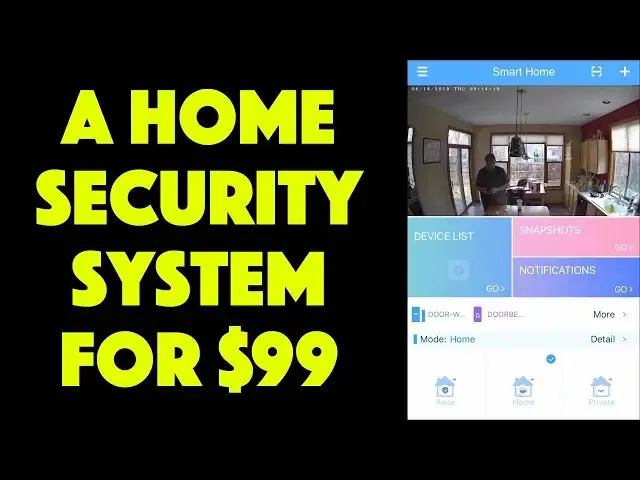
Home security systems cost a lot of money and require a pro to install, right? Wrong. In fact, modern devices can give you all the protection and security with much lower cost. For example, the Bosma X1 Security Camera with remote doorbell and remote door/window sensor included can help you set up a basic security system for a condo or apartment for under $100.
Tech expert Dave Taylor of https://www.AskDaveTaylor.com/ shows off all the cool features - including notifications, remote triggers, and two different types of night vision - while experimenting with the Bosma X1 system in his own home.
Check it at Amazon: https://amzn.to/2XuD3r5
And don't forget the 20% discount code off your X1 purchase: 20DaveTaylor
Show More Show Less View Video Transcript
0:00
Is this a simple security system for your home or office
0:03
Let's have a look. Dave Taylor here, and I'm looking at this
0:14
This is the Bosma X1 security camera. And it's pretty cool. So let's go ahead and start right out
0:21
It comes with some peripherals. This is a doorbell, and this is a window and door sensor
0:26
Let me pick it up. And let's watch out my, watch out my phone. You should be able to see. Let's maybe tilt it against the box
0:35
And I'm going to open up the door and we get a sensor alert. And then I'm going to ring the
0:41
bell. You ready for this? So not only does it actually do the bell sound, so you can really use this as a doorbell, but
0:50
it also triggered another notification on my phone, which is really cool. It's actually a really
0:56
slick little system. So the base unit is the this camera and of course base. And it features 110 decibel siren. I am not going to demonstrate
1:06
that because I want to retain my hearing. It's full duplex two-way audio and I'll have a demo
1:12
which will show a little bit of that. It also offers night vision in two modes. There's starlight
1:18
and color and I actually you'll see the difference between the two again in just a second
1:23
145 degree wide angle view 1080P full HD video and you can put in a micro SD card if you want and you can have storage up to a 128 gig microSD card and it can save video sequences onto the card. No cloud, no getting it onto your app, no nothing. It's super secure. Then you just pop it off and access it however you want. So very nice. Okay. It also includes like I said
1:53
the doorbell. This is super easy and you just basically just put a sticky on the back and you put it on
2:00
the side of your door or something and then it comes with one door or window sensor and this is
2:05
pretty basic stuff. It's actually just a magnet and then when it separates for whatever reason
2:12
maybe your door opens and then it closes then a notification triggers and this actually can
2:19
optionally, depending on how you configure the application, can actually then, immediately start recording video
2:25
Now, it could do the same thing with the doorbell. If you get a doorbell event, it could actually start recording video for 30 seconds
2:32
So if you have this pointing out your window or something, then this would be a nice way
2:36
to see who was ringing at my door at 2 in the afternoon when I was at work. Hmm
2:42
So it comes with an app, which of course you have to download
2:45
So let me get to the app And the app pretty straightforward And here you can see a little bit that you basically have let go back to the home screen
2:57
So you have the video feed. And then you have a device list, snapshots, notifications
3:04
You can see I have the two peripherals. Again, let's just jump into a demo, shall we
3:09
So what I did is I recorded a demo. And so I could explain what's going on
3:15
I'm going to actually play the demo and watch it on my phone while you see the inset
3:20
So let's start out. So first off, I had this recording in my kitchen, and the first thing I wanted to demonstrate
3:28
hello, hi Dave. First thing I wanted to demonstrate was that you could actually move it from side to side
3:35
So one of the neat things about this is I have other devices like this that are just set
3:39
and they just give you the view they give you. But this one, as you can see, gives us a rotation ability
3:45
so that actually lets me remotely, I could be 500 miles away, and I could be slowly turning this to get a full view of everything that's going on in my kitchen, in your living room, in your front hallway, in your basement, whatever it is you might want to do
4:01
Okay, so there was that. Now let's see. Real quick, I'm going to bounce through a couple of other features in this little video
4:08
So here are my devices. It just shows this is the device
4:13
And then you have local. If I take snapshots, you saw those. And these are my list of notifications
4:19
Much more interestingly is that I can actually go and I can set my notifications
4:25
I'm not sure exactly where I have that. That's good. So we're back to the video
4:31
And now I'm going to do an audio demo. Let's see if this will work
4:38
So, oops. So there we go. I accidentally pressed the doorbell. Let's go back to the video
4:47
Well, I guess I did go back to the video. So that was the full video
4:51
So you got to see various features there. Sorry, it's slightly confusing, but as you can see, it's pretty straightforward
4:58
So let me show you, when you do the doorbell, here's the notification that pops up on your screen
5:04
If the door or window sensor opens or closes, here's that noise. here's that notification, right? So really nice. Now, let's go back to night mode. So I did two versions of night mode. What I did is I went into my basement where it's super scary dark. I was going to take a picture to show you the setup, but it's completely black because it's that dark. There's really barely any light at all. So if I actually wanted to walk around in that level of darkness, it would not be fun. But there I was sitting on the stairs and I was just looking at my phone. So that's all the illumination I had. This first
5:37
shot shows you it in regular night vision So this is gray scale and I think it did a pretty darn good job with that Then I switched to color which is the sort of enhanced starlight that they have And you know in some settings that probably going to work better
5:51
but I actually prefer the gray scale. Either way, pretty remarkable for almost completely pitch dark
5:57
So let's see. What else can I tell you about this? It is actually Amazon Alexa compatible
6:04
You can say things once you have it all hooked up, you can say like ask Bosma to take a photo
6:09
and it will take a photo and save it. So that's actually pretty cool. If you have an Amazon Echo device that has a screen
6:17
there's just a couple of those, it can actually show you the video. At least I believe that's the case
6:21
I haven't actually tested that feature. Double check with the manufacturer if that's an important feature for you
6:26
but it should allow you to do that. And like I said, you know
6:30
the app lets you control things like notifications and you can take snapshots to save for later
6:36
It's like, you said you weren't home all day. look, here's a picture of you at home. That's not okay. And you can also do things like record capture
6:45
based on movement. So this can get a little annoying, but every time there's any movement detected
6:51
this thing's sending out notifications. It can also automatically record video. To do that
6:57
however, you're going to want to put the little microSD card in the device and that's where
7:02
it'll record that video because it can't guarantee your phones available or that your phone's
7:06
ready to record the video. So that's their technological solution. Makes sense. So, okay, we've done a
7:14
big sort of technical tour of this. Let me tell you from a user perspective, it's a pretty
7:20
slick device. I really like that this is a fully functional small apartment or home security
7:27
system, really. You know, it all comes in this one box. It's super easy to work with
7:33
even the way they package it, I just want to say is that a lot of companies don't really think this through
7:38
but you can see everything's nice and neatly labeled. So there's the doorbell, the door and window detector, the power adapter
7:46
The Quick Start Guide is sitting right on top. So it's pretty hard not to get going with this
7:52
And once you have it all set up, and setup did involve a little fiddling. I will say that their manual probably could do with one more pass in terms of having it be consistent with what you're actually going to
8:03
going to end up having to do for it to work. But once you get it all set up, then it is actually pretty
8:10
darn cool. I mean, this whole thing is remarkably inexpensive. And if you've been thinking about
8:15
having a security system, this kind of covers all your bases. Even if you don't use the doorbell
8:20
it turns out that they have for the same price, another package designed where they have two door
8:26
window sensors. So you could have front door and garage door, right? And then that's all you got
8:31
and then you have this sitting in some central location where it set up to take pictures if there motion Now it not super sophisticated so there no like geo fencing or awareness that I come home or my phone
8:45
has come home, therefore stop all the motion sensor and stuff. It just sort of works all the time
8:50
which probably is something they could fix in a software update. But for now, it's still pretty
8:56
basic and pretty straightforward. And like my daughter has a little apartment in Denver, and I really
9:01
want to set this up for her. I suspect that we'll probably just point this at the front door
9:06
because I know her and I know she's not going to want this recording the living room when she's
9:11
hanging out. Totally understand that. You're in control. You can decide where to put these things. So that's
9:16
pretty straightforward. You know, is she going to use the doorbell? Probably not. She might just do two
9:22
door sensors or she might just use the door sensor and the camera and never even hook that up. That's okay
9:28
You're in control, right? So super easy. Only thing like that, enough to talk about is the price and I promise you'll be impressed by the price. It's really
9:35
remarkably inexpensive. But before we get there, I'm going to ask if you can subscribe to my
9:40
channel. Really appreciate when you subscribe to my channel. And if you have a home security
9:44
system, tell me in the comments, what is it? You got a big scary dog. You have a digital
9:49
dog that is a sensor based on someone knocking. Or do you just have, you're always home because
9:55
you have no social life and you never ever leave so you don't need a security system. So let me
10:01
No, all options are valid. So, now, having said that, the Bosma X1 security camera kit with all of these pieces, or like I said, the option that has two doors or window sensors and no doorbell
10:17
either option will cost you a remarkable 9999 at Amazon.com. And if you just want this and you don't want either of these sensors, you can actually drop $10 off that price and get this camera
10:31
with all of its night features and HD streaming and all of that for $89
10:36
That is a remarkably good price. And I will say this is one of the most easy and straightforward systems I've tried
10:43
So I'm a big fan of these sort of devices. I like being able to peek in on my house
10:49
And I like getting sensor alerts, even when I'm not in my house, in fact, particularly when I'm not in my house
10:55
So something like this is a very nice solution for that. And with that, I need to jump in the car and start
11:01
set this up in my daughter's apartment, assuming she says yes that is, which means I'll catch you
11:06
in my next year
#Consumer Electronics
#Home Automation
#Home Alarm & Security Systems