Up next in 10



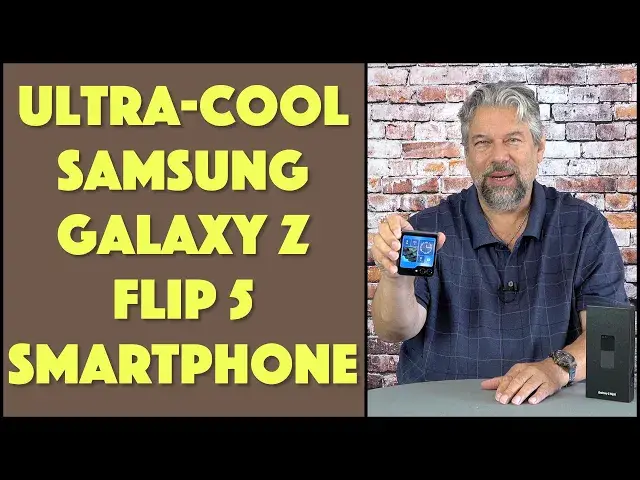
There's no question, this phone is cooler than what you currently own. It's the fifth generation Samsung Galaxy Z Flip 5 Android smartphone and it's a pretty remarkable device. Tech expert Dave Taylor spent the last week working with the phone and offers up lots of demo photos and video, along with a detailed assessment of the pros and cons of this particular Android 13 phone. You'll want to watch and check it out!
Learn more about the Flip 5 at https://www.ATT.com/
Visit Dave's Q&A Web site at: https://www.AskDaveTaylor.com/
#samsung #flip5 #galaxyz #flipphone #android13 #askdavetaylor
Show More Show Less View Video Transcript
0:00
This is a really cool design, but is it a good Android phone? Let's check it out
0:05
[♪ Music ♪ Dave Taylor here, and I'm checking out this
0:15
This is the Samsung Galaxy Z Flip 5 Android smartphone, and I kind of fell in love with it in a lot of ways
0:24
It's a really cool design, just to answer that question right off the bat
0:28
So, it has a full-size screen on the front, and then when you open it up
0:33
then you have a full-size Android display, just like you have on your current Android phone, probably
0:39
And, again, all you have to do is close it, and it goes into a sleep mode with an always-on display
0:45
that's showing the time, and battery level, and number of notifications, and the date
0:51
And, of course, I can just push, and that's actually this power button
0:56
is also the fingerprint scanner, so I'm actually unlocking it by doing that
1:00
And then you can get to different apps and do different things while it's unlocked, which is cool
1:06
But, of course, the real fun is when you open it up, and you can actually have the full screen
1:11
But, it also has modes like this. So, if I unlock it, and actually unlock it, show you what happens
1:18
is I can go into a mode like that, where I might be watching a video on this screen
1:24
and interacting with the content on the lower half of the screen
1:28
One thing that's really important is when you open it up, it is fully flat
1:33
And then, when you close it, it closes fully. This does mean, if you get dirt or anything in the middle
1:41
that could have a deleterious effect on your screen overall. But, as long as you keep it nice and clean, you hopefully won't have any issues
1:48
Now, I did an unboxing video, which you probably want to check out
1:52
to find out everything that was in the box. But, let me go through the specs again, and then I have a ton of demo photos and video content
2:01
because I know that's a lot of what people like to look at. So, the front screen is... let's get this back into this bright display mode
2:10
The front screen is a 3.4-inch cover screen. It's 720 by 748 pixels
2:16
And then, you open it up, and it's a 6.7-inch main screen at 2640 by 1080
2:23
And it's powered by a Snapdragon 8 Gen 2 octa-core, with either 256 or 512 gig of storage, and 8 gig of RAM
2:35
So, plenty of storage. Android 13, Bluetooth 5.3. Unfortunately, it also comes with all the Samsung apps and the Samsung UI on top of Android 13
2:47
So, it does have a slightly different flavor than if you were running, say, a Google Pixel
2:52
But, it's pretty easy to get used to. Now, dual-SIM capable, and then the rear-facing cameras, there's two of them
3:00
One of which is a 12-megapixel wide-angle f1.8, and the other is a 12-megapixel ultra-wide f2.2
3:09
It's a little slower, but it's a wider field of view. And then, front-facing, let me bring up something so you can maybe see
3:17
Let's launch an app. Here we go. So, you can see here, there's a little punch-out here, and you see it in the close-up too
3:25
and that's the front-facing camera. And that is a 10-megapixel wide-angle f2.2
3:31
Now, there's more I want to talk about, but let's just jump right into photos
3:36
and then we'll jump into video. And know, I've done most of these with a tripod, so most of these are not handheld
3:44
First shot here is a wide-angle, and then we go to 1x, 2.5x, and 5x zoom
3:56
The zoom breaks down a little bit, but still, it's pretty darn cool
4:00
I'm going to show you two different selfies. This one is just a regular selfie that was taken with the phone in its normal, I guess, horizontal orientation
4:11
And then this one is actually a selfie I took while it was in folded mode
4:15
So, of course, they're using the same camera. I just wanted to show you that it sort of automatically compensates for the orientation of the camera
4:22
Macro, super cool. I'm really very impressed by this photo. And then, night mode was fantastic
4:30
So, I've done a lot of night mode photos with, like, Google Pixels
4:34
and they can take up to five minutes to capture an image. These, the longest image captured here across these different photos I'm showing you, was six seconds
4:44
And this one of my house is beautiful. I could use this in a real estate listing
4:48
It's very, very attractive. Now, let's switch to video, because video is even more fun
4:53
So, here's 1x video. 2.5x video. 5x video
5:10
A selfie. This is a sample selfie video, and I am under a bridge with water running behind me
5:16
So, there's a lot of environmental and background noise. But, hopefully, you can still hear me pretty well
5:22
As you can see, the camera's doing a nice job either way. Slow motion video footage
5:31
Time-lapse video footage. And, finally, an example of director mode. This is an example of what Samsung calls director mode
5:42
And I'm seeing both the image being captured from the selfie cam
5:47
and I'm having a chance to use the other camera and move around and capture this video, which is pretty fun, actually
5:55
It's a pretty cool effect. All in all, I think these are really very impressive
6:00
This is so much to go for this phone. And, of course, Samsung has been doing generation after generation of not just their phones
6:08
but their flip phones. This is their fifth generation flip phone, which means they've had a lot of practice figuring this out
6:15
The hinge is actually really, really well done. It's just a very smooth motion, and you can stop it at any point
6:24
If you wanted to have your phone sitting like this, you can do that. That's totally fine
6:28
And, of course, if you're using it in that sort of viewing angle
6:32
you can do any angle, and it will just sit exactly in that spot
6:36
Or you can close it all the way, and then on the very edge, it actually just has Samsung emblazoned on it
6:42
I suppose, at some point, maybe the Flip 17, this will be a tiny screen, too
6:48
Until then, I'm not sure you'd really need that, but they'll probably come up with that
6:53
So, a couple more specs to talk about. 3,700 mAh battery, up to 35 hours of talk time, according to Samsung
7:02
Qi Fast Charging 2.0, so it does wireless charging with the back here
7:07
And it's the faster generation of it, which is good because it doesn't have a great battery life
7:15
They say you'll get a 50% charge in 30 minutes when you plug it into the USB-C on the bottom
7:22
But my experience is that I often use the phone, and then put it on standby, and then go do something else for a day
7:30
And I have some phones where it's kind of eerie that two weeks later, it'll still be at almost a full charge
7:38
So their standby mode is super efficient. This one is not that phone
7:43
If you have this phone, and you just close it up and put it on the side table while you go for your run
7:49
and then your evening activities, and then you sleep, and you wake up
7:52
you'll have lost a significant percentage of battery life. So that is something that a lot of people have commented on
7:59
is that the phone's really cool, but one of its limitations is it probably could have had a bigger battery
8:06
or it could have had a little bit more efficiency in terms of how it utilizes that energy to stretch out your battery life
8:13
Now, truth be told, modern phones are really all about charge every time you can
8:18
So if you're near a Qi wireless charger, then you're going to just want to drop that on
8:22
and even if you can eek out 5% or 10%, hey, that's 5% or 10% charge, right
8:27
So that's a benefit. Now, one of the other things I want to give Samsung props for
8:32
is that this is also a 5-star EcoScore. So the packaging, the phone, the way they designed the whole thing
8:40
the way they packaged it all is very eco-friendly, which is important
8:44
You can see the box. This is literally the height of the box
8:48
It used to be you'd get these big boxes with little devices inside
8:52
and now they're really trying to minimize that, because number one, they can ship more
8:56
It's much more efficient to actually move them around. But number two, it's much more environmentally friendly
9:02
So really big props to Samsung. And in terms of assessing this phone, I really, really like it
9:09
In fact, what I have said to people when they've been looking at it is
9:13
I would absolutely, no thought involved, go and buy an iPhone that had this feature
9:20
because I'm kind of more of an iPhone than an Android person at this point
9:24
because of the ecosystem of Apple products. But this is really one that made me think twice
9:30
because it is really cool. When you get notifications and stuff on this screen
9:35
make it a little bit more interesting, it's actually pretty cool. And you can change what's on here
9:41
and the notifications can lead you to apps, and you can do photos, all without opening up your phone
9:47
which means that you have something that's just much more easy and compact to work with
9:52
And that's really nice, because a lot of phones are getting bigger and bigger and bigger
9:56
And one of the phones I most recently reviewed was actually the Pixel Fold
10:01
which was, if you imagine, two of these phones, right? And another one next to it, and then it folded and it opened up
10:07
And that just felt like too much screen real estate. If I wanted that much screen real estate, then I would go ahead and just get a tablet
10:15
But this gives you a regular size Android phone, and it's just a size that everyone's used to
10:22
but you can fold it in half, and now you have this entirely different way of interacting with the system
10:28
Very cool. Now, not much else to tell you. It has the typical power and volume up and down buttons on the right-hand side
10:37
and then on the bottom it's USB-C for charging. It includes a USB-C cable
10:42
which you would have known if you would have checked out my unboxing video. And that's it
10:47
So, that's everything there is. So, on the plus side, the design is fantastic
10:53
They've done a really great job of implementing the screen and everything
10:57
and it feels... there's a little bit of a feel of a fold
11:01
but generally it's really close to being seamless. And, of course, the whole idea of being able to have that extra screen is super cool
11:11
So, lots to like here. It's a little spendy, and it's a little bit weak on the battery side
11:19
but there's a lot of pros that compensate for that. So, definitely one worth checking out
11:24
Now, we do need to talk about the price. So, before we get to the price
11:28
I'm going to ask if you, you, could subscribe to my channel. Click or tap on that subscribe button
11:33
Give me a thumbs up if you found this to be interesting and informative
11:37
And we can be connected. Great. This... let me again get back to that other screen
11:44
This is the Samsung Galaxy Z Flip 5 Android smartphone. It's a loaner from AT&T for me to be able to do this review
11:53
Thank you, AT&T. And it comes in... this is... let me show you the back here
11:58
It comes in mint, graphite, lavender, and cream. This is graphite, a.k.a. black
12:04
And it is $999.99 or $27.78 a month for 36 months at att.com
12:14
There are other places you can pick one up, and you might be able to find different pricing
12:18
but since AT&T sent me this, I'm going to promote their pricing
12:22
So, really, so much to like. A little bummed I have to send it back
12:27
but, you know, that's how it goes with these loaners. So, one to definitely check out
12:32
If you're in the market for a new Android phone, this is definitely one you want to check out
12:36
especially if you're already into the Samsung ecosystem. And there's a lot going for that, too
12:41
That's all I got. I'm going to go back to my phone. So I have to catch you in my next video
13:02
I'm going to catch you in my next video
#Consumer Electronics
#Mobile Phones
#Gadgets & Portable Electronics