Up next in 10



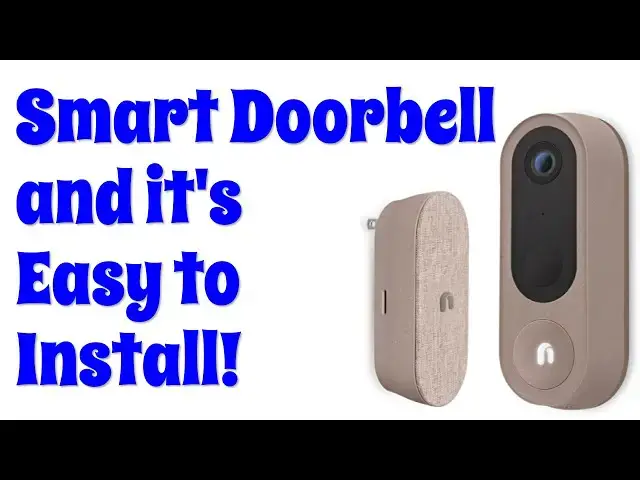
Ready to upgrade your doorbell with an easy-to-install device? Tech expert Dave Taylor checks out - and installs - the Nooie Cam Doorbell and finds it's a bit chunky, but works great. Even better, it's a beautiful 2K video image, has a great night IR vision system, and works with local MicroSD storage so there's no subscription fee required.
This video includes a full spec and detailed tour, installation and live demo of the various security and notification features.
Learn more about it at https://www.Nooie.com/
Check out Dave's Q&A site at https://www.AskDaveTaylor.com/
#nooie #doorcam #security #doorbell
Show More Show Less View Video Transcript
0:00
A wireless doorbell with 2K video? Let's check this out
0:04
[♪ Music ♪ Dave Taylor here, and I'm checking out this
0:13
This is the Nui Cam Doorbell. Well, it's everything in the box
0:18
So, it is the light, it is the base station, it is the mounting kit, and they have two different mounting kits
0:28
Here's one that's nice and easy to work with. And the actual doorbell cam itself is battery-powered
0:37
So, it has this honking 10,000 mAh battery. Now, that is a big battery
0:45
You just snap it in on the back, and it is ready to roll
0:49
And the reason you have that battery and why it's so big is this gives you up to 10 months
0:55
without having to worry about recharging it. That is pretty sweet. Now, there are a lot of different cameras in this market segment
1:03
and most of them are wire-required, or they have batteries that you have to charge every five or six months
1:09
So, being able to get almost double is pretty sweet. Now, to be fair, I haven't tested it yet because, obviously, I haven't installed it
1:17
So, we're going to do that, and it'll be the second half of this video. But before we do that, I just wanted to talk a little bit about all the components and how it works
1:26
So, like I said, battery-powered, up to 10 months without a charge
1:30
Let's go ahead and take this little cover off, and you'll be able to see that it has the camera
1:38
It has a passive infrared sensor. I'll talk about that in just a moment
1:43
It has the doorbell, right, because you're going to push that, and people are going to actually ring the bell because they hopefully want to come into your home
1:52
Well, or if you let them. There is a speaker at the bottom because there's two-way communication
1:58
and on the back, there is the battery, and there is this sort of secret quick-release element
2:04
which shows up on this, the mount plate. And there's two different mount plates. This is really cool
2:11
Oh, first off, there's a sticker to help you get your mount plate put on correctly
2:15
That is a good bit of thinking on their part. But sometimes, when you mount your little bell
2:21
it can end up right next to a wall. So instead of you having to worry about that
2:26
they have a 15-degree mount plate that lets you just sort of tilt it away from there just a little bit
2:33
so you get a better perspective. Now, with all of that, let me tell you that it gives you a live video feed option
2:41
2K resolution, 158-degree field of view. It has night vision. It has that two-way audio
2:49
How do you do that? You do that from the app. So there's a NUI app, and that app really is how you manage and control most of this
2:58
One thing that's really nice is it works with 2.4 or 5 gigahertz Wi-Fi networks
3:04
And like I said, it has that infrared sensor, and that will work
3:09
You can set it to be 6-foot, 10-foot, or 20-foot range, and you can also have it be where it only will notify you if it detects a human
3:18
So if you have dogs running up on your front porch or something
3:22
then they will not trigger you getting a notification and or you having some video saved
3:28
Now, one thing that's really nice is if we go back to this base unit
3:33
this is the thing that's going to ring inside your house. So this you'll plug in somewhere, and then you'll be able to hear the ring
3:40
They're customizable. There's lots of ringtones you can choose from. We'll get there
3:45
But it also has a microSD slot on the side because you can locally save the recordings off of this system, which is great
3:55
You can put in up to 128 gig microSD card, which is going to give you a ton of recording space
4:02
If you don't want to do that, you can also use the NUI Cloud
4:06
which lets you have your recordings in the cloud. Now, it does have a subscription cost and it starts really inexpensive
4:15
But I got to say, generally speaking, I like the idea of buying a product and not having to pay a subscription
4:21
So having this send the data to this and having this be something that I can communicate with on the app
4:28
so I can see those video segments. That's a win to me
4:32
Now, I should mention, if it uploads the video to NUI Cloud
4:36
they say that all the videos are encrypted. So even if someone makes it onto their server, they can't see any videos from you
4:43
That's pretty important, right? Now, it also has an anti-theft siren because the thing I always think about with these, especially this one
4:51
this is a pretty substantial, this is one of the biggest ones on the market
4:55
is what if someone comes up and says, oh, that's cool, tear, right
4:59
So number one, not so easy to get this thing off once you mount it properly
5:04
But number two, it has a built-in siren and it will go bananas
5:09
So that's good to know. Finally, one more thing let me tell you is that there is the NUI app
5:16
and that actually lets you work with Alexa or Google Home. So there is some limited ability for you to ask, for example, Alexa to show you
5:27
if you have a visual display device, to show you what's coming, you know, the live stream from your doorbell cam
5:34
That's pretty sweet. All right, dimensions. It is 6.6 inches by 2.4 inches by 1.7 inches
5:43
or 168 by 60 by 44 millimeters, depending on what you prefer
5:49
And pairing, getting it all to work is pretty darn easy. I've worked with other NUI devices before
5:55
but I'm going to go ahead and do that right now. And then once that's done, once it's paired and I'm ready to roll
6:01
then unfortunately I'll have to do this tomorrow, but I'm going to do the install
6:06
So I'll actually do the installation. I'll talk you through what I did
6:10
and then we'll actually do some demos with it running. So let me go ahead and I'm going to stop right now and get this thing all configured
6:18
I'll show you that super quick and then we'll go on to the actual install
6:22
For the configuration, I've already downloaded the NUI app. And if I go to cams, you can see no device yet
6:29
All right, we're going to fix that. So I'm going to go to add the device and we'll just see how this goes
6:35
Here we go. NUI, here are my options, NUI cam doorbell. Let's choose that and then make sure your doorbell battery is fully charged
6:44
That's a good reminder. And I already did this, but before you actually do that initial install
6:51
the battery is charged via USB-C, cable included, charge it fully. And then when you put it in the doorbell, you then have 10 months, 8 months
7:03
I guess it depends on how often people come to your door without having to worry about it
7:08
So we're good to go with that. Add device, plug the base station in
7:13
We're going to do that. I happen to have power here. And then this is actually a button
7:20
So it's going to actually change lights and we want to wait till it flashes blue
7:25
So I can only assume that that's something that it's going to take a minute or so to get ready to do that
7:31
Okay, it's flashing blue. So I'm going to choose LED flashing blue and I'm going to pick a current network and we'll leave it at this network
7:41
And I'm going to put this down and type in my network password
7:45
I am not going to share that with you just so you know. So we're going to just jump forward 15 seconds
7:50
All right. Looks like we should be good to go. I'm going to go to connect and now we need to choose this as a network
7:58
And so there it is. There's the NUI. I choose it and hopefully it works
8:04
We'll see. And then I go back to the app, which is easily done on an iPhone
8:10
And let's see. Distance larger than 3 feet between the doorbell and everything
8:15
So I think what it's doing right now is it's actually just sort of configuring and pairing
8:20
You'll notice there's a countdown timer near the bottom that's telling me 165 seconds
8:25
It's a long time. Looks like I'm connected to the network, which is great
8:29
So now I can just choose next and let's see. Insert your doorbell battery and press the reset button once
8:37
It has that little tool. Now, let's see. We want to just see that it thought it detected someone
8:46
That would be me doing the setup. So now we want to press the reset button on the back once
8:54
And here's a close-up of what the back looks like so you can see that
8:58
I'm going to press it. And then we're watching the LED. We want it to turn all white
9:07
Right now it's flashing blue, but it should become steady white after a short period of time
9:16
And it looks like I've got it all paired. And it's telling me in the app that we're good and I can continue
9:24
So let's see. Push the doorbell to see if the base station rings
9:32
I think I got it this time. Let's try again. So they're both ringing
9:39
Yes, success. So continue. All right. Next step now is to do the actual installation
9:47
This was a little bit more tricky than I expected pairing the two, but mission accomplished
9:52
And now the easy part, right? Because we have the sticker to make sure we put things in exactly the right spot
9:59
And then I can choose which of the two base plates I'm going to use. And then once I have that installed, I just go ahead and click the doorbell on it, and I'm done
10:07
And that's it. So let's go do that install. Let me walk you through the install pretty quickly
10:12
On the front door, you can see I have a pretty small doorbell
10:16
The size difference is pretty staggering. But the old one's an old wire doorbell, so we'll have to fix that
10:23
Easy enough. Unscrew it. You can see there's two wires. I basically covered them with electrical tape and shoved the whole thing into the hole
10:31
in case I ever change my mind and want to go backwards. And then I used the handy mount foam to get the drill points in the right spot
10:41
Then I had the actual mount plate installed. And then at that point, it's super easy
10:47
All you have to do is clip the actual cam doorbell onto the mount plate
10:52
Mission accomplished. All right, so it's all installed. And it's a bit big, all in all, but it works really well
11:01
First off, let's go ahead and see what I'm seeing right now by going into the app
11:06
And you can see on the phone, this is what I'm seeing
11:10
Let's turn off the audio, though. And if I do it sideways, you can see now I can zoom in
11:19
You can even see that I have a camera there, and I have notes under the camera to remind me of exactly what I want to say
11:26
So that's pretty sweet. So some of the other stuff you can do in the app is you can go into settings, which I can do here
11:35
And now you can see there's a lot you can do remotely
11:39
including changing things like upgrading the firmware on the bell or the remote unit
11:47
I can go to audio, video, and modify settings. So I can change the chime
11:53
I would like there to be more chime options, but this is what you get
11:57
A relatively small number. I'm hoping that over time that Newey will add maybe some classic doorbell sounds
12:04
I mean, why not, right? These all are a little bit more sort of smartphone sounds
12:09
And you can change video, turn off night vision. One of the ones I've found most important is that motion sensor
12:17
Make it as high as you can. You can see there are three levels of sensitivity
12:23
Turn it all the way up because then it starts recording a little earlier so you get better footage
12:29
So what does that footage look like? Well, let's go ahead and look
12:33
Last night I actually had this all set up and I have two examples of footage
12:38
This first one is with the porch light on. And this is pretty generally what you would see in my house because I always leave my porch light on
12:53
But let's say the porch light was off and it was a more dark environment
12:57
This is what that would look like. One more thing I want to show you is that I do have a micro SD card installed in the base unit
13:11
And you can see here that it is 29.6 gig available. And there's also a remote format button which is very helpful when taking pictures
13:21
Very helpful when you put in a new card. Always go ahead and just format it
13:25
And that's really it. There's really not much else to talk about
13:30
It's big. I do have it pretty well installed on there. I can obviously ring the bell
13:39
I don't know if you can hear but I have the base unit inside and it's still ringing
13:43
You do get things like now this is showing me the front door view
13:50
Because I actually have someone at the front door. So that is exactly what you want this to do
13:58
So my upside, my positives on this is that it's easy to work with
14:03
It's easy to configure. It works with your phone exactly as you would want
14:08
And the downside, if there is, is that it's pretty big. So this is a pretty chunky doorbell
14:17
But at least with my setup, it's a pretty easy one to install
14:21
I replaced my little tiny doorbell with this. And obviously I just significantly improved my functionality
14:28
So not much else to share. I hope you found this super helpful
14:32
This was a lot of work to get this all assembled the way it did. But it's totally worth it because this is a really interesting product
14:38
So before I give you the price and talk about that, I'm going to ask if you could subscribe to my channel
14:43
Go ahead and click or tap on that subscribe button and we're connected
14:47
Really appreciate that. Great. This is the NUI Cam Doorbell and it is $149.99 at nui.com
14:57
But I noticed that if you sign up for their mailing list, you get 10% off
15:02
So ostensibly it's $149.99 minus 10%. So that's not a bad price
15:08
It is easy to install. You don't have to worry about wiring
15:13
All you need to do is have a drill and be able to drill two holes. That's it and you're done
15:18
Easy enough. So definitely one worth checking out in the smart doorbell category
15:23
And with that, I think I need to go inside and calm my animals
15:27
who are wondering why the doorbell keeps running and ringing. So I'll have to catch you in my next video
15:40
♪♪♪��
#Camera & Photo Equipment
#Home Improvement
#Science
#Home Alarm & Security Systems