Up next in 10



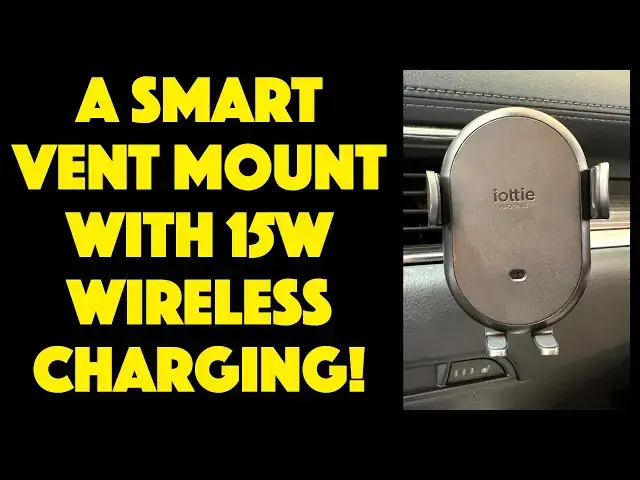
It's the best of all possible worlds with the IOTTIE Auto Sense 2 Air Vent Mount and Car Qi Wireless Charger for your smartphone. It fits snugly on your air vent, whether it has horizontal or vertical blades, automatically opens and closes to grasp your phone, and has a fast 15W wireless Qi charging feature too. Tech expert Dave Taylor walks you through all the features, including how he quickly fit it into his Mazda CX-5 and how it charged his iPhone 15 Pro.
Check it out at: https://www.iOttie.com/
Visit Dave's Q&A Web site at: https://www.AskDaveTaylor.com/
#iottie #autosense2 #wirelesshcarger #carmount #airventmount #carphonemount #askdavetaylor
Show More Show Less View Video Transcript
0:00
A phone vent mount with wireless charging and a cool secret feature
0:04
Let's check it out. Dave Taylor here and I'm checking out this
0:15
This is the Iota AutoSense 2 air vent mount with Chi wireless charging and a cool feature
0:23
Ready? It actually automatically opens and closes and there's a proximity sensor
0:28
Now, since I don't have power going to it, I'm just using the battery that it has that just gives you just enough juice to open and close it
0:36
But once the car's running, you'll find that all you have to do is move your phone near it and it will automatically open up
0:42
You put your phone in and it automatically closes. Better yet, the bottom is adjustable so you can get just the right height to make sure that it is wirelessly charging your phone as fast as possible
0:55
and it's not pushing any of the buttons on the side. So let's just jump into my car and I'll give you a demo
1:02
Then I'll come back out and we'll talk a little more about its features and specs
1:06
So it's two parts, basically. There's the cable. We'll get to that in a second
1:10
But there's a piece that goes on your vent and you can do horizontal or vertical orientation
1:16
I have horizontally oriented vents. So I'm going to go ahead and adjust this and then put it on my vent
1:22
And you can do it whatever works for your vent. So mine work better when I have the tab upward
1:30
So I'm going to do that. And then the back of this, it's pretty typical
1:34
You turn it this way to loosen it, and then we'll turn it the other way to tighten it
1:38
So I'm going to put it on here. And now it's on, and it's not tight, but that's because I want to take it off again
1:47
And I want to plug in the cable Now I trying to keep the cable neat by having it partially still wrapped up and it just plugged into my 12 adapter So now I going to put it on here and then I going to tighten it
2:02
and that's easy enough to do. And now you're thinking, oh, well, now you have a bit of a problem because
2:10
it's not plugged in and powered, because my car's not on. But it turns out the unit actually has a little
2:17
bit of extra power. So I can actually put it on and get it just so. Now when I start the car
2:25
watch the top. So there you go. So now it's wirelessly charging. And here's a little handy
2:33
tip. I can again push the side button to open it up. But a handy tip is that this has four
2:39
different positions. And I encourage you to experiment because I found if I put it all the way down
2:47
then on my iPhone 15 Pro this pushed the volume button which is not good so moving it up just one and then notice the proximity sensor by simply moving my phone in front of it will open up
3:03
but by doing that and by moving this up one I do get it to charge and it's not pushing the volume button so this is working perfectly and of course I can loosen the back if I want let's see I think that's in this
3:17
direction and then I can adjust it and then tighten it again and now I have it in the optimal
3:24
position for me while I'm driving so that's everything you need to see in the car let me jump
3:29
back on camera I think it's pretty cool actually and I'll show you again now here's a couple
3:34
of close so you can see here the charging unit itself and then here the back and you can see how it those two parts and you can also see the actual vent attachment device And then separately here the USBC to USBC cable
3:51
It's really everything. And on the side, there are buttons on both sides
3:56
And if you push the button, then it will remember and be able to open and close
4:02
That only lasts for a little while. It's just a little battery in there, but it's enough
4:06
Now, let me give you some specs because this is a 50. 15 watt Chi wireless charger, but how much power your phone will get for wireless charging is a function of exactly what phone you have
4:18
So, for example, a Google Pixel will get all 15 watts. A Samsung Galaxy will get a 10 watt charge, and Apple iPhones will get a 7.5 watt charge, which is ostensibly the fastest you can charge them
4:32
Now, I should mention that Chi 2, a new wireless standard is coming out, and that's going to change all
4:39
the specs but it's probably a year before we see those products that as
4:44
standard was just agreed on just like a couple of weeks ago so we'll see that
4:49
but in the interim I think this is a great solution now on the back there are
4:54
vent holes so it helps dissipate heat as you charge so that you can charge
4:59
at the maximum possible speed without worrying about your device overheating and
5:03
like I said it's an auto open and close and these little buttons let you
5:08
automatically open enclose it separately when your car is not on and I will also note that on the back that this
5:16
there actually rotates so you can install it on a horizontal or vertically oriented air vent and
5:27
that important you want to spend a minute or two just with this piece by itself making sure you have it in the best orientation to be stable because once you have this on here it works great but there is some weight So you really want to have installed it in a way that going to work well
5:44
even when you're hitting a bumpy road. So adjustable foot, USBC cable, some nice packaging here
5:52
It's really everything. I think they've done a really nice job. This is going to be my go-to charger for my car
5:59
and I think it's going to work just fine. So before we go any further, I'm going to invite you to subscribe to my channel
6:08
Go ahead and click on the bell icon to get notifications, and I always appreciate a thumbs up
6:13
And of course, if you'd like, go ahead and leave me a comment. I always respond to my comments, though sometimes that's a full-time job
6:20
Cool. All right. This is the Iota AutoSense 2 air vent mount, and it is 6495 at IOT.com
6:32
It's a no-brainer, great solution where you have all the best features of an air vent mount with all the adjustability and everything
6:40
You also have Chi wireless charging and you just need to plug it into some sort of a power source
6:46
And finally, it also has that auto open and auto close, which I think is actually the best feature of the unit
6:52
And I will also say, just in closing, is that I did test it with my iPhone in a MagSafe friendly case and it worked just fine in that too
7:02
So that's everything. I need to get it back in my car. So I'll hope to catch you in my next video
#Vehicle Parts & Accessories
#Car Electronics
#Mobile & Wireless Accessories
#Gadgets & Portable Electronics