Up next in 10



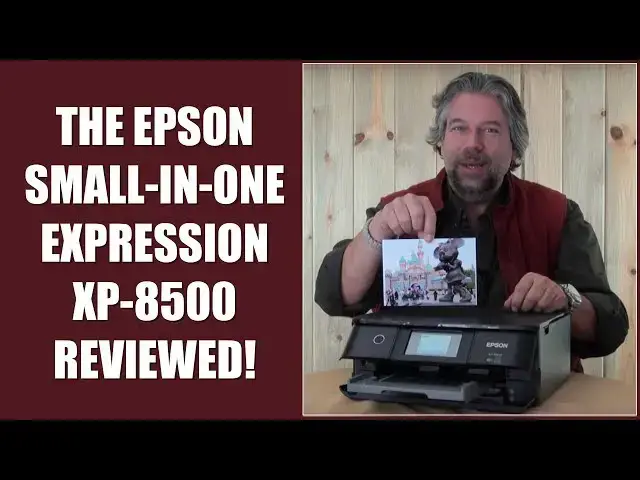
Looking for a workhorse printer that fits neatly under your desk or in a shelving unit - or in your home office closet or dorm room - while offering up a full range of power and capabilities? Then you'll want to check out the Epson "Small-In-One" Expression XP-8500 photo color printer / scanner / copier.
Tech expert Dave Taylor of https://www.AskDaveTaylor.com/ -- and his cat! -- explore the capabilities of the Epson XP-8500 and find it's a quite capable printer in a surprisingly small package. In addition, the six separate ink cartridges make it easy to replace the colors you've used while getting every drop out of each cartridge too, because we all know it's the ink that ends up costing a lot, not the printer itself.
NOTE: No animals, cats, or kittens were harmed in the making of this YouTube video. :-)
Learn more about the Epson: http://amzn.to/2z2OA4Q
Show More Show Less View Video Transcript
0:00
there's this color photo printer copier
0:01
and scanner everything you need for your
0:04
small office let's find out Dave Taylor
0:18
here and this time I'm looking at color
0:19
printers specifically I'm looking at
0:21
this this is the Epson expression XP
0:25
8500 and it's really nice it's what they
0:28
call their small in one unit so it's not
0:31
just a color photo printer but it's also
0:33
a scanner and copier and where does it
0:36
scan I'm glad you asked there is a glass
0:39
surface here that takes your
0:41
eight-and-a-half by 11 it'll work fine
0:43
and since it's a photo printer you can
0:46
actually make color copies obviously
0:48
color scans but you can make color
0:49
copies onto photo paper so you can
0:52
actually make some pretty nice copies if
0:54
you have a photo and you really wish you
0:55
had a second one this can do the trick
0:57
all by itself now it also has built-in
1:00
USB and you can drop in directly SD
1:05
cards so that means that you can take
1:07
stuff straight out of your camera for if
1:09
you have a camera and then you can plug
1:11
it into the printer and using the
1:13
control on the front here you can pick
1:15
the specific image you want it's a
1:17
little tiny color screen and then print
1:19
straight from there no computer needed
1:21
super nice super handy doesn't even need
1:24
a network doesn't even need to be on the
1:26
internet for that function to work now
1:27
having said that it is a full Wi-Fi
1:30
printer so I actually have it hooked up
1:33
via the internet and it's on my Wi-Fi
1:35
network so all of my devices whether
1:37
they're Android iOS Windows Mac Linux
1:40
all of them can see this and here's
1:43
what's even more cool is that
1:44
Epson actually has something they call
1:46
Wi-Fi direct which gives you the ability
1:49
to have this create its own Wi-Fi
1:51
network so if you don't have any
1:53
wireless networks at all this can still
1:56
serve as a base for you to do wireless
1:58
printing now
2:00
it doesn't magically get you on the
2:01
Internet life is not that good but it
2:04
works really great just straight ahead
2:06
like that which is really cool now the
2:09
printing itself and you can see here in
2:11
this close-up where all the car
2:13
or ink cartridges are is it uses
2:15
something called a six color claria HD
2:18
printing technology so the six inks are
2:21
cyan and light cyan magenta and light
2:25
magenta black and yellow so what this
2:28
does is this means the printer gets
2:30
really really nice skin tones and it can
2:33
really do a really nice job of
2:36
differentiating the sort of gradiation
2:38
zuv color shades on things like skin so
2:41
I'm gonna go ahead and I'm gonna
2:42
actually send a five by seven printout
2:45
and then we do a close-up and you'll see
2:47
exactly how fast it is now honestly
2:50
watching a printer print is a little bit
2:52
like watching paint dry but give me
2:55
about thirty seconds and you'll see this
2:56
beautiful photo come out
3:07
[Music]
3:33
[Music]
3:41
[Music]
3:46
okay so printouts done let's have look
3:49
let's see as you saw it's pretty quick
3:53
for a five by seven and here you go it
3:56
really is a beautiful photo printout
3:59
I'll give you a quick close-up so you
4:01
can see the detail but it's done a
4:03
really nice job and there's some really
4:05
nice nuance in particularly in minis
4:08
face and you know that was pretty good
4:11
for what about a seventeen second
4:13
printout not too bad so what else can I
4:16
tell you is that obviously if you want
4:19
to make a color copy you can now put
4:22
your photo on here and you can do a scan
4:25
what else let's see make copies
4:28
obviously and scanning on the Macintosh
4:31
at least it's super easy because the Mac
4:33
printer driver for this includes
4:35
scanning capability so you go into the
4:38
printer you choose scan and then it'll
4:40
actually remotely scan off of this which
4:43
I use a lot actually I use that to
4:45
capture my children's artwork for
4:48
example where it's just instead of just
4:49
having it stuck on the fridge and then a
4:52
few months later you throw it away
4:53
because it's gotten a little gnarly
4:55
instead make a digital copy and now you
4:58
have an archive forever super fun to
5:00
look at stuff they did five or ten years
5:02
ago now the printer itself is somewhat
5:06
heavy so it's about fourteen point eight
5:09
pounds so it's not exactly the lightest
5:12
thing in the world and it's let's see 23
5:16
inches in one direction seventeen inches
5:19
in the other and about eight inches tall
5:20
and you see all this stuff out in the
5:22
front I will tell you that it all can go
5:26
in you can close it all up and it all
5:29
looks very nice like that and the
5:32
printers smart enough it'll actually
5:33
open the doors and do whatever it needs
5:35
just to have you have easier
5:37
functionality and of course the screen
5:39
if you have it in a position where it's
5:41
hard to see it you know because it's
5:43
flush you can tilt it up a little bit to
5:45
make it a lot easier I really like that
5:48
printing companies are doing this now
5:49
it's just a really great design so the
5:53
only other thing to talk about is the
5:54
cost of the ink cartridges and before we
5:56
get to costs let me ask if you don't
5:58
mind click on this
6:00
I button I really appreciate you
6:02
subscribing to my channel now how much
6:05
would you pay for this printer
6:06
well the printer itself the Epson
6:09
expression XP 8500 runs two hundred and
6:13
forty nine ninety nine Amazon and
6:15
honestly you're paying not just for
6:17
really great photo printing but you're
6:19
also paying for a really compact size a
6:22
lot of these all and ones are beasts
6:24
they're honestly like twice the size and
6:27
just these huge hefty things this is
6:29
something you could have on a shelf in
6:30
your dorm room or in a small office even
6:33
it would work totally fine you can have
6:35
this in your closet and have huge
6:37
printing functionality super nice and
6:39
the inks themselves so it's six inks six
6:44
inks each ink cartridge will run you
6:47
1099 it's standard size and then you
6:50
need to think about well okay are there
6:53
larger capacities and the answer is yes
6:55
Epson sells larger capacity cartridges
6:58
for about twenty $1.99 each the black
7:01
turns out to be a couple of dollars
7:03
cheaper not sure why that's the case I
7:05
guess it's a less expensive ink to
7:07
produce either way one of the nice
7:09
things about the way they designed the
7:11
six color claria system is that if
7:14
you've run out of magenta but everything
7:16
else looks fine which of course your
7:17
printer can tell you and pretty much any
7:20
printer driver will show you flu ink
7:22
levels on the different colors if you
7:24
only need one just by one and put that
7:26
one in and then the others you can keep
7:28
using and that's a great win over
7:30
designs where there's like one big bulky
7:33
cartridge that has all the inks because
7:35
you know you're gonna run out of them at
7:36
different speeds if I'm printing lots of
7:39
stuff with red and you're printing lots
7:41
of stuff with blue we're gonna run
7:42
through cyan and magenta at different
7:44
speeds so it only makes sense to have a
7:47
design where you can actually manage
7:49
your cartridges as you go but as with
7:52
all printers and indeed as with all
7:54
photo color printers it's the ink
7:56
ultimately in the long run that's gonna
7:58
prove to be expensive so know that as
8:01
you go in nonetheless I would say if
8:04
you're looking for a really nice photo
8:06
printer that gives you the functionality
8:08
of a scanner and copier to and can work
8:11
pretty fast and pretty quiet
8:13
then this is actually a really good
8:15
choice this is Dave Taylor I'm gonna get
8:18
back to taking photos and printing
8:20
photos of Disney and I'll catch you in
8:22
my next
8:24
[Music]
#Printing & Publishing
#Camera & Photo Equipment
#Product Reviews & Price Comparisons
#Photo & Video Services
#Document & Printing Services
#Photo Printing Services