Up next in 10



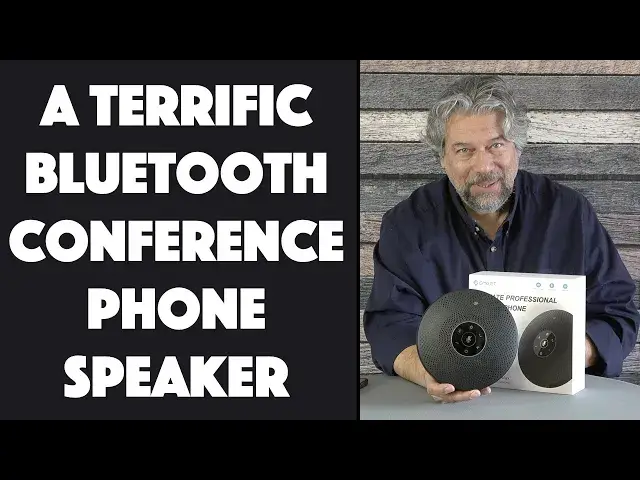
Trying to get conference calls to work smoothly with a phone in the middle of the table or a computer facing some people, but pointing away from others? Time to upgrade to the EMEET M2 Max Conference Phone Speaker. Tech expert Dave Taylor checks out the M2 Max and finds a lot to like, from the crisp 5W speaker to the 4-mic pickup array. All demoed in this review video!
Like what you hear? Check it out at: https://amzn.to/3Eamjvx
Check out Dave's Q&A Web site at: https://www.AskDaveTaylor.com/
#emeet #conferencecall #phoneconference #speaker #office #soho #askdavetaylor
Show More Show Less View Video Transcript
0:00
Now this is a speaker phone. Let's check it out
0:10
Dave Taylor here and I'm checking out this. This is the E-Meet M2 Max conference speaker
0:17
and it's really nice. Now, I reviewed their smaller conference speaker some while ago
0:22
and really liked it. What they've done with this is they've just sort of upped every spec
0:27
So it has much longer battery life, it works for a larger room, it has better pickups, it has an AI
0:34
sound reduction system and you can even daisy chain multiple of them so you can have one at
0:38
each end of a really big conference table. Really nice. So they say it's one to 15 people per unit
0:46
So you get two of these, you plug them together and you could easily cover a room with 25 people
0:52
in it and have everyone be heard and have everyone hear who's on the other end. Really nice. Now, how
0:58
does it do that magic? It has four directional microphones on the edges which gives it an
1:04
omnidirectional capability at up to 48 kilohertz which is basically like a DVD recording. So the
1:11
audio quality is really good. I'm going to give you a couple of demos when we get there. It also features
1:16
a five watt speaker so it actually sounds really nice and it has noise reduction in a couple of
1:22
ways. It has that AI you can turn on and off but it also has rubber feet so that it doesn't pick up
1:28
vibrations. In a lot of situations you have your conference speaker sitting on a conference table
1:34
and someone's tapping away on their computer and all of that is just transmitted right to the
1:39
microphones. This avoids that by using those rubber feet. Simple, smart. Now, let's see, it also has
1:47
that daisy chain capability. You can plug in a second one if you need it. The battery charges via
1:52
USB-C and once fully charged it can run for 12 hours just on battery. So, how do you charge it
2:00
Well, there's a little flap on the side and behind that flap are four ports. You can see from left to
2:08
right there is the lock which is really handy if you want to make sure it stays in your conference
2:14
room. And then there's a tiny reset button, there's a 3.5 millimeter AUX, there's a link button
2:21
and then finally there's that USB-C that actually lets you charge the device. When you're done you
2:27
just put the rubber cover back on it and you're good to go. So, let's go ahead and power it on
2:32
which I do by pushing and holding on the power button. And it's powered on and it's automatically
2:44
connected to my iPhone because it's a Bluetooth device. So, it actually has the ability to dual
2:50
connect. So, you can connect to two different devices and whichever one's pushing sound to it
2:55
is actually the one it will use, which is great. Not enough? Well, there is a dongle on the back. So
3:02
you even if you're using this with a computer that doesn't have Bluetooth, you can still use
3:07
it wirelessly by plugging this into a USB-A port. Don't need it? Just leave it in the back
3:14
Doesn't cost anything, it doesn't have any particular hassles or anything. Now, one of the
3:18
things I really like about this is that you can check the battery status by just pushing that and
3:24
you can see I'm about 80% charged. Easy enough, that's good to do because that means if I'm
3:29
walking into an hour-long conference call, I know I have plenty of battery life. So, the connectivity
3:35
like I said, there's USB, you can connect to it through that or Bluetooth or AUX or you can use
3:41
that dongle and it's compatible with really any computer system. I've used it with Mac and PC
3:49
Obviously, I'm using it with my iPhone. It's a Bluetooth device and it automatically shows up
3:54
as the microphone and as the speaker. So, it's compatible with Zoom and Skype and Webex and
4:00
GoToMeeting and Google Hangouts and FaceTime and Microsoft Teams and you name it, this thing can
4:06
handle it. You can probably use it for gaming if you really want to. It's not exactly its primary
4:11
purpose, but that's okay. So, I want to give you two demos. First one is I just want to give you
4:16
some music. So, turn it up a little bit. And that's not full volume. And I can adjust the volume on
4:29
the unit itself. But we'll pause that. And then I'm going to actually do a voice recording. And
4:37
that should be very helpful because then you'll be able to hear what it sounds like
4:42
So, what I'm going to do is I'm going to switch from this microphone that I have clipped to my
4:47
shirt to... Now, we're using this microphone. And of course, I have two of the microphones right here
4:56
So, you're hearing my recording of this device and I'm a pretty typical distance away from it. So
5:03
this is your sense of what it sounds like. Now, let me jump back on regular microphone
5:09
And that's pretty much the primary things it can do. If you want to get software updates for it
5:15
there is an app you'll have to run on a PC and then you'll connect this to the PC and it can do
5:20
software updates. Fairly important. Probably like once a year is plenty. Company might recommend you
5:26
do it more often. But my experience is firmware for these sort of devices doesn't tend to change
5:32
that often. In terms of dimensions, it's 7.5 inches around, 1.7 inches thick, and it's 2.7
5:40
pounds. There's a lot of battery and there's that big speaker in there. So, it does have some heft
5:44
to it, which is nice. Now, in the box, there we have the box. Let me just show you what else it
5:50
comes with because that's always good to know. So, it's interesting. The box itself is completely
5:57
devoid of any printing. I'm not sure if I have a pre-production unit or something, but be that as
6:03
it may, it comes with, let's see, a basic warranty and limitations and a pretty nice user guide that
6:13
gives you details of every button and every light and everything you can do. And finally, it comes
6:19
with a really long, this is great, a really long USB-A to USB-C cable. And it's a braided cable
6:28
This is a really high quality cable. It's one of my favorite parts about this. But of course, that's
6:33
not why you're going to get this. You're not going to acquire this because it is a nice cable. You're going to acquire it because it has really nice sound and it works really well. I've tried this
6:42
for phone calls and it's just a joy. I think right now we're at a phase where we all
6:48
think our phones are really good speaker phones. They're not. So, something like this is just a game
6:54
changer. And for the people at the other end of the call, they will be so happy that you're using
6:58
this sort of a device because it really makes a difference. So, what we need to talk about is we
7:04
need to talk about the price. But before we get to the price, I'm going to ask if you could subscribe
7:08
to my channel. Really appreciate that. And the more subscribers I have, the more cool gear I get
7:14
and the more honest and candid reviews I can give you. I'll tell you, every so often, a vendor's
7:19
like, yeah, we don't want to work with you anymore. And I'm like, okay, that's the price I pay for
7:23
being honest. I'm willing to pay that. So, subscribe. A click or a tap on that red subscribe
7:29
button and we're connected. Cool. Now this, let me turn it off just so you can hear what that sounds
7:34
like. All right. So, this is the E-Meet M2 Max conference speaker and it's $329.99. But right now
7:47
on Amazon, I saw a $60 coupon, which drops it down to a very reasonable $269.99 at Amazon.com
7:56
And you might be thinking, that's pretty spendy for something I'm going to use by myself
8:00
And it's not really intended to be for you to use by yourself. E-Meet makes smaller, less expensive
8:06
devices for very small one or two person cases. This is really for a large conference room with
8:12
a large number of people. And it's a game changer. Definitely one worth checking out if you have a
8:17
big group or if you're like setting up a conference or office facility, or you're going back to the
8:23
office and you realize that you do have to have conference calls with a half dozen people in the
8:27
room. Something like this is a game changer. It is really nice. That's all I got. I hope to catch you in my next video
#Consumer Electronics
#Audio Equipment
#Voice & Video Chat
#Teleconferencing