Up next in 10



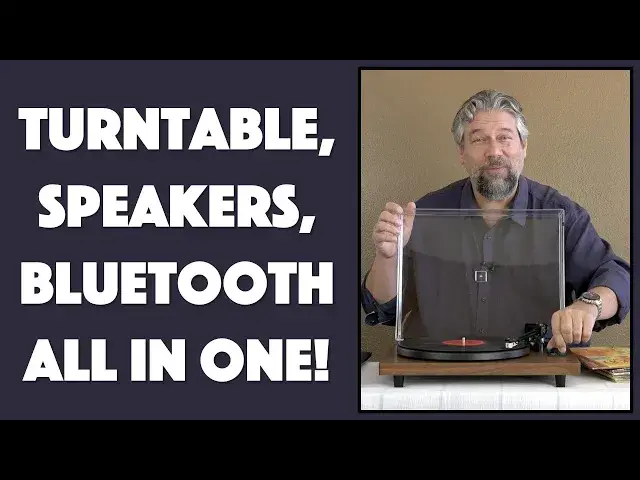
Have a box of classic old vinyl LPs in the basement, just waiting to spin on a turntable and bring more enjoyment to your life? Then you'll going to want to learn all about the DIGITNOW Record Player and Speakers set. It's an all-in-one album ready stereo with line in and digital out. Not only that, but you can connect to it via Bluetooth too. And oh, those speakers, they sound surprisingly good and have plenty of oomph with 36W per. Tech expert and old-school music fan Dave Taylor of https://www.AskDaveTaylor.com/ spins a few classic LPs with the system to show how it works, and also demonstrates how to record digital copies of your vinyl collection too.
Check it at Amazon: https://amzn.to/36AvfeA
Show More Show Less View Video Transcript
0:00
A vinyl record player with Bluetooth support
0:03
Let's check this out. Dave Taylor here, and I'm going a little retro this time
0:15
I'm talking about LPs, big vinyl platters that you might have some or your folks might still have some
0:23
This was how you listened to music for decades. And there was just this whole journey about it
0:28
So here is a classic album. This is Steve Winwood, Talking Back to the Night
0:34
And albums featured big covers, so they had artwork. And then you'd open it up, and on the inside
0:40
there was a sleeve. And the sleeve would have the lyrics, like you see here
0:45
And then there was the way you took an album out, so you didn't touch the black part
0:51
You didn't want to get fingerprints on this, because one of the downsides of vinyl
0:56
is that you get the pops and the cracks and the hisses and the scratches and all of that
1:01
So you wanted to keep this part pristine. But this was a lot of the musical journey
1:07
for a lot of people. So when Digit Now said, do you want
1:11
to review this vinyl LP record player, and actually it's one that comes with its own speakers
1:19
and everything, I said, oh, heck yeah. That sounds really fun. So here's where we are
1:24
This and these, this whole setup, is the Digit Now vinyl record player
1:30
And I just want to show you, it is a pretty nice setup
1:34
So you open the cover, and then it's a tiny needle that goes in a groove on the album
1:40
and it slowly works towards the center, for those of you that have never seen an LP before
1:45
And basically, all you have to do is you move this over the album, and then you
1:52
lower it with the little arm. And once it actually starts up, and this
2:01
is Kenny Loggins' Nightwatch. Now, I don't have rights to any of this music
2:07
so I'm going to have to be careful to keep talking. But I will tell you, these are 36 watt speakers
2:14
and they get loud. So I think you can hear that already
2:18
It's pretty loud, right? So I'm going to actually not do that
2:23
So we're going to lift it up again. And the way this all works is that there are wired speakers
2:44
These are 36 watt speakers, and then there's wires that plug into the back of the turntable
2:50
And then you have the whole setup is all right here, and everything you need here, other than the albums
2:56
is included in the set. So it's really a nice setup. There are also RCA out on the back of the turntable
3:03
so you could hook this up to an old school Wi-Fi system or something
3:07
Hi-Fi system, Wi-Fi, see? Modern times. Or you could hook it up to any other audio amplification
3:14
system you wanted to. What's really cool is it's also a Bluetooth receiver
3:19
So I could switch to Bluetooth. And let me just give you a close-up of the control panel
3:26
So there's mode, and you can switch between phono and Bluetooth. And it's only Bluetooth receive
3:34
There's some confusion on the net that looks like people think this also transmits Bluetooth
3:38
It doesn't. There might be other ones that do, but this one does not
3:42
And then you can choose the speed of your album. And basically, the way it works is
3:46
that big vinyl discs are 33 revolutions per minute, or RPM. And then the smaller singles were 45
3:55
Now, one of the many, many things this comes with is this little 45 adapter
4:00
Because for reasons I can't tell you, 45s had a big hole in the center
4:05
whereas 33s have a little hole in the center. So this is designed for the 33 hole
4:11
So you need an adapter so your 45s will sit on it properly
4:15
So it goes. So you can choose 33 or 45. And then there's pause play for when you're actually
4:20
listening to Bluetooth. Now, as you can see, you have to lift this up
4:25
to get to the controls. I would say that's one of the design mistakes that they made
4:30
I would much prefer to have it maybe on the front so you can control these things or change the volume
4:37
without having to lift this up. Because having this closed means you have less dust problems
4:43
And that's important with these old albums. OK, so it also has USB out
4:49
And it includes this USB cable, which gives you USB 3, that rectangle, pretty classic connection
4:57
What's that for? That's really cool. You can plug this into a computer
5:03
And you can record your LPs. In fact, it comes with a copy of a program called Audacity
5:11
which you can download for free. It's an open source piece of software. It's a great piece of software
5:16
And using Audacity, you can capture your vinyl and then save it as a digital copy
5:22
Now, that might be convenient because then you can listen to it on your phone
5:26
But it also might be something where your albums are starting to deteriorate
5:30
They only have a certain lifespan. And if they're starting to deteriorate or they're a little scratched up
5:35
then having a digital recording is a whole lot better than nothing. So that's important
5:40
Let's see. Also in here are extra belts. And this is also important
5:46
So there are two kinds of turntables. There are what are known as direct drive, which
5:50
are the fancy ones. And then there are belt drives, which are a little bit less expensive
5:54
And the belt drive is how the turntable turns. There's a little spindle that's spinning
6:01
And then there's bands that go around it. And that's how the turntable itself turns
6:06
The downside of a belt drive is it has a little bit of susceptibility
6:10
to slipping or having the belt gradually stretch out of shape, which means you don't get a perfect speed
6:17
So that's something to be aware of. If you have this or any belt drive turntable
6:22
and it's starting to sound a little bit slow or a little bit
6:27
too fast, then it might just be that you need to switch out and put a new belt in that's just
6:31
the right size for your turntable. Really, really fancy direct drive turntables
6:36
actually have mechanisms that make sure and constantly check the speed. This one is not that fancy
6:43
It's also nowhere near that expensive. So that's important. Now, the arm is the key piece of any LP or turntable
6:53
And this one has a counterweight on the back that you can dial
6:57
And your goal is to have it, when it's up and it's over the album, you want
7:03
it to just be super, exactly perfectly balanced with the weight in the front versus the weight in the back
7:11
If it's too heavy in the front, it will damage the albums
7:15
And if it's too light, when your album has a nice dramatic moment, the head
7:20
will literally bounce off of it. And you don't want that. That's not good
7:23
Or you'll be walking towards it. It'll have a susceptible to bounce. So having that be adjustable is nice
7:30
Now, I've shown you that control area. Let me give you a close-up of that whole armature balancing system
7:37
And it's pretty straightforward. You just screw the counterbalance or counterweight to get it to be exactly balanced
7:45
I found that everything out of the box was ready to go. So this is something where, if you get a different cartridge
7:51
head or something for some reason, then that might be something you'd have to adjust
7:55
But generally speaking, it should be ready to go. Now, let me give you a tour of the back
8:00
because it's really important for you to see all of these different plugs and ports
8:04
So you can see there's a power on-off switch, again, in the back
8:08
It's not exactly super great user interface. And then there's the wired speaker connections
8:14
which is, again, kind of old-school hi-fi. I love it. I really like this whole retro thing
8:20
So that's fun. And then you have your power. It's a little 9-volt adapter you plug into the wall
8:25
USB out. And then you can switch between phono and line, if that's what you want to do
8:31
And then the RCA outs. And then there's this little adjustment dial
8:35
So lots of controls hidden in the back of this. And of course, at this price point, none of this
8:40
is real wood. These are all particle board with stickers on them. But they look nice
8:45
This is a great, you could have this on a shelf in a CEO's office with a stack of albums
8:50
sitting next to it. And that would just be really cool, really fun
8:54
And I just want to say, it sounds really good. I was pretty darn surprised when I turned this on
9:00
And I turned on some Kenny Loggins, or I have the old Michael Franks, or Linda Ronstadt
9:07
or Jonathan Edwards, just some great old albums. And they all sounded really good
9:12
And part of the fun is the occasional pop, or a crackle
9:17
or something like that, where you just get this sort of artifact of a vinyl LP
9:23
It is not perfect reproduction. That's the nature of this. But honestly, I think that's part of what people
9:28
enjoy, having record players. So lots to like here. So let's do a quick demo
9:35
Let me show you. I'm going to just switch to my computer screen
9:39
and show you what it looks like in Audacity, which is admittedly a complicated program
9:44
But what it looks like to record a little bit off the album
9:48
or off the turntable. And this is done by utilizing this USB cable
9:54
plugging it into the computer, turning on Audacity, making sure that's my input
9:59
All right, enough. Let's just jump onto the computer and see what this looks like
10:03
So here we are in Audacity. And this is on the Mac. But the Windows version looks 100% the same
10:08
Your key thing is to make sure that you've chosen the input from USB
10:13
And this is the turntable. So we are ready to record. Make sure it's in stereo
10:18
And all I have to do is push record. Now, the blue wave indicates that that's
10:24
audio coming from the turntable into the Mac. And I'm obviously recording it
10:30
What I recommend is that you set the volume on the turntable
10:34
to about 50%. And then, oh, it looks like we're between tracks
10:39
I think we'll pick up another track in a minute. But then use this gain adjustment
10:45
to make sure you actually get it where you want the blue spikes to be pretty tall once
10:50
the music starts, but not so tall that they're touching the top and bottom
10:56
So if I do this, that's going to be too much. And you're going to end up with what's known as clipping
11:01
And it's not going to sound good. So turning the input gain down just a little bit
11:07
gives me much better results. And then when I'm done recording, all I have to do is push stop
11:13
And then I can do file. And I can export as MP3
11:19
And if that's just the one CD or track, I should say
11:24
then I can just say, what a fool believes, and .mp3, and save it, and done
11:33
That's as easy as it is to record your vinyl onto your computer
11:39
Pretty cool. All right. So honestly, really pretty handy feature to be able to record your old LPs
11:46
It might be something that takes you a year or two if you have hundreds of LPs
11:50
But having a digital copy of all of those is great. Being able to listen to the original in its original format
11:57
with all of the quirks and characteristics of a vinyl LP, super fun
12:03
So lots to really like about this. And I just want to give you the size real quick
12:08
It's 16.5 inches by 13.6 inches by 5 inches. And combined with the speakers, and they're not super light
12:17
They're reasonable weight speakers. The total setup is 20 pounds. So this is not exactly something portable
12:24
But honestly, all of this, this is more like precision, old school audio
12:28
You don't want to move this stuff around. You want to set it up in a really
12:32
stable and safe environment. And then just enjoy all those great LPs
12:37
And there's lots of new ones coming out too. So don't think this is just for old school stuff
12:42
like Linda Ronstadt. And honestly, what the heck's wrong with Linda Ronstadt? Hey, okay, don't even leave a comment about that
12:49
So let's talk about the price. But before we get to the price
12:53
I'm going to ask if you can subscribe to my channel. Really appreciate when you do that
12:57
It's just that little red button on the lower right, a click or a tap and boom, you're subscribed
13:02
All right, great. This setup is the Digitnow Vinyl Record Player or turntable, depending on what you want to call it
13:10
And it's $229.99. And right now that's minus 10%, which puts it just a bit above $200 at amazon.com
13:19
for the speakers and the turntable and the cartridge and the software, though you can download it online
13:28
and all these different wires, including RCA and everything. So it is good to go
13:33
If you know someone that has vinyl and wishes they could listen to them again, this is an all-in-one solution
13:38
Definitely worth checking out. Does it have some limitations? Yes. Is it going to sound great 5,000 hours later
13:46
Probably not. I'm going to imagine that things like that belt drive
13:50
the belt is going to need to be replaced. Does come with a couple extras
13:54
But it's also not the price of a turntable. If you buy a top-end turntable
13:59
they can be anywhere from $500 to over $1,000 just for the turntable
14:04
And that's without Bluetooth, without USB out, without any of those nice features this also includes
14:10
So you're not getting state-of-the-art, top-of-the-line, but you're getting a really fun solution
14:15
that's going to work for a whole heck of a lot of people. And with that, I think I am going to go back
14:19
to listening to Kenny Loggins. So, and notice by the way, it turns on when you put the tone arm over the album
14:27
And then when I put the tone on back, it turned off. So all I need to do is lower it down
14:33
and then we should be good to go. Let's see, what are we hearing here
14:39
Okay, there's our music, which is my cue to say, I hope to catch you in my next video. ♪♪♪ ♪♪♪ ♪♪��
#Recording Industry
#CD & Audio Shopping
#Music Equipment & Technology
#Music Streams & Downloads
#Consumer Electronics
#Audio Equipment