live_tv
Livestream Starting Soon
00
Hours
:
00
Minutes
:
00
Seconds
Up next in 10



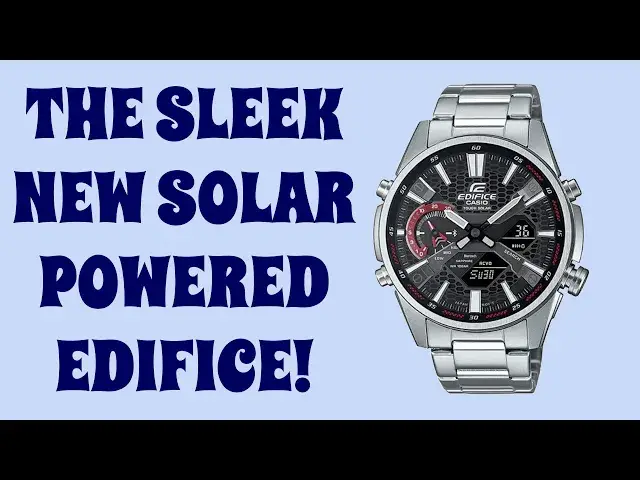
The latest chronograph from Casio Edifice, the ECB-S100, has a design inspired by a sportscar grille and it looks terrific. But it's the lower-powered Bluetooth connection with the Edifice app on your smartphone that really makes this watch a keeper. Techie and watch fan Dave Taylor got his hands on the new Casio Edifice ECB-S100 watch and ran it through its paces to see how it held up...
Check it out at:https://Edifice.Casio.com/
Check out Dave's Q&A Web site at: https://www.AskDaveTaylor.com/
#edifice #casio #ecbs100 #bluetooth #watch #askdavetaylor
Show More Show Less View Video Transcript
0:00
Is this the most elegant watch in the Edifice lineup? Let's check it out
0:11
Dave Taylor here, and I'm checking out this. Now, I suppose I should take it off so you can see
0:15
This is the Casio Edifice ECB-S100, and it's very nice. They did a really nice job with this
0:24
First off, it's slim. For an Edifice watch, this is a very slim design, and it has a design
0:31
you can see in this close-up, it's based on a sports car grille. So that's the inspiration
0:36
for the design, and I think it's really cool. It's also solar-powered, and the S100 series
0:43
they actually redesigned the solar receptors, so it's less than 50% of the surface area
0:49
of the ECB-900 line, which I have also reviewed here on YouTube. One of the things that's cool
0:55
about it is there is this double LED night illumination, features a sapphire crystal
1:02
and of course, Bluetooth connectivity with the Edifice app on your smartphone. I'll show you
1:07
that in a second. And I just want to tell you that it's a 50mm by 46mm by 9.8mm case
1:15
and it weighs 138 grams, so it is not the lightest watch in the world, but it's relatively light
1:23
and I find that once I put it on my wrist, I really forget that it's there. Now, as with all
1:28
of these watches, when they send it, they generally have too many darn links in the chain, so for your
1:34
strap, you're going to probably either go to a jeweler or have to have really, really good hands
1:40
to be able to take a couple of links out so that it fits you properly, but it is a very typical
1:45
three-part clasp on the back, and that's easy to work with, and comes in the cool Edifice box
1:53
with a whole bunch of documentation and everything, but you don't care about any of that. I know you
1:57
want to see this watch up close, so I got two sequences here. First off, I'll show you how the
2:03
watch interacts with the app on a couple of basic things, and then we'll just look at the watch
2:09
really close up so you can get a couple of seconds of just seeing this really cool design and some of
2:14
its features. Let's do it. I've launched the app, so now I need to pair the watch to the app
2:20
and that's done as it shows on the screen by pushing and holding this button in for a couple
2:25
of seconds, and that double beep means that we should be ready to roll. Let's see if the
2:31
phone sees it. Nope, might need to do it again. There we go. I think that's the one, and now we're connected
2:42
and once it connects, there's a couple of different features you can access by using the app. Now that
2:48
it's connected, there are three things you can access that are interesting. There's the stopwatch
2:53
and here I can import up to 200 lap times. I can go to world time. You can see here that my primary
3:02
time is Denver. That's the watch hands, and then the secondary world time I have set to London
3:08
and that's the digital display at the bottom there. I could switch the two, and if I do that
3:16
then you'll see the watch change time. We'll send that to the watch
3:24
and this might take a couple seconds. It's certainly going to confuse me when I next look
3:29
at my watch, but now it's switching the two so that you have London time as the primary face
3:37
and then on this little screen here, you're going to have my actual local Denver, Colorado time
3:44
Now, third thing you can do with the stopwatch is you can set a stopwatch time
3:50
and you can set it to record time in place points. Now, third thing you can do with the watch
3:54
because it uses a low power Bluetooth connection, is you can record time in place points
4:01
and then you can go into the app, and you can check on waypoints on, for example, a bike ride
4:08
or a hike, or any sort of travel that you do. So all of that's super helpful. You can also get to
4:14
a whole lot of settings for the watch, as you can see. So lots of things. Now
4:23
let's zoom in more closely on the watch face itself. Starting at the top right, the four
4:28
buttons around the side let you do illumination. I'll show you that in a second, and then the lower
4:33
one, lower right, is time adjustment, time in place markers, and their phone finder feature
4:40
Lower left is letting you switch between modes, hold for three seconds, and you'll actually get
4:46
into Bluetooth mode or disconnect that. And then the top left lets you switch display and get day
4:52
and date. So let's go ahead and have a quick demo of that light. It's a short press, and you can see
4:59
that LED on the corner really gives you bright illumination for a couple of seconds. Doesn't
5:05
last long enough? You can adjust that in the app. So really cool. Really like this watch. I hope
5:11
you appreciate its design features. Let's jump back on camera. There's a lot I really like about
5:16
this. I'm a big fan of the entire Edifice line, in case that's not obvious. This is my 10th Casio
5:22
Edifice I've reviewed here on YouTube, and each one I like more than the previous. I don't know
5:28
if that's entirely true, but I really like them all. They all have different sorts of designs
5:33
but they're all these sort of big, heavy, masculine chronographs, which honestly remind me
5:38
of sort of classic watches from the 50s and 60s too. You might have a different memory about these
5:43
sort of things, but I think these are really handsome watches, and there are very few people
5:49
male or female, who are not going to have this look really good on their wrist. Of course, it's a
5:54
pretty big face, so if you have a very slim wrist, then this might be a little overpowering, but that
6:00
can look really stylish too. Now, all we need to talk about is the price, but before we get to the
6:06
price, let me ask if you could subscribe to my channel. A click or a tap on that little red
6:10
subscribe button, and we're connected. Now, give me some feedback too. Leave a comment. Tell me
6:15
what else you wish I would have shown or maybe done in a close-up. Obviously, I am not trying
6:20
to do a promotional video for the watch, though I really like it, so there are limits on what I'm
6:25
going to show you, but suffice to say, I really like this. This is a really cool design, and
6:32
having just the slimmer design and having the solar receptor be really subtle and small means
6:39
that I can put this in a drawer for six months in the dark, and when I open that drawer, it'll still
6:44
be running and still be with the right time, and it even syncs with my phone to make sure that it
6:49
stays on time. Really, really cool. Now, it comes in three different color combinations. This is
6:55
silver with a black face. It also has silver with a blue face, and there's black and blue
7:02
so you get that black and blue look, but it looks good on this one, and it's $260 at edifice.casio.com
7:12
and if you're into watches or you're just looking for your next really great watch that's simple
7:19
it doesn't have notifications, you're not taking phone calls on it, it's not measuring your heart
7:24
rate, it's just a watch, but it has some secret superpowers with the app, then this is definitely
7:30
one to check out. That's all I got, so I'll hope to catch you in my next video
7:54
Bye
#Vehicle Modification & Tuning
#Gadgets & Portable Electronics
#Clocks