Up next in 10



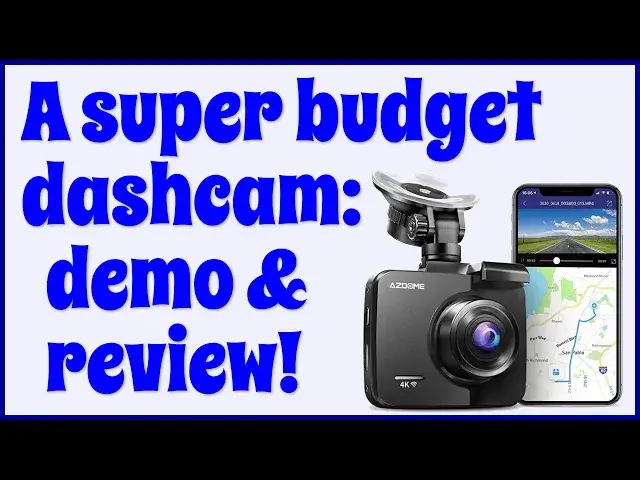
The AZDOME GS64H 4K GPS Dashcam is about $100. So can it be any good at all? Tech expert and car enthusiast Dave Taylor checked one out for a week of driving and found that daytime video was great, but nighttime? Not so much. Another plus: You can pair it with your phone and use the AZDOME app to tweak and tune the settings to meet your preferences. And that demo footage? There's plenty included in this detailed demo and review...
Check it out on Amazon: https://amzn.to/3iZVLEU
Check out Dave's Q&A site: https://www.AskDaveTaylor.com/
#dashcam #azdome #budget
Show More Show Less View Video Transcript
0:00
A budget 4K dash cam
0:02
Let's check it out. Dave Taylor here, and I'm checking out this
0:13
This is the AZ Dome GS-63H. It's a 4K GPS dash cam
0:20
It does everything you want in a dash cam, and it's incredibly well-priced
0:25
So, turns out it actually, you can use it and experiment with it and get all the settings right
0:32
even if you're not in your car, which is a real blessing, because it's really hard to record this in my car when it's 100 degrees out
0:38
So we're going to switch to a different locale, and then I'm going to give you lots of demos and hands-on
0:44
Let's go ahead and do that. Man, it's hot in my car. I am so glad to be inside where it's a little cooler
0:51
So let me tell you a little bit about the dash cam, but actually, even before we do that, let's just go look at some demos
0:57
because I know that's what you really want. First off, daytime driving
1:01
And yeah, I've sped it up a little bit just to make it a little more visually interesting
1:13
Now I'll switch to nighttime driving and the results weren't as good, but it's also a very budget dash cam, so that's worth keeping in mind as you watch this footage
1:28
It's really all about that demo. And honestly, the nighttime footage could be a little better, but it's really just my headlights that are illuminating everything in front of me
1:40
So that's kind of the way this works. Now, as I said, it does have a built-in battery, so it gives us the ability to turn the device on without having it in the car
1:52
which turns out to be a real blessing because it's hard to actually have it and be used
1:58
the on-screen controls. In fact, let me go ahead and give you some close-ups so you can see what's going on
2:05
We're going to start with a tour of the edges. And on the left side is the micro-SD card and the power button
2:12
And then on the top is the slider for however you want to mount this and an AV-in plug
2:22
And then on the right-hand side is the mini USB, kind of an interesting choice for a connection
2:28
for power and there's an HD out if you want to actually use this, you know, hooking it up to your
2:35
TV or something directly. And then on the bottom, there's just a little couple of cutouts for the
2:40
speakers. And then on the back, as you can see, there are five buttons on the bottom. And it does
2:48
give you the ability to actually go and change settings and turn things on and off. And that's really
2:55
hard to do when you using this tiny device So I found it much much better and much easier to actually have this go into Wi mode connect it with my phone and then modify all my settings using the AZ app But before I get there let me just give you some more information
3:19
It's a 2.4-inch color screen. The buttons, as I've shown, are along the bottom
3:25
And you can record up to 2880 by 2160, which is what 4K resolution is as video
3:32
It includes Wi-Fi capabilities so you can hook it up to your phone without having to actually suffer through yet another wire, which is handy
3:42
It has a built-in GPS, so I hope you notice the geolocation, lat-long information at the bottom of those videos
3:50
It has wide dynamic range, and I have to say, I found the daytime footage to be excellent
3:55
It's really clean and crisp and bright, and it's not blown out where the sun is or anything like that
4:02
170 degree wide angle. It's a very wide angle shot. You get everything, including your dashboard
4:10
So positioning is something you're going to want to adjust and just get just so
4:15
There's a parking mode with a G sensor. So the reason it has a battery is it can actually sit and monitor for 24 hours
4:24
And if your car is jarred or jammed or hit or something, it'll turn on, record for a couple of seconds, and then turn off again
4:31
So I did not test that. My car is not hit very frequently. Thank goodness. But I know that's something a lot of people are interested in. As with all dash cams, it does loop recording. You can set it to be one minute, three minute or five minute loop intervals. I found when I set it to five minute segments that it occasionally had a problem missing a few seconds between the end of one video and the beginning of the next. But then when I went back to the default of three minutes
5:01
Then it worked perfectly and I never lost a single second of footage. 24-hour parking monitor already mentioned that
5:08
Super night vision. Well, that's what they say. Maybe I had to enable something
5:13
I don't know. I don't think I had to do that. But in any case, you saw my nighttime footage
5:19
And in terms of the microSD, it supports up to 128 gig, which is going to give you a lot of footage
5:24
That's a lot of video to record. Now, one more thing before I show you the app is let me show you everything that's in the box
5:31
So you get the dash cam. You get the suction mount, which is pretty nicely designed
5:37
You get a 12-volt adapter for power. The nice thing is a lot of cars now just have USB 3
5:47
So this super long USB 3 to mini USB cable is going to be plenty enough for you not only to have it on your dash
5:57
and have it plugged into your cigarette lighter, as we used to call them
6:00
but to actually tuck the wire in and have it go around so that you have a nice, neat, and clean installation
6:08
It's plenty long enough for that. And then finally, it also includes a mounting kit
6:14
And in here are a bunch of sticky tape wire holders and a little blue plastic gizmo that if you don know what that is it to tuck things behind some of your trim in your car if you really want as permanent installation as you can
6:32
So that's everything. Now I'm going to need to actually plug this in because the battery is actually going away right now
6:41
And then I can show you this screen and show you. with my phone, the app, and you'll see how it all fits together
6:48
So let me go get some power. All right, we're not in the car, but I do have it powered up
6:53
And again, having it be USB3 instead of requiring this sort of adapter is super convenient
7:00
You could plug it into your computer if you want to do that for accessing files or
7:05
modifying your settings. So it's showing my shirt. So you're seeing a sort of light green here
7:12
but most importantly I can turn on the Wi-Fi, pair it with my phone, go into the AZ DOM app, and then modify things
7:22
So I'm going to do just that. So to do that, I choose menu and push it a second time
7:29
And then there's up and down arrows. So I choose Wi-Fi and on
7:35
And now it's in Wi-Fi mode. There's not much to see here
7:39
But the important thing is I can now go to my... phone and they have Android and iPhone apps and there it is AZ dome Gs 63H I choose it
7:51
it's connected and now I can go to the app AZ dome and tilt this up so it's a little bit more
8:01
interesting to see what we're seeing okay and now I choose the dash cam
8:12
and it connects. And now you're seeing on the phone what I'm seeing in that direction
8:21
So that is really nice so you can preview and you can even go full screen
8:27
And why would you want to do this? Because this is how you best position the dash cam to make sure that it has a level horizon
8:35
and that you have it in the best possible place in terms of pointing towards the front of your car
8:41
and in terms of that sort of up-down, having it be in the best possible position
8:47
Now, once you've accomplished that, then you can go into things like settings
8:52
And I'm going to tap on the little gear icon on the top right. And, oh, I have to stop the recording first
9:00
All right, we'll do that. Then I'll tap on the gear icon. And now you can see this huge number of different settings
9:07
And really, they're all accessible from the device itself. but it is so much easier to do this sort of thing from your phone
9:16
So I can change photo size. You can see they support a lot of different sizes
9:22
Oops I think I did the wrong thing there Let turn off recording Let go back to settings Let go to video resolution And here again there a lot of different choices Why would you want a smaller or lower
9:37
resolution when you have a 4K dash cam? Because it gives you the ability to store and record even more
9:43
So you might want to have a week's worth of driving record on your dash cam. That might be more than your 4K video will allow you to do on your
9:54
your micro sd cards. So this is one way you could step it down. Here's your loop recording
10:01
the different increments. I'm sorry, I said one, three and five. Apparently, it's three, five
10:05
and ten. Three minutes is the default, and I've had the best results with that. And then you can
10:11
turn on things like the wide dynamic range. And as you can see, there's motion detection
10:18
If you do that, any of those sort of things like with the G sensor, those generally are involved
10:24
with hard wiring your dash cam into the power of your vehicle
10:29
But there's just quite a bit that they let you access here, and that's really helpful
10:34
So what I want to do is I want to talk about the one thing we haven't yet addressed
10:41
that's really important, and that's the price. So you've seen the demo, you've seen the great daytime footage, the okay nighttime footage
10:51
You can see there's a ton of configuration options, comes with everything you need to get going
10:58
There's an optional rear-facing camera you can install. You would have to purchase that separately
11:04
But the question is, how much does this thing cost, right? People like dash cams
11:08
All of my kids want to put dash cams on their cars, too, just so you have a record if you get into an accident or something
11:15
That's just good planning. But before I get to the price, I'm going to ask if you could subscribe to my channel
11:20
I'll really appreciate when you do that. A tap or a click on that red subscribe button
11:24
And leave me a comment, letting me know if there's anything else you wish I would have demoed
11:28
I am not going to have someone hit my car so we can test that feature out. Sorry
11:33
But otherwise, tell me what you'd actually have appreciated me to show. Now, with all that in mind, and it's still recording, this is the AZ Dome GS-63H-4K GPS dash cam
11:46
and it is a remarkably inexpensive, 1099 at Amazon.com. For $100, this gives you a lot of flexibility
11:57
really crisp daytime video, and the fact that it does, like, built-in GPS and everything
12:04
is really pretty sweet. There's really a lot to like about the AZ Dome GS-S-63H
12:09
4K GPS dash cam. I'm going to go ahead and put it back in my car
12:13
and we're going to go for another drive. So, I'll catch you. in my next video
#Autos & Vehicles
#Vehicle Shopping