Up next in 10



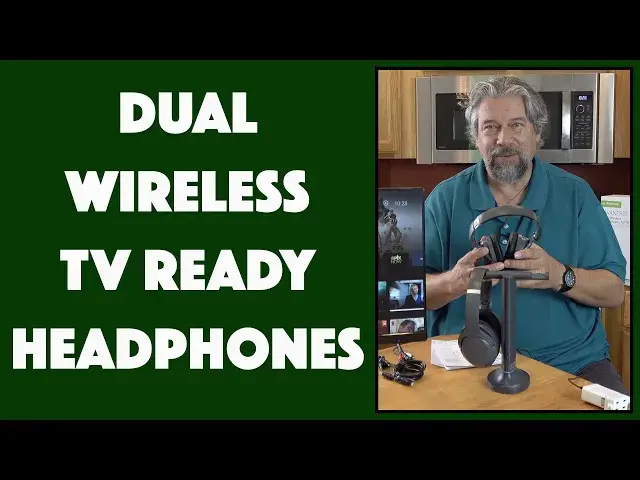
Tired of not being able to properly hear the TV, but also trying not to bother everyone else in the house when it's too loud? The solution is the terrific Avantree DUET Dual Wireless TV Headphones. Two comfortable, over-ear wireless headphones that can hook directly into your TV's audio system, whether you have a fancy 7.1 surround-sound audio setup or are just using the speakers built into your television. Tech expert Dave Taylor shows you all the features and capabilities, and lots more...
Check them out at: https://amzn.to/3nENdUQ
Then visit Dave's Q&A Web site https://www.AskDaveTaylor.com/
#avantree #headphones #tvheadhpones #duet #tv #television #askdavetaylor
Show More Show Less View Video Transcript
0:00
Dual TV headphones with a ton of features
0:03
Let's check them out. Dave Taylor here, and if you're like me, you probably watch TV, maybe movies, maybe your favorite streaming series, but you probably watched it odd times
0:21
Sometimes you're watching a show and you can't understand the dialogue. Other times you're in the room with someone else and they wanted it at a different volume than you do
0:29
What do you do in those situations? Well, sometimes you just sort of suffer through
0:34
Enter this. This is so cool. This is the Avantry Duet, dual wireless TV headphones
0:41
And as you can see, here are these two wireless headphones that are actually quite light
0:47
They're only eight ounces each. And they are absolutely stuffed with features and capabilities
0:52
Now, the first thing I want to point out is right there on the top is a charging unit
0:57
and the base is actually a charging base. So all I have to do is that
1:02
and now the headphones are charging again, which means every time you take them off
1:07
they're paired, they're ready to go, and they're fully charged. Now, if you need to charge them
1:13
a 1.5-hour charge will give you 35 hours of playback. That's pretty sweet
1:19
Now, from a headphones perspective, they feature 40-millimeter drivers, which gives you 20 to 20,000 Hertz of frequency response
1:26
and their 2.4 gigahertz wireless, which gives you over a hundred foot range
1:31
and even further, if you're using these for like an outdoor television or something
1:36
So probably the single best feature here is that each unit has independent volume
1:43
That also means that if great Uncle Joe likes to have the TV up super loud
1:49
and you can't convince him to wear these headphones, you could use the headphones
1:54
and then turn the volume down and now you've got another way to watch a show with the great Uncle Joe
2:00
without having to suffer through the volume that he has. But of course, mostly you're going to be using this to amplify the sound
2:08
And one of the things they've done at Avantry with this design that's really cool
2:11
is it has its own little amplifier built in so you can get up to 120 decibels
2:17
That's really loud. So I don't recommend you pull the volume all the way up unless you have hearing challenges
2:24
and that's how you are able to hear TV. So let me give you a tour of the headphones themselves
2:30
because everything has lots of buttons and features, but once you get it all set, it's super easy to work with
2:36
So on the left earpiece, you can see that there is a 3.5 millimeter out
2:44
There is also a mono and stereo. So if you have hearing loss in one ear, you can switch
2:50
and you'll have it work great for you. there is balanced mode and then there's clear voice mode
2:58
This is something really worth talking about is that modern audio on video content, movies, TV, series, streaming, all of that tends to have a lot more of the sound effects and less of the voice
3:13
And you know one of the ways that my kids and I deal with that is we turn on subtitles But the clear voice feature here actually will change it It gives you clearer dialogue so you can hear what the heck people are saying Honestly right there that a huge selling
3:30
feature to me. And then on the right hand ear, you have volume up and down, you have a mute
3:37
button in the middle if you need to just suddenly turn off that sound super quick because someone's
3:41
asking if you need a cup of tea. Don't want to miss that question. And then there's on, off
3:47
and pair and then there's a USBC plug for charging, but you're never going to use that
3:53
because you're just going to go ahead and put it on the transmitter charger stand
3:57
So that's just a nice backup. If for some reason you want to put this somewhere
4:01
that's less accessible because you don't want to watch it or see it
4:05
but honestly, putting it right by your TV works perfectly fine. And of course, the second headphones are the same
4:11
The only difference between them is that one has silver bands and the other one is gold bands
4:17
probably you might be in a family where that ends up being an issue
4:21
So the silver one is always grandmas, and then the gold one's up for grabs, right? Whatever
4:28
Now, the base itself is also really interesting. Let me turn it around so you can see
4:33
And I'll give you a close-up. So the back is where all the controls are
4:37
and they are top to bottom, volume boost, and then the next section is all about your audio input
4:46
So the lower portion, you plug in the audio from your TV or audio handout source
4:53
And then that upper switch, you slide to match. So you can see I'm using AUX
4:58
And then the bottom part's super cool. The bottom part is actually what's known as pass through audio
5:04
So you can then have this where, for example, connection is going to be optical out from your TV to the charging station
5:12
And then optical out from that to maybe your. soundbar or your 5 in 1 or even 7.1 sound system or something. So you can do that. You can have the
5:24
sound bar and surround sound all working. That works great. And you can still use the headphones
5:30
It's such a great design. Now, on the front, there's just a basic on-off and there's a very
5:35
subtle light on the very bottom that gives you some feedback on what mode it's in. It's also a
5:41
charge light on the very top. I think you can see that. And it will show if the head
5:46
headphones are charging as they are now or if they're fully charged when the light goes out
5:51
So the companies really thought this through and there's a ton of features and capabilities
5:57
but fundamentally out of the box, it's really easy to work with. I had this working with my
6:01
little quasi TV here in, I don't know, about 90 seconds, pull it all out of the box. You get everything
6:07
you need with one exception. Get there in a moment. And then basically take audio out from your
6:13
TV, whatever that is going to be. I think my device, what happened here? There we go. Take audio out
6:21
from your TV, plug it into this, make sure that switch is in the same mode. You're done. That's it
6:27
The headphones come pre-paired to the charging station. So that's really easy. The only time you'd
6:33
need to pair it is if you want to get more headphones and it can support, this is crazy
6:38
up to a hundred pair of headphones So honestly if you like at a retirement home or something you could set something like this up give every resident their own headphones They all work off of this unit and then each person can adjust it to just their favorite volume
6:54
That's really nice. Now, one of the other things to talk about is latency
6:59
So latency is the delay between when you see someone's lips moving and you hear that audio
7:06
And if you have a lot of latency, you get that weird out-of-sync dubbing effect
7:11
from foreign movies because you don't want to watch the subtitles, you want to actually have it dubbed into English or something
7:17
And latency is bad. It's very disconcerting, it's very distracting, and it can really damage an otherwise terrific show
7:25
The good news is this has essentially zero latency. It's 30 milliseconds of latency
7:31
It's so small that when I watched a show on here and I was listening to it on the headphones
7:36
it certainly seemed to my brain that everything was perfectly lined up
7:41
which was great. So not much else I can tell you. So the charging unit comes ready to go
7:48
You just plug it in. But we should talk about that just plug it in part
7:52
Because what the company does is they include a charging cable. So it's USBC on the base of this and then USBA
8:01
but they don't actually include the little unit to put into the wall
8:06
Why do they do that? Because on a lot of modern TVs, there is USB
8:11
USBA, that rectangular shape, there is USBA on the back of the TV
8:16
So you can just plug this directly into your TV for power. Super easy, no hassles, no devices needed
8:22
If you need a charging unit, it comes with instructions, and it tells you, contact us, and we'll send you a free charging unit
8:31
That's pretty straightforward. I happen to have plenty of extras around here
8:35
so I just used a different one, and it worked just fine. So that's the only limitation I've done
8:41
would say and cable-wise it came with this a ux cable and it might not look very long
8:48
but remember this device is going to be sitting just at the bottom of your television so you don't need that much length so there's your a ux to a ux or
8:56
3.5 millimeter and then they also have an RCA adapter so if you have an older
9:03
TV that has a red and a white plug and that's audio out plug in this
9:09
plug this into your AUX cable and you're ready to rock and roll
9:13
It also comes with an optical cable and this is your primary and best way to push audio to this unit
9:20
because this is going to give you the best possible quality. And it even comes with a little mini extra charging cable so you can charge the headphones off of the charging stand
9:29
Though honestly, I don't really know why you would do that. So let's see. That's just about everything on the cable department
9:36
Let me go ahead and plug this back in. because I also want to talk about the audio quality
9:42
So to do that, I'm going to hopefully this will work. I'm going to just pick a program
9:48
Hopefully all the defaults are going to give us the right thing. This is HBO, and I obviously don't have the rights to rebroadcast this content
9:56
but I will just tell you that, there we go, I think that, there we go
10:00
So now we have something live, and for me to now listen to it on audio
10:05
all I have to do is pick up the headphones and put them on because the headphones are already turned on and there a nice right and left shown So okay so I listening to the audio right now and it that easy
10:19
It's really easy to work with. And I really appreciate that. Let me get back because I don't want to get into any issues with HBO
10:29
But that's it. So two more things to point out. Number one is that you can fold the headphones up for travel
10:37
Now, you still need to take the charging base, so it's not the most portable thing in the world
10:42
but the idea that you could like be at a hotel room and you and your spouse could plug this into the hotel TV
10:49
and then watch TV without the neighbors in the next room over complaining that your TV's too loud
10:56
Fantastic. It's also, I'm going to just reiterate this super easy to set up
11:01
It looks really complicated. There's certainly lots of different cables and connections and stuff
11:06
But in fact, it's really easy as a default. And they have a really, really well done clean and simple setup video that you can watch
11:16
that the URL is included in the documentation. In fact, they say, before you start actually installing this, go watch our video
11:24
Can't get much easier than this. Now, in terms of the sound, it sounds really good, actually
11:30
I was really impressed. I mean, versus a TV, particularly versus the speakers built into a TV, these headphones sound dramatically better
11:40
They have a nice, big sound to them. And of course, you could turn the volume all the way up
11:44
And most importantly, that clear dialogue mode is really kind of wild to try out
11:50
It's really nice. I was watching some shows, and then I just pushed that button, and suddenly it's like, oh, my gosh, I can hear what they're saying
11:57
Really, really, if you're one of the people like us in my family who is frustrated by the fact that it's hard to understand dialogue nowadays, that button by itself might make this a worthwhile purchase for you
12:10
Really, really great idea. So, only thing let's talk about is the price
12:16
But before we get to the price, I'm going to ask if you could subscribe to my channel, a click or a tap on that subscribe button, and then make sure you turn on notifications so you know about my new videos
12:26
and we're connected. Great. Thank you. This is the Avantry Duet dual wireless TV headphone setup
12:34
and it's 23999 at Amazon.com. Now, that might sound a tiny bit spendy
12:41
but if you think about the lack of complaints you're going to get from people
12:45
and the fact that you now finally have an entirely personal, an entirely private volume control
12:53
for any video that you're watching, That's worth a lot more than the price of this unit
12:59
That's something worth peace of mind, and that's a great thing. Anyway, these are really cool
13:04
I think I'm going to go back to that HBO show, so I'm going to have to catch you in my next video
#TV & Video
#Audio Equipment
#TV & Video Equipment