Up next in 10

Vue.js 3 vue3-notification Tutorial to Show Toast & Notification Alert Messages in Browser Using TS
Jan 9, 2025

Get the full source code of application here:
https://gist.github.com/gauti123456/d5fdded8e6bbe27ccbddba2bdfd1e6e0
Show More Show Less View Video Transcript
0:00
uh hello guys welcome to this video so
0:02
we will show you another view3
0:05
notification Library you can see on your
0:08
right hand side corner this uh hello uh
0:11
success call back is showing
0:14
notification so you can use this package
0:16
as well so let me show you the package
0:19
name it is view3 notification if you go
0:23
to npmjs.com uh just search for this
0:27
package which is view3
0:33
notification so this is actually the
0:36
package and I've already installed it
0:39
this is a command it's almost having 19
0:42
downloads a fairly new package so now to
0:45
initialize this first of all you need to
0:47
go to
0:48
your main.ts file this is in
0:53
typescript so first of all you need to
0:55
import this package so we say import
0:58
notifications coming from
1:03
this package and then we pass it as a
1:07
middleware which is app. use
1:11
notifications that's all so
1:15
now we close it now we come to the
1:21
component inside your template we Define
1:24
a button we will say
1:27
show notification so you'll just find
1:31
an add theate click on click so when we
1:35
click the button we will execute this
1:37
function show notification so now we
1:40
need to Define this and we also need to
1:43
embed this component which is
1:45
notifications to actually show the
1:48
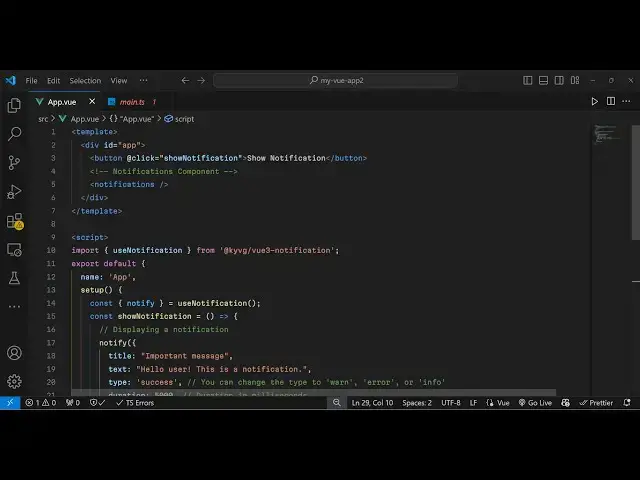
notification so now in the script tag
1:50
inside your typescript code we import
1:52
the module such as use notification and
1:56
it will be coming from this package
2:02
like this and then we export
2:05
default
2:08
and provide the name of the component
2:11
and
2:12
then we need
2:14
to call the setup function and right
2:18
here we
2:22
specify we need to extract
2:25
notify from this use notification
2:30
and then we Define this function show
2:32
notification which is a arrow function
2:35
and inside this we use this notify and
2:37
it actually takes an object which
2:39
contains three properties such as the
2:42
title of the
2:44
message and then a little bit more
2:47
detailed explanation so you'll say hello
2:49
user this is
2:52
notification and then the type of the
2:55
notification or
2:57
toast this will be a success say so it
3:00
will be appearing in a green
3:03
color so and then the fourth one
3:07
duration so how many seconds that you
3:09
want this dur notification to stay so I
3:12
will say 5,000 millisecond it will stay
3:15
for 5 seconds and lastly uh we just need
3:19
to return
3:21
this method show notification that's all
3:25
so this is a complete example and you
3:27
will see this button and as I click the
3:29
button you will see the notification
3:32
will stay for 5 seconds and then it will
3:34
go away you will see
3:39
that but if you click this it will go
3:42
away if you want to close it before 5
3:44
Seconds you can just click on that
3:46
notification and then it will go
3:50
away so uh apart from that we do it
3:54
offers some more notification toast
3:56
types as well so if you don't want it to
3:58
be in green color you can change this to
4:02
be error so now it will be in red
4:07
color you will see that it also supports
4:13
warning I think it will be in yellow
4:15
color or blue color sorry and then info
4:19
which is I think it will be in yellow
4:23
color oh sorry blue color so these are
4:27
all the types that it supports a very
4:30
lightweight tost notification message
4:33
library and I think it also supports the
4:36
positioning as
4:41
well top left can provide
4:44
it default position is uh bottom sorry
4:48
top right but I think uh
4:53
yeah so if you check out their
4:55
documentation as well uh this is the
4:57
GitHub page you can do read more about
5:00
it so thank you very much guys for
5:02
watching this video If you like this
5:04
video then please hit that like button
5:06
subscribe the channel and do check out
5:08
my website as well free mediat tools.com
5:11
uh which contains thousands of tools
5:14
regarding audio video and image and I
5:17
will be seeing you guys in the next
5:19
video