live_tv
Livestream Starting Soon
00
Hours
:
00
Minutes
:
00
Seconds
Up next in 10

Vue.js 3 vue-sidebar-menu Example Build Sidebar Responsive Navigation Menu in Browser Using TS
Jan 9, 2025

Get the full source code of application here:
https://gist.github.com/gauti123456/621d292a92de756b585af415914d4ede
Show More Show Less View Video Transcript
0:00
uh hello guys welcome to this video so
0:03
in this video I will show you how to
0:04
make this nice little navigation sidebar
0:07
menu inside vuejs 3 so it can even have
0:12
menu items you will
0:14
see submenu items as well so we are have
0:18
having these controls out there so if
0:20
you click it it will hide and it will
0:22
show something if you refresh you can
0:25
hide this and you can click on you can
0:27
see so it's a nice little sidebar
0:30
navigation menu you can create it inside
0:32
vuejs 3 so there is a specific package
0:35
out there which lets you create this and
0:37
it looks awesome on mobile devices you
0:39
will see it will look something like
0:40
this on smaller devices and it's
0:43
completely responsive and it's on
0:46
desktop it will look something like this
0:48
so there is a package here which allows
0:50
you to do this uh if you go to npmjs.com
0:54
uh just search for this package which is
0:57
uh let me tell you the name name of this
1:00
package which
1:02
is view sidebar menu so just search for
1:06
this package view
1:07
sidebar menu so this is actually the
1:11
sidebar menu component specifically
1:14
designed for UJS application so this is
1:17
a command here I've already installed it
1:20
so just install this it's having 6,000
1:22
weekly downloads so I will show you step
1:26
by step how to configure this so just
1:28
create a simple vuejs three application
1:31
I've already created one so first of all
1:34
I'm developing it inside typescript so
1:37
we have this main.ts file you go to this
1:40
file so first of all we will add this
1:44
module so we at the very top we import
1:48
this module so import view
1:51
[Music]
1:52
sidebar menu and it will be coming from
1:55
this package view sidebar menu so it's
1:59
55 kiloby package so we import this
2:02
using this line and secondly we also
2:06
import the CSS file of this package
2:08
which view sidebar menu it is located in
2:12
the disc directory view sidebar
2:16
menu do CSS so we import this and it's
2:20
almost 12 kiloby of CSS files so we
2:23
import the module and the CSS file and
2:26
then we need to pass it to this actual
2:30
vuejs app.use and we pass this plugin
2:35
view sidebar menu so that's all that we
2:37
need to do in this file so now you can
2:40
close this file and now coming back to
2:42
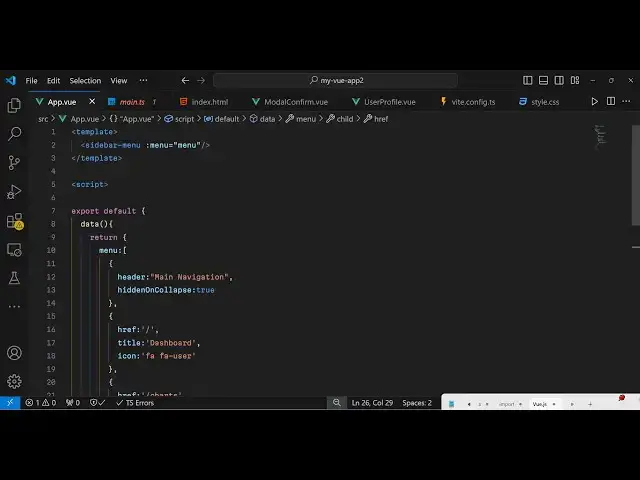
the main file which is app. viw
2:44
component so right
2:47
here we will actually create our
2:50
template inside vuejs so we will be
2:52
creating this embedding this sidebar
2:55
menu
2:56
component and we will actually pass an
2:59
attribute
3:00
so colon menu
3:03
so so here we need to now Define this
3:07
actual component pass it as this
3:09
attribute so now we write our typescript
3:12
so script so inside this we export
3:16
default a simple vuejs component and
3:20
inside that we will pass this
3:23
data and it will return a very basic
3:27
menu so we are defining this attribute
3:30
that we are passing
3:32
it so inside this menu uh it will
3:35
contain array of items menu items so
3:39
each menu item will be having this
3:41
object which contains the Header
3:43
information so you can
3:46
have any item here main navigation
3:50
hidden on
3:51
collapse so there is this property here
3:54
it will be hidden when you collapse the
3:56
menu so you will just set this property
3:59
to true
4:00
and then you can Define more menu
4:03
items so this will be the homepage
4:08
so so you can give it a title here which
4:11
will be
4:16
dashboard and the third property if you
4:19
want to also set a icon so you'll be
4:21
using phont awesome so we can use Font
4:25
as some icons directly fa stands for
4:28
font is awesome so for this you need to
4:31
include the CDN for font awesome so just
4:33
go to your index.html file I've already
4:36
included the font awesome CDN so just
4:39
include this CDM so that you can use the
4:42
phont awesome directly right here by
4:44
passing it in icon
4:47
name so then you can Define some more
4:49
menu
4:52
items similarly so for this it will
4:56
navigate to/ charts
4:59
we'll set it title charts and then an
5:04
icon
5:06
Fafa chart
5:09
area and you can even Define a sub menu
5:12
as well by providing this child property
5:14
so this actually refers that if you want
5:17
to also have a submenu item
5:20
so chart
5:24
sublink so you can Define in this way
5:27
you can create a very beautiful looking
5:30
uh navigation sidebar menu you define
5:34
the items you can even Define sub items
5:36
as well like this that's all that we
5:39
need to do right here and if you refresh
5:41
your browser you will see this
5:43
navigation menu appearing so if you
5:46
refresh by default it will be now be
5:48
showing and if you
5:52
see you can toggle this now it appears
5:56
like this so whenever user hovers on to
5:59
any navigation item it looks something
6:01
like
6:06
this so default styling is located in
6:09
this CSS file so you can open the CSS
6:12
file if you want to change the colors as
6:14
well so CSS file is located so you can
6:19
check the node modules folder you can
6:21
troubleshoot if you want to customize
6:23
this Lo and field by default this blue
6:25
color is selected so you can even
6:27
customize this as well by just editing
6:29
that CSS file
6:31
so this is actually the module uh which
6:35
is view sidebar menu you can install it
6:38
and use it inside view3 application for
6:41
diff uh designing this awesome looking
6:44
navigation sidebar menu so thank you
6:46
very much for watching this video and do
6:49
check out my website as well free mediat
6:51
tools.com uh which contains thousands of
6:55
tools regarding audio video and image
6:57
and I will be seeing you in in the next
7:00
video