Up next in 10

Vue.js 3 vue-files-preview Example to Build File Viewer to Embed Images,Video,PDF,DOCX Files
Jan 21, 2025

Get the full source code of application here:
https://codingshiksha.com/vue/vue-js-3-vue-files-preview-example-to-build-file-viewer-to-embed-imagesvideopdfdocx-files-in-browser/
Hi Join the official discord server to resolve doubts here:
https://discord.gg/cRnjhk6nzW
Visit my Online Free Media Tool Website
https://freemediatools.com/
Buy Premium Scripts and Apps Here:
https://procodestore.com/
Show More Show Less View Video Transcript
0:00
uh hello guys welcome to this video so
0:02
in this video I will show you a file
0:05
reader inside vuejs 3 in a package which
0:08
you can read almost all type of files so
0:12
this package supports all files so we
0:14
have a example right here and if I
0:17
upload a doc file Word document file and
0:20
as I select this word document file you
0:21
will see the word document file will be
0:24
displaying inside the browser and you
0:26
can view it read it online in the
0:29
browser
0:32
so this is the word document dox
0:36
file and similarly we can select an MP3
0:39
file as well so this is playing in this
0:43
player so you can play this file in this
0:46
nice little audio
0:49
player and similarly we have all these
0:52
files here we can even display SVG files
0:55
as well in right in the browser it's say
0:57
SVG graphic file
1:01
and then you can display this PNG
1:05
image then the video as well you can
1:09
play it in a video player and lastly we
1:11
also have the PDF viewer as well so you
1:13
going to directly read them inside the
1:15
browser so the package that I'm talking
1:18
about is View files preview so if you go
1:21
to npmjs.com just search for this
1:24
package View files preview it's
1:26
specifically made for view applications
1:31
so this is actually the module
1:36
here so it's almost got this is actually
1:39
the command I've already installed it
1:41
and 642 weekly downloads so now to get
1:45
started here you need to go to your
1:47
main. typescript file and first of all
1:50
we need to register this
1:52
module
1:55
so so right in this file we need to add
1:58
the import statement
2:10
so after we add this module so you can
2:12
see 3.95 megabytes the size of this
2:15
module so we also need to import the CSS
2:18
file of this module as well so which
2:28
is so ni 19 kiloby the CSS file of this
2:31
module as well and now we need to Simply
2:34
register it inside this so we simply say
2:37
app.use View files preview so we are
2:39
directly passing the name of the
2:42
plugin so these three lines of code you
2:44
just need to write it in order to
2:45
register it now you can close this file
2:48
and come to your app. viw
2:51
file and here you'll be writing the
2:54
template here alongside with your
2:56
typescript code so here again in the
2:59
script tag we need to import this module
3:01
so I will just change this language to
3:05
typescript setup language is equal to
3:09
typescript and then we'll be requiring
3:11
the necessary packages which will be the
3:13
reference coming from The
3:17
View and then we need to declare a
3:20
variable where upload file so here
3:24
you'll be allowing the user to upload a
3:27
certain file
3:42
so here we just declare a simple
3:44
variable upload file of type
3:51
file and then we will have another
3:53
variable here which will be of file
3:55
input
4:01
this will be of type HTML input
4:08
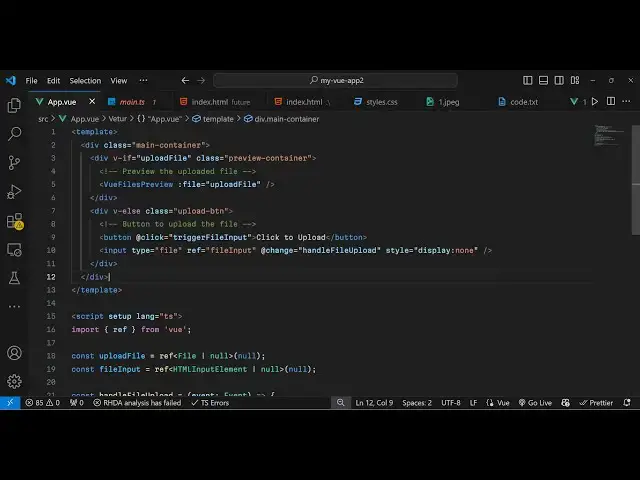
element so now inside the template we
4:11
will display this
4:15
uh div tag and just give it a class
4:26
here you'll just have a if tag here
4:29
which which is upload
4:32
file so we're just giving this uh if
4:36
condition that this upload file if it is
4:38
there then only execute this code so
4:40
just give it a class here which will be
4:42
preview
4:46
container and then we will simply render
4:49
this preview component View
4:51
files
4:55
preview and
5:00
we render this component and it actually
5:02
takes some
5:05
parameters the actual file that needs to
5:08
be preview so you'll simply pass this
5:11
file here the very the only component
5:15
the only argument it takes the file that
5:18
you want to
5:22
preview and after this we will also add
5:25
a button so that the user can
5:32
select a file from their computer so we
5:35
simply add a button right here which
5:37
will
5:38
say select
5:41
file and then we'll simply bind an
5:43
onclick event handler so whenever the
5:46
user clicks on this button you will
5:48
simply say trigger file
5:52
input so we just need to Define this
5:55
function right here
6:05
so file input. value question mark
6:16
click
6:22
so after this button here you'll be
6:25
having this input field here input type
6:28
file
6:30
we attaching this reference file input
6:32
and binding and onchange event
6:40
hander so handle file upload so now we
6:44
also need to Define this function so
6:46
this function will read the file and
6:48
pass this file to the actual component
6:51
where we'll be rendering the file so
6:53
handle file upload so e parameter will
6:56
be passed here e parameter will be of
7:15
type so in this way you can get access
7:18
to the file and then
7:32
so if you refresh your application now
7:34
uh you have this button of choose file
7:37
and as soon as you select the file you
7:39
will see the file will display in this
7:41
nice toal viewer This Is The Word
7:43
document file and same goes with all
7:46
other files as well so if you select SVG
7:49
files then it will display it so this is
7:51
a nice little component View files
7:52
preview you can use it and all the
7:55
source code will be given in the
7:57
description of the video and also check
7:59
out my website free mediat tools.com uh
8:03
which contains thousands of tools
8:04
regarding audio video and MH and I will
8:07
be seeing you guys in the next video