live_tv
Livestream Starting Soon
00
Hours
:
00
Minutes
:
00
Seconds
Up next in 10

Vue.js 3 Tutorial to Build Image Lightbox Editor with vue-easy-lightbox Library in TypeScript
Jan 9, 2025

Get the full source code of application here:
https://gist.github.com/gauti123456/f4519e067cfe1698618b3843284df9e0
Show More Show Less View Video Transcript
0:00
uh hello guys welcome to this video so
0:03
in this video I will show you a view js3
0:07
light box image plug-in uh where you can
0:10
actually select any image files from URL
0:13
or local images so the slidebox plugin
0:17
allows you to view images with all these
0:20
controls out there you can zoom in zoom
0:22
out you can view this image and you can
0:26
rotate the image as well so in a nice
0:28
little window you can view the image so
0:31
user can select zoom in pan Zoom all
0:35
these controls are
0:38
available and we can also load multiple
0:41
images so this is for single image and
0:43
now we have a button for showing
0:45
multiple pictures so we have the slider
0:48
here which will navigate to the second
0:49
image you will see we are loading these
0:51
images our local images and we see these
0:55
controls zoom
0:57
in which is rotation plugins all these
1:01
controls are available you can load
1:03
multiple images with a nice little light
1:06
boox plugin
1:08
so the actual plugin is uh if you go to
1:11
npmjs.com just search for this plugin
1:14
which is view easy light box it's
1:18
specifically made for
1:21
view3 version so it's compatible with
1:25
the latest version view easy light box
1:28
this is actually the name of the package
1:30
uh the command is very simple I've
1:32
already installed the library it's
1:36
almost having 177,000 weekly downloads
1:40
so so it is compatible it only works
1:43
with the latest version which is vuejs
1:45
3 and uh after installing it now uh we
1:50
write the actual app. View files I will
1:53
show you from scratch so now first of
1:56
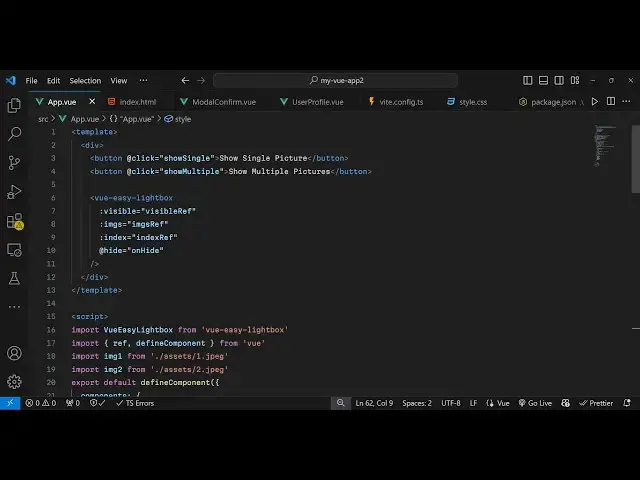
all inside your template we will
1:58
have Define find two buttons in the
2:03
HTML so the first button will only work
2:06
for single image so you'll says show
2:09
Single
2:11
image and now we'll have a second button
2:14
which will say
2:16
show
2:17
multiple images so we'll just bind an
2:20
onclick listener to on both of these
2:23
buttons so you'll say at the rate click
2:25
so when you click the button we execute
2:28
this function which is show
2:30
single and when we click the second
2:33
button we bind another click list now
2:36
which I will call this as
2:39
show
2:41
multiple so now we just need to Define
2:44
these functions in the Ty typescript in
2:48
the script
2:50
tag so we
2:54
load so you just write
2:57
this typescript code
3:00
just
3:02
wait so right after this we will
3:07
have the script
3:15
tag so now to import this module we
3:18
simply use the import statement and then
3:20
we say view
3:25
easy uh light box and it will be coming
3:29
from this pack page view easy light box
3:31
this package we import this module by
3:34
this import statement and then we also
3:38
need to
3:40
import uh the buil-in ref and Define
3:47
component which will be coming from the
3:49
base package of
3:51
view and then we need to import our
3:54
images in my assets directory so it is
3:57
present
4:03
so these images are present in my assets
4:06
directory I'm just loading it
4:11
from so if you just see we have this
4:14
assets directory which is a built-in
4:15
directory inside vuejs so we have all
4:17
these images present so I'm just loading
4:19
it one by one
4:25
so you can load
4:29
your own images like
4:35
this so after loading all these images
4:38
now we just need to export the plugins
4:42
so for exporting it we use Define
4:45
component and here we
4:47
export the components which is our third
4:51
party plugin which is view easy light
4:54
box and then we need to
4:57
export put a comma and then the setup
5:00
method and inside this
5:03
we declare some variables uh first of
5:08
all a
5:10
reference so visible reference I will
5:13
declare this variable and initial value
5:15
will be false so the images will not be
5:18
displayed and again we have also have
5:21
index ref initial value will be zero so
5:24
this represents uh the first
5:27
image and then we'll be having images
5:30
array as
5:33
well so initial value will be an empty
5:37
array and
5:41
then we will Define uh both these
5:44
functions show single and show multiples
5:46
so we'll be first of all be defining the
5:48
method for showing a single image so
5:51
show
5:53
Single so this will be a
5:57
simple function
6:00
so here we manipulate this image
6:02
reference variable that we declared so
6:05
image reference. value and we'll be
6:07
loading this image from a URL so if you
6:11
have a remote website you can go to it
6:13
unsplash I copy image address so I just
6:16
need to paste the address of the image
6:19
like
6:21
this and then after pasting
6:27
it we call the
6:31
method which
6:36
is on show so this method will be
6:40
responsible for showing the image so I
6:42
will just declare this method on
6:49
show so it actually make the visible ref
6:53
property from false to true so you'll be
6:55
manipulating this property and set this
6:57
to true so now the image will display
7:01
so show
7:04
Single so now we just need to export all
7:07
these methods that we defined
7:12
so right here if you see we have this
7:15
setup
7:20
function yeah so just after this
7:25
uh we have this return statement and we
7:30
return all these functions which is
7:32
visible
7:34
ref index ref and
7:41
images and then we have the show
7:54
Single so we also need to Define this
7:58
function as well which
8:00
corresponds to show multiple so if you
8:02
want to show multiple images you define
8:04
this function as well so which is
8:06
responsible for showing multiple
8:08
images so show
8:15
multiple so you say image refi the
8:18
variable and we'll be putting the value
8:20
here and we'll be initializing an array
8:24
here which will contain the images that
8:25
we loaded
8:27
so loading all these images one by
8:31
one so we have imported all these four
8:34
images that we imported and we are
8:36
passing it inside this array that we
8:38
want to show these images and now we'll
8:41
be setting the first image index RI
8:44
property value to be
8:46
zero and then again we'll be calling
8:48
this function on show which
8:51
will show this image and then we export
8:55
this function which is show multiple
9:00
and one more function that we need to
9:01
export which is on height so this
9:05
function will be responsible for hiding
9:08
the image so this plug-in supports this
9:12
function as well I will just make the
9:14
visible ref property from again true to
9:18
false and I will export this method as
9:20
well which
9:23
is on
9:26
height so if you refresh your brow
9:29
browser uh you will see these two
9:31
buttons appearing if you click on show
9:33
Single image
9:43
uh let me see what is a problem we
9:49
exported oh we are missing this uh
9:52
component because we haven't configured
9:54
the component yet just after these two
9:57
buttons we just need to embed the
9:58
component which is view
10:01
easy light box so we just forgot
10:05
to embed this component view easy light
10:08
box and it actually takes some options
10:11
here first of all the property of
10:14
visible so you'll be attributing this to
10:17
visible ref which is a Boolean parameter
10:19
either true or false whether the image
10:21
is visible or not and then the images
10:24
that we want to display so images
10:28
reference which is an array here which
10:30
we configured and
10:33
index we have all these variables
10:35
declared in the typescript code so we
10:37
are just attaching these attributes so
10:40
hide is a actually callback function so
10:43
when user clicks it the image will hide
10:46
so it takes four parameters visible
10:49
which is a Boolean parameter whether it
10:51
accepts whether the image show or not
10:53
the second parameter is the images which
10:55
is an array of images that you want to
10:57
display then this height par meter which
10:59
is a call back function for hiding the
11:01
images and this is a index
11:04
parameter so if you refresh now uh click
11:07
on the button you will see your image
11:08
will display in a nice little light box
11:11
plugin which will have all these
11:13
controls for zooming in you can rotate
11:16
the image as well and uh now for showing
11:20
multiple images it is showing these
11:22
multiple images with the next controls
11:26
you can go to previous image next image
11:28
and we see all these controls available
11:31
zooming in zooming out we have can
11:33
rotate the image as well
11:36
so so in this way guys you can use this
11:39
package in View js3 application to
11:43
easily integrate The View lightbox
11:45
plugin using this package so thank you
11:49
very much for watching this video and do
11:51
check out my website as well free mediat
11:53
tools.com uh which contains thousands of
11:56
tools regarding audio video and image
11:59
and and I will be seeing you guys in
12:00
next video