0:00
uh hello guys welcome to this video so
0:02
in this video I'll show you a markdown
0:04
theme uh by Microsoft in vs code
0:07
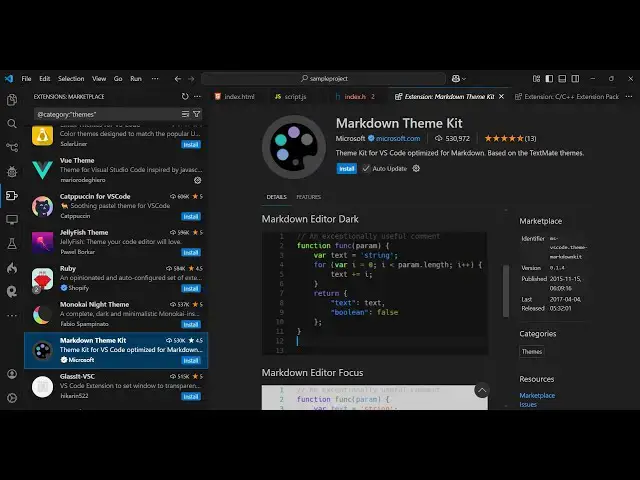
extension so if you go to extensions and
0:10
just type here markdown theme uh this is
0:13
actually the extension that I'm talking
0:14
about uh it's developed by Microsoft and
0:17
it's almost got 530,000
0:20
downloads and it looks something like
0:22
this it has four themes just click the
0:25
install button and then activate this so
0:28
now you will see you will be able to
0:30
navigate these it has four
0:33
themes this is actually the main theme
0:36
markdown editor it's a light theme so if
0:39
you have a markdown file here can see
0:42
that it does the formatting pretty well
0:46
this is the light theme let me just
0:51
theme so this is actually the Dark theme
0:55
simple let see this is your markdown
0:58
file sample do MD and uh you can see
1:04
so nice little formatting is there and
1:12
focus so now if you see whenever you
1:16
focus on a particular element in
1:18
markdown it will add this nice little
1:21
white background color so this simply
1:23
tells you on which line your cursor is
1:27
so if you put a cursor on a particular
1:30
line it will add this nice little
1:32
background color of white just
1:35
highlighting it and there is a fourth
1:37
theme which is there which actually
1:40
turns the whole background color to
1:42
Yellow this is actually a markdown theme
1:46
here so typically markdown files are
1:49
stored in a background color of yellow
1:52
so that's why it has a nice little
1:56
background color of yellow this is the
1:58
four themes are there inside this
2:01
extension this is a light this is dark
2:05
this is a focus one and this is yellow
2:08
so it's developed by Microsoft you can
2:10
safely use it it's 5 31,000 it's
2:13
completely free and to
2:17
use apart from that if you search in the
2:22
see a GitHub dark markdown theme as well
2:40
so in this way you can use this
2:47
extension so this is actually the
2:50
extension markdown theme kit so simply
2:52
install and use it so thank you very
2:54
much for watching this video and also
2:57
visit my website as well free mediat
3:00
which contains thousands of tools
3:02
regarding audio video and image and I
3:05
will be seeing you in the next video