Up next in 10

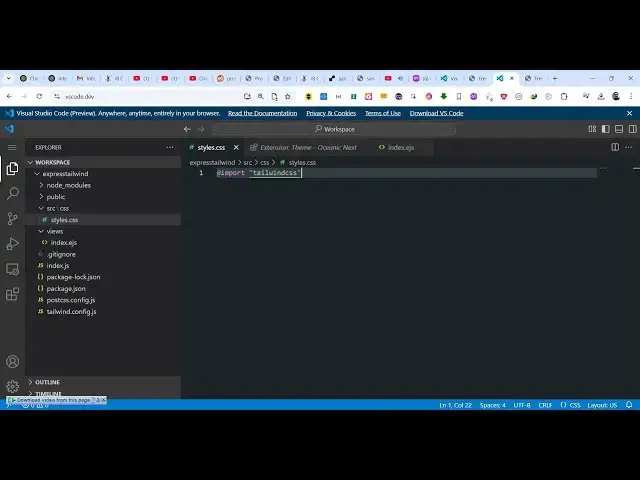
Visual Studio Code Tutorial to Open IDE in Browser to Edit and Write Code in Browser
Feb 15, 2025

Get the full source code of application here:
Hi Join the official discord server to resolve doubts here:
https://discord.gg/cRnjhk6nzW
Visit my Online Free Media Tool Website
https://freemediatools.com/
Buy Premium Scripts and Apps Here:
https://procodestore.com/
Show More Show Less View Video Transcript
0:00
uh hello guys welcome to this video so
0:02
in this video I will show you how to use
0:04
this Visual Studio code
0:07
uh IDE right inside your browser itself
0:11
so you don't need to install Visual
0:13
Studio you can directly use it in the
0:14
browser by visiting this website vscode
0:19
ddev so if you directly type this in the
0:22
browser this code editor will pop in and
0:25
you can directly write code right here
0:30
you can directly open any
0:32
folder from your computer so if
0:36
any project that you want
0:41
to so let's suppose I select this folder
0:45
so it will simply say you need to Grant
0:47
the permissions so it will fetch all the
0:50
files of this folder and display it you
0:52
can see now you can open individual file
0:57
here control plus you can zoom in or
1:00
zoom
1:04
out so in this
1:08
way so you can go to the menu by
1:10
pressing this button right here and this
1:13
menu will
1:14
open and you can open a new terminal by
1:17
going to this option so terminals are
1:20
not available in the web AG so you can't
1:23
directly run the code but
1:27
uh for this you do need the vs code code
1:30
desktop version but this version is very
1:32
much helpful if you just want to see the
1:35
code and just uh read the code not
1:39
essentially run it you can't run the
1:41
code here so that's one disadvantage but
1:45
uh you can safely uh read the code it's
1:49
no problem by going to this website
1:52
vscode DD it's completely free and uh
1:56
you can just see vs code preview
1:59
anywhere any time entirely in your
2:00
browser so you can't run the code that's
2:03
one disadvantage but you can safely read
2:06
your code by opening the folder inside
2:09
this and it will fetch all the files and
2:11
you can
2:13
directly code
2:15
here and as you make the change here it
2:18
will able to edit files in X you just
2:20
need to click on Save changes so it will
2:22
actually save the changes that you have
2:24
done you can't run it but you can modify
2:27
the code and as you just modify it it
2:31
will automatically detect and then you
2:33
just need to click save
2:36
changes and automatically it will save
2:39
you can even go to the menu and click on
2:41
this button
2:42
save to save the changes it's a
2:45
completely in the browser IDE which lets
2:48
you edit your codes directly so you
2:52
don't need the desktop version but one
2:54
disant disadvantage is that you can't uh
2:58
run the code but you can even install
3:01
extensions as well some extensions will
3:03
be disabled because they can't work in
3:05
the web version so one such extension I
3:10
see is live
3:14
server so yeah so this live server
3:17
extension is also not available because
3:19
you can't run the code in the browser so
3:22
for this you do need the desktop
3:26
version so these extensions are disabled
3:30
so you can see that you can't click on
3:32
them so majority of the extensions are
3:35
not available for the web version but
3:37
some extensions are available you
3:41
can like you can change the theme of the
3:44
vs code let's
3:52
suppose so if you pick this theme Here
3:55
click on install you just need to trust
3:58
the publisher as soon as you you can
4:00
edit the themes right here so as soon as
4:03
you open it you will see your theme will
4:05
be changed so in this way you can
4:07
install extensions to actually change
4:09
your theme as well so it's very easy to
4:12
do
4:12
that you can have GitHub theme Trula
4:16
just select your favorite theme and just
4:19
you can play with these options so
4:21
that's completely free and uh it doesn't
4:24
save any files on your system it works
4:26
entirely in the browser so that thing is
4:28
very easy to do just install the
4:30
extension and just see the various
4:32
themes which are there and it's very
4:35
easy to do and you don't need to install
4:37
anything on your
4:39
computer can just play with these themes
4:41
options so just select whatever theme
4:44
that you
4:54
like it's very fast to do it in the
4:57
browser because you don't need to store
4:59
any files just click that as soon as you
5:03
click it you will be able to see all the
5:06
themes which are available so that thing
5:08
is very
5:13
good click on that
5:18
and so in this way guys you can use the
5:21
web version of the vs code directly in
5:24
the browser while visiting vscode ddev I
5:27
basically showed you all the features
5:29
that that it's supports so thank you
5:31
very much for watching this video and
5:33
also check out my website as well freem
5:35
mediat tools.com uh which contains
5:38
thousands of tools regarding audio video
5:40
and MH uh I will be seeing you in the
5:43
next video
#Programming
#Development Tools