Up next in 10

This VSCode IDE Extension Automatically Generates .gitignore Files For Your Coding Project
Jul 8, 2025

Get the full source code of application here:
Show More Show Less View Video Transcript
0:00
Uh hello guys, welcome to this video. So
0:02
in this video, I'll show you how to
0:04
generate the git ignore files which is
0:07
specially used inside uh git bash for
0:10
your coding projects inside VS code. So
0:12
if you go to extensions, this is
0:14
actually the extension dot get ignore
0:18
generator. If you just type this in the
0:20
search bar, uh the very first extension
0:23
which comes right here, it's developed
0:25
by this person. It's almost having
0:27
287,000
0:29
downloads. So it generates this get
0:31
ignore file automatically. So simply
0:34
click the install button to install this
0:36
extension. So once the extension is
0:38
installed, it will be enabled globally.
0:40
And now it's very easy to generate the
0:42
git ignore files. Simply open your
0:45
command pallet by the shortcut key
0:47
control shiftp
0:49
and just write here generate
0:52
get ignore file and you will actually
0:54
see this option appearing right here and
0:57
simply select this option. After
0:59
selecting this option by default it will
1:02
be windows will be selected because
1:04
you're generating on a windows machine.
1:06
If your machine is different you can
1:08
untoggle this option and visual studio
1:11
is also selected.
1:13
You can even open command pallet by
1:15
going to view and open command pallet.
1:19
And once you select this option generate
1:21
get ignore file and here you can select
1:23
from a various programming languages you
1:26
will see in the inside the drop-down. So
1:28
if you're developing it for NodeJS you
1:31
simply select node here and simply
1:33
select this node option.
1:40
So just select your programming language
1:43
in which project you're working and
1:44
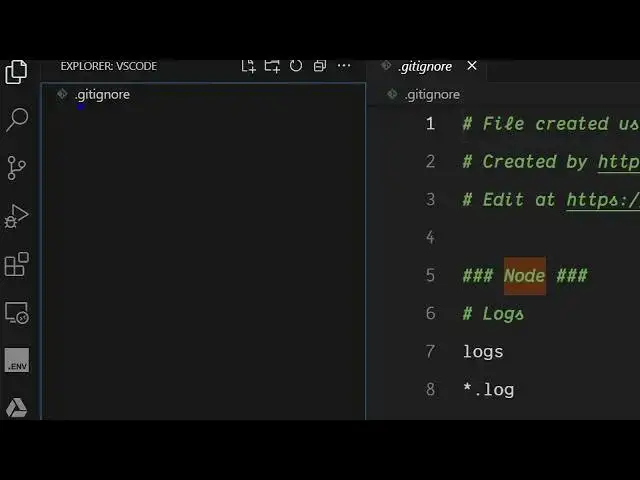
simply click okay. And as soon as you
1:47
click okay, you will see it will
1:48
generate this git ignore file
1:50
automatically for you inside the root
1:52
directory. And this g ignore file is
1:55
very much necessary for git patch to
1:57
actually tell which files to ignore. So
2:00
you will see it has created this file
2:06
automatically. So this will save you a
2:08
lot of time. Simply
2:12
install this extension and activate
2:14
this. After activating it, you can
2:17
generate git ignore files of any
2:19
language.
2:23
So it supports all these languages. You
2:25
will see
2:27
in the drop down here all the languages
2:30
are there.
2:43
So if you're developing for a specific
2:45
project here Laravel you will see
2:47
Laravel is also there and then
2:50
automatically it will create this get
2:52
ignore file. So in this easy way you can
2:54
create this simply install this
2:55
extension. Uh also check out my website
2:58
freemediatools.com
3:00
uh which contains thousands of tools.
#Programming
#Software