0:00
uh hello guys welcome to this video so
0:02
in this video I will show you how to add
0:04
this stopwatch or timer inside your vs
0:07
code to keep track of how many how much
0:10
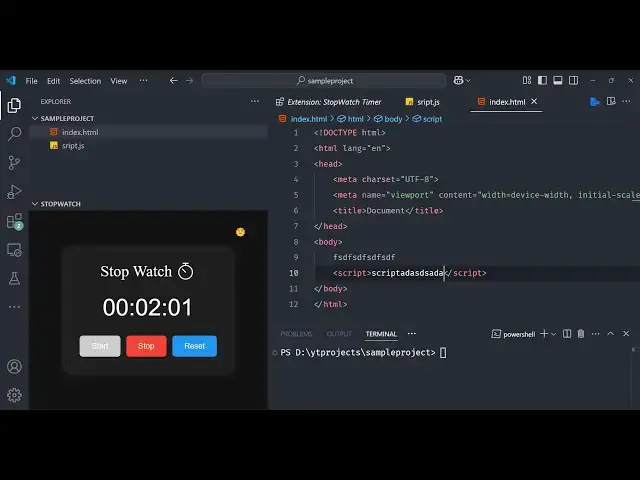
time you are coding right here so if you
0:12
are writing code here side by side you
0:14
will see this stop for timer right here
0:19
you can have three options either you
0:21
can stop it to keep track of how much
0:23
time that you took for writing a certain
0:25
amount of code or you can reset the
0:28
timer and then click the start button
0:30
and now the time will start so this can
0:32
be useful in various scenarios so if you
0:35
are taking a test of the student then
0:37
you can start this timer just keep track
0:39
of how much time they took to write the
0:41
code or in general also if you are
0:44
coding you want to keep track of how
0:46
much time that you're coding so you can
0:48
even add this timer so let me show you
0:52
the extension which is there so if you
0:54
go to the extensions just search for
0:58
stopwatch so this extension will come so
1:02
there are various extension this is the
1:07
one stopwatch timer this is the one that
1:10
I'm using it is developed by y
1:13
3191 it's a fairly new extension 16
1:16
installs simply install this and after
1:20
installation just refresh your Explorer
1:23
and then at the bottom side you will see
1:27
section it will appears like this this
1:32
uh make bigger like this you
1:37
can side by side you can make the files
1:41
here and whenever you're writing you can
1:48
appearing so side by side as you're
1:50
writing the code here in vs code you
1:52
will see side by side that stop watch
1:54
timer also so it can be useful in
1:57
various scenarios that I already
2:00
so if you like it then you can install
2:02
this extension it's fairly minimalistic
2:05
extensions but it does the job pretty
2:10
so so like this so thank you very much
2:13
guys for watching this video and also
2:17
check out my website as well free mediat
2:19
tools.com uh which contains thousands of
2:22
tools regarding audio video and image
2:25
and I will be seeing you in the next