Up next in 10


Get the full source code of application here:
Show More Show Less View Video Transcript
0:00
Uh hello guys, welcome to this video. So
0:02
Uh hello guys, welcome to this video. So
0:02
Uh hello guys, welcome to this video. So in this video, I'll show you a website
0:04
in this video, I'll show you a website
0:04
in this video, I'll show you a website where you can explore and find out the
0:07
where you can explore and find out the
0:07
where you can explore and find out the VS code themes. So this is the website.
0:09
VS code themes. So this is the website.
0:10
VS code themes. So this is the website. If you go to the browser, simply type
0:11
If you go to the browser, simply type
0:12
If you go to the browser, simply type vscode themes.com and right inside this
0:15
vscode themes.com and right inside this
0:15
vscode themes.com and right inside this website, it contains a lot unlimited
0:19
website, it contains a lot unlimited
0:19
website, it contains a lot unlimited number of VS code themes. So it actually
0:22
number of VS code themes. So it actually
0:22
number of VS code themes. So it actually gives the name of the theme. Likewise,
0:24
gives the name of the theme. Likewise,
0:24
gives the name of the theme. Likewise, GitHub theme that you can see right
0:26
GitHub theme that you can see right
0:26
GitHub theme that you can see right here. You will see the short little
0:27
here. You will see the short little
0:28
here. You will see the short little preview of the theme. how the theme
0:29
preview of the theme. how the theme
0:29
preview of the theme. how the theme looks like and if you are interested you
0:33
looks like and if you are interested you
0:33
looks like and if you are interested you can copy this name and install this
0:35
can copy this name and install this
0:35
can copy this name and install this extension. So it
0:38
extension. So it
0:38
extension. So it so it has unlimited number of themes
0:41
so it has unlimited number of themes
0:41
so it has unlimited number of themes right here and it becomes very much easy
0:43
right here and it becomes very much easy
0:43
right here and it becomes very much easy for you to actually search for a
0:45
for you to actually search for a
0:45
for you to actually search for a specific theme right here as you can
0:46
specific theme right here as you can
0:46
specific theme right here as you can basically select here in the search bar.
0:49
basically select here in the search bar.
0:49
basically select here in the search bar. If you simply type GitHub now it will
0:52
If you simply type GitHub now it will
0:52
If you simply type GitHub now it will filter out all the GitHub related themes
0:54
filter out all the GitHub related themes
0:54
filter out all the GitHub related themes and it will show to you. Likewise uh you
0:58
and it will show to you. Likewise uh you
0:58
and it will show to you. Likewise uh you can even sort this by the trending
1:00
can even sort this by the trending
1:00
can even sort this by the trending themes which are there. So right in the
1:03
themes which are there. So right in the
1:03
themes which are there. So right in the trending section is also there. You can
1:05
trending section is also there. You can
1:05
trending section is also there. You can simply say trending. So now these are
1:08
simply say trending. So now these are
1:08
simply say trending. So now these are some of the trend trending themes which
1:10
some of the trend trending themes which
1:10
some of the trend trending themes which are there. We can see colorful GitHub.
1:13
are there. We can see colorful GitHub.
1:13
are there. We can see colorful GitHub. If I remove this search and just click
1:17
If I remove this search and just click
1:17
If I remove this search and just click on trending and if I refresh
1:21
on trending and if I refresh
1:22
on trending and if I refresh go to VS code and if I now these are
1:26
go to VS code and if I now these are
1:26
go to VS code and if I now these are some of the trending themes out there.
1:28
some of the trending themes out there.
1:28
some of the trending themes out there. Neo Kirao theme. So this website is very
1:31
Neo Kirao theme. So this website is very
1:31
Neo Kirao theme. So this website is very useful. So you can see unlimited number
1:35
useful. So you can see unlimited number
1:35
useful. So you can see unlimited number of themes are there. So inside
1:37
of themes are there. So inside
1:37
of themes are there. So inside pagination.
1:39
pagination.
1:39
pagination. So
1:40
So
1:40
So so now once you selected any sort of
1:43
so now once you selected any sort of
1:43
so now once you selected any sort of theme that you want to
1:45
theme that you want to
1:46
theme that you want to activate you can basically select any
1:48
activate you can basically select any
1:48
activate you can basically select any theme and then it will give you the name
1:50
theme and then it will give you the name
1:50
theme and then it will give you the name of the theme and then if you go to VS
1:53
of the theme and then if you go to VS
1:53
of the theme and then if you go to VS code go to extensions and simply type
1:55
code go to extensions and simply type
1:56
code go to extensions and simply type this name that it gives you and you can
1:58
this name that it gives you and you can
1:58
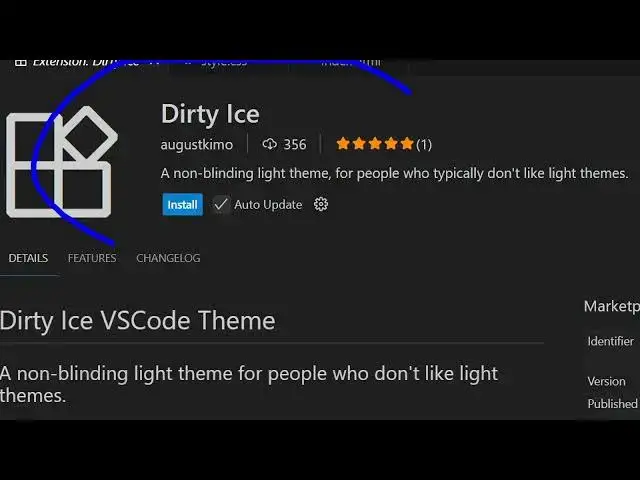
this name that it gives you and you can see this is actually this theme. Click
2:01
see this is actually this theme. Click
2:01
see this is actually this theme. Click on install and as soon as you install
2:03
on install and as soon as you install
2:03
on install and as soon as you install this this theme will be activated. So as
2:06
this this theme will be activated. So as
2:06
this this theme will be activated. So as you can see so in this easy way guys you
2:09
you can see so in this easy way guys you
2:09
you can see so in this easy way guys you can activate explore any sort of third
2:11
can activate explore any sort of third
2:11
can activate explore any sort of third party VS code themes using this website
2:16
party VS code themes using this website
2:16
party VS code themes using this website can uninstall this and if you're looking
2:19
can uninstall this and if you're looking
2:19
can uninstall this and if you're looking for a specific language related themes
2:22
for a specific language related themes
2:22
for a specific language related themes you can see this is showing you
2:24
you can see this is showing you
2:24
you can see this is showing you JavaScript in the drop-down you can
2:26
JavaScript in the drop-down you can
2:26
JavaScript in the drop-down you can select PHP as well. So now the PHP code
2:29
select PHP as well. So now the PHP code
2:29
select PHP as well. So now the PHP code will be written right here and you can
2:32
will be written right here and you can
2:32
will be written right here and you can even toggle the dark theme. If you only
2:35
even toggle the dark theme. If you only
2:35
even toggle the dark theme. If you only want to see the dark themes, it will
2:36
want to see the dark themes, it will
2:36
want to see the dark themes, it will show you the dark themes only. So this
2:39
show you the dark themes only. So this
2:39
show you the dark themes only. So this is a very useful website guys.
2:41
is a very useful website guys.
2:41
is a very useful website guys. Definitely visit vscode themes.com. Here
2:44
Definitely visit vscode themes.com. Here
2:44
Definitely visit vscode themes.com. Here you can explore
2:46
you can explore
2:46
you can explore uh third party VS code themes which are
2:48
uh third party VS code themes which are
2:48
uh third party VS code themes which are very much popular and once you simply
2:52
very much popular and once you simply
2:52
very much popular and once you simply search for the name and you can see
2:56
search for the name and you can see
2:56
search for the name and you can see so I personally use this website a lot
2:58
so I personally use this website a lot
2:58
so I personally use this website a lot to actually
3:00
to actually
3:00
to actually get access to the themes which are
3:02
get access to the themes which are
3:02
get access to the themes which are released every day by VS code. So it
3:05
released every day by VS code. So it
3:05
released every day by VS code. So it gets added inside this website. So it
3:07
gets added inside this website. So it
3:07
gets added inside this website. So it becomes very much easy to actually get
3:11
becomes very much easy to actually get
3:11
becomes very much easy to actually get whichever theme that you like. So you
3:13
whichever theme that you like. So you
3:13
whichever theme that you like. So you can easily access it. Just copy the name
3:16
can easily access it. Just copy the name
3:16
can easily access it. Just copy the name and paste it in the extensions tab and
3:19
and paste it in the extensions tab and
3:19
and paste it in the extensions tab and right here
3:20
right here
3:20
right here simply activate
3:23
simply activate
3:23
simply activate the theme. After activating it, you
3:26
the theme. After activating it, you
3:26
the theme. After activating it, you basically
3:31
so now you can see uh it has a various
3:37
so once you activate your theme likewise
3:39
so once you activate your theme likewise
3:39
so once you activate your theme likewise you can see that. So definitely install
3:43
you can see that. So definitely install
3:43
you can see that. So definitely install this or go to this website vscode
3:46
this or go to this website vscode
3:46
this or go to this website vscode themes.com and explore and uh find out
3:50
themes.com and explore and uh find out
3:50
themes.com and explore and uh find out third party VS code themes in various
3:53
third party VS code themes in various
3:53
third party VS code themes in various languages you can sort this and also
3:55
languages you can sort this and also
3:55
languages you can sort this and also search. Thank you very much for watching
3:57
search. Thank you very much for watching
3:57
search. Thank you very much for watching this video and also check out my website
4:01
this video and also check out my website
4:01
this video and also check out my website freemediatools.com
4:03
freemediatools.com
4:03
freemediatools.com uh which contains thousands of tools.
#Programming
#Software