live_tv
Livestream Starting Soon
00
Hours
:
00
Minutes
:
00
Seconds
Up next in 10

The Ultimate Postman Alternative Thunder Client in VS Code to Test REST APIs Easily
Jan 9, 2025

The Ultimate Postman Alternative Thunder Client in VS Code to Test REST APIs Easily
Show More Show Less View Video Transcript
0:00
uh Hello friends welcome to this video
0:02
so in this video I will show you a
0:05
postman alternative inside vs code which
0:08
is actually an extension where you can
0:11
test out rest apis right in the vs code
0:14
without leaving it so the name of the
0:16
extension is thunder client this is
0:19
actually the extension so just type in
0:23
the extension tab Thunder client so it
0:27
is having almost 5 million download you
0:30
will see that you can see 4.6 million
0:33
downloads the rating is also
0:37
412 so just install it by clicking the
0:40
install button so once you install this
0:43
extension you will see this uh appearing
0:46
right
0:47
here if you click this and you will
0:51
actually see this option Thunder client
0:53
or you can just press this shortcut
0:55
control shift
0:58
R and this panel will come and here you
1:02
can make a new request so if you have a
1:06
rade API that is
1:08
available if you want to test it you
1:10
will see this editor will open on the
1:14
left hand side you will add enter your
1:16
url where your API is
1:19
located so you can just make just write
1:23
the URL so let's suppose if I enter the
1:26
URL google.com click make a send request
1:30
you will see on the right hand panel
1:32
status 200 okay size it will tell you 24
1:35
KB the time took 250 millisecond and it
1:38
will return the HTML which is returned
1:41
headers cookies so all sort of
1:44
information which Postman also supports
1:47
so it's a good good alternative free
1:49
alternative the main thing is that the
1:51
extension is free totally free and uh
1:54
this is really useful because in if you
1:57
are coding if you're making your rest
1:59
API
2:00
so you don't need to open Postman in
2:02
another window you can do it right here
2:05
from the vs code so let's suppose I take
2:08
an example right here of Json
2:10
placeholder API which is a fake rest API
2:13
for Developers for testing purposes so
2:15
let's suppose I take an example here
2:18
which returns a Json response so this
2:21
request that you make right here it
2:24
returning a Json response so what I can
2:26
do I can paste this request and and make
2:30
a get request here click on send and now
2:33
you will see on the right hand corner we
2:36
return this Json response we are
2:38
successfully getting 200 status code
2:41
okay similarly we can even make a post
2:44
request as well so this Jason
2:45
placeholder API
2:48
also supports the post request and for
2:51
making the post request we just need to
2:55
submit so what we will change right here
2:58
after that typer code SL poost and here
3:03
from the we will change it from get to
3:05
post and in the body section here you
3:08
need to provide the title and the body
3:11
for the post so we will provide the
3:14
title you will say this is the first
3:18
post and put a comma and the second
3:21
property it takes is the body so in this
3:24
way you can provide the body here while
3:27
you are making the post request so we'll
3:28
simply say this is the body of
3:31
the and here we can send this request
3:34
and it is processing it and now you will
3:36
see the rimed the newly created post is
3:40
returned to us with the title that we
3:41
provided and the body and the ID is
3:44
automatically generated by Json
3:45
placeholder and the status has been
3:47
return which is 2011 signifying that the
3:50
record has been created and uh you can
3:54
just see so in similar way you can even
3:57
make put request delete request
3:59
everything
4:00
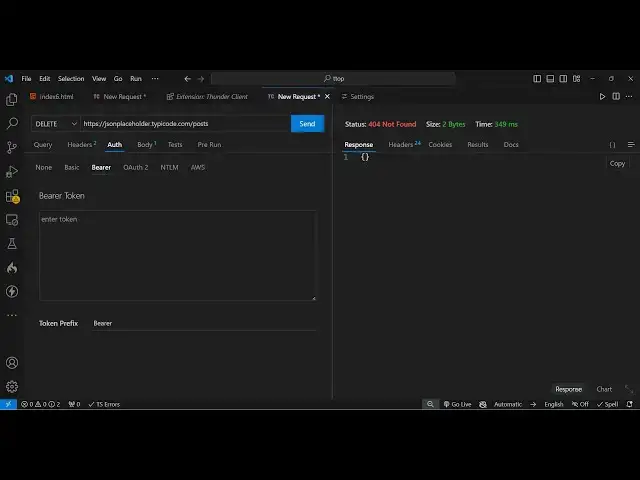
so in this way you can make it for the
4:03
delete request once again for this you
4:05
do need to provide the ID parameter
4:08
which post you want to delete so if you
4:10
now send this it is processing it 404
4:14
not found so this post is not
4:21
found so you'll see that the post is
4:24
deleted now and in this way you can make
4:27
a delete request as well so if you have
4:30
authentication you can provide the
4:33
authorization token right here if you
4:34
have basic authentication beerer here
4:37
you can provide the token so this is
4:39
readymade Tech uh functionality if you
4:43
used Postman in the past you will
4:46
know everything which is available this
4:48
is Postman which is an external software
4:51
for making this rest API calls so the
4:55
interface is having the same
4:58
functionalities you don't don't need
5:00
Postman you can easily do it inside vs
5:03
code using the simple extension the name
5:06
of the extension is thunder client just
5:08
install it and I showed you how to do
5:10
this it's very simple once you install
5:13
it you will be able to do this and thank
5:16
you very much for watching this video
5:18
and do check out my website freem mediat
5:20
tools.com which is a tool-based website
5:22
which contains thousands of free tools
5:25
so thank you very much for watching this
5:28
and I will be seeing you in the next
5:29
video you
#Programming
#Software