Up next in 10

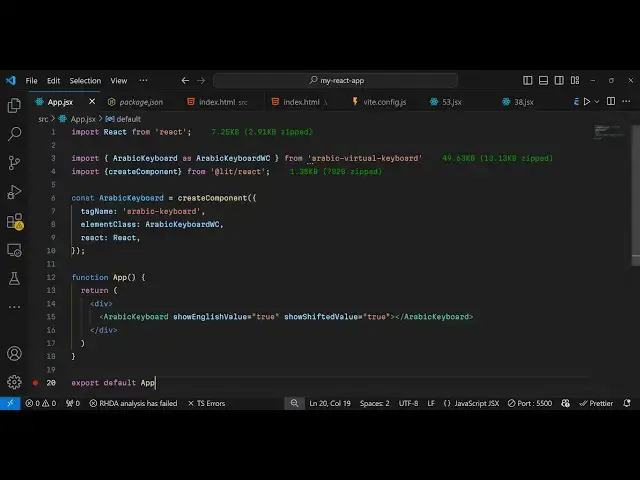
React.js Tutorial to Show Arabic Virtual Keyboard Using arabic-virtual-keyboard in Browser Using JSX
Jan 9, 2025

Get the full source code of application here:
https://gist.github.com/gauti123456/c23eb5c09cf39b425c2389d7e90226ac
Show More Show Less View Video Transcript
0:00
uh hello guys welcome to this video uh
0:02
so in this video I will show you how to
0:05
integrate the virtual keyboard for
0:08
Arabic
0:10
language so virtual keyboard where you
0:12
can type specifically it is designed for
0:15
react is application and it will show
0:18
this Arabic keyboard here where you can
0:20
type simple Arabic if you know Arabic
0:23
here you can use this keyboard to type
0:26
this virtually and inside this input
0:30
field the Arabic will be typed and in
0:33
this input field you can enter it like
0:35
this all these correctors will be
0:37
present in this keyboard and there is
0:39
this package available I will show this
0:41
package to
0:43
you uh if you go to npmjs.com just
0:46
search for this package Arabic virtual
0:50
keyboard uh I've already installed this
0:53
plugin
0:55
uh command is very simple uh I've
0:59
already installed it's having 44 weekly
1:01
downloads so now to integrate this it's
1:06
very simple we come to
1:08
the app.jsx file and we create a simple
1:12
functional
1:13
component and then just at the very top
1:17
we use the import statement and inside
1:20
this we use Arabic keyboard
1:31
we import this from this
1:36
package and then we also need to import
1:40
this as well create component which will
1:42
be coming
1:43
from atate lit react so also require
1:48
this as well and now we'll be creating
1:50
this uh
1:53
component Arabic keyboard and then
1:56
create component we will use it this
1:59
takes the tag
2:01
name which I will say Arabic
2:06
keyboard and then it takes the element
2:09
class which is Arabic keyboard and then
2:13
the
2:15
react so we are developing it for react
2:17
so in this way you can create your own
2:20
component now we can simply embed this
2:23
inside jsx so we say Arabic keyboard and
2:28
then it actually takes some
2:32
options so the first option is take is
2:35
if you also want to show the English
2:38
value there is an option here to also
2:41
show English value I will set it to True
2:44
convert Arabic to
2:46
English then show shifted value to true
2:51
as well so you can embed
2:55
this show English value true show
2:58
shifted value true so so if you see the
3:00
output in the browser it will look
3:03
something like this the keyboard will
3:05
essentially show and now you can type
3:08
the Arabic here very easily if you know
3:10
Arabic you can use this keyboard to type
3:13
it and this will reflected inside this
3:16
input field so it's a great package if
3:20
you want to integrate this keyboard
3:21
directly inside your application you can
3:23
do it to let users type Arabic instead
3:26
of writing
3:28
it so it's very useful some keyboard
3:31
doesn't support Arabic but this package
3:34
will support it so thank you very much
3:37
for watching this video and do check out
3:39
my website as well free mediat tools.com
3:42
uh which contains thousands of tools
3:45
regarding audio video and MH and I will
3:48
be seeing you guys in the next video
#Software
#Intelligent Personal Assistants