live_tv
Livestream Starting Soon
00
Hours
:
00
Minutes
:
00
Seconds
Up next in 10

React.js SheetJS Example to Read Excel File and Show Data in Bootstrap Table in Browser
Jan 9, 2025

Buy the full source code of application here:
Show More Show Less View Video Transcript
0:00
uh hello guys welcome to this video so
0:02
in this video we'll be looking at how to
0:04
read the data from an Excel file and
0:07
show it in the browser in a table like
0:10
structure inside bootstrap we will be
0:13
using reactjs for this and we'll be
0:14
using the sheetjs library and you have
0:18
this application where we allow the user
0:20
to Simply select Excel file once they
0:22
select the Excel file we show the data
0:25
inside nice little formatted table right
0:28
here if you see we have three columns
0:30
name H country and we have set we have
0:33
these column these rows of data in the
0:37
Excel file so I'll show you how to read
0:39
this Excel file in reactjs and we'll be
0:43
using this Library sheetjs which is have
0:46
a company name sheetjs if you just write
0:51
and they actually have this Library exls
0:54
package which I will use it's a nodejs
0:57
package you can directly install which
0:59
can see sheetjs
1:03
Community very famous module almost 2
1:05
million weekly download simply install
1:07
this by using this command npmi XLS and
1:12
also we will also be using bootstrap as
1:15
well so just install these two packages
1:18
exls and bootstrap so these two packages
1:21
we are using it inside our react CH
1:23
application so I've already installed
1:25
these two packages so what I will do I
1:28
will start my react Chase proc project
1:31
so now to get started what I will do I
1:34
will start from scratch so the very
1:38
first thing we need to do we need to uh
1:40
instantiate a functional component and
1:43
here we simply say hello world and I
1:47
will export this functional component
1:49
export default app so here guys what we
1:52
need to do we need to have a input field
1:56
where we allow the user to Simply select
2:01
the Excel file that they want to load so
2:04
inside this we will have the container
2:06
class of
2:08
bootstrap and inside this we will have a
2:10
heading and which will simply say read
2:13
Excel file in
2:17
react I'll will be giving a class to it
2:21
of margin bottom four after this we
2:24
having a input field and this input type
2:28
file and you will be accept all the XLS
2:31
files do XLS
2:34
files and uh it should be required and
2:37
uh we will be giving a bootstrap class
2:40
of form control margin bottom
2:44
4 and we will also be giving a on change
2:47
attribute so when the file is changed we
2:51
will be executing this function handle
2:53
file
2:55
upload now we need to execute this
2:57
function so we do need to Define this
2:59
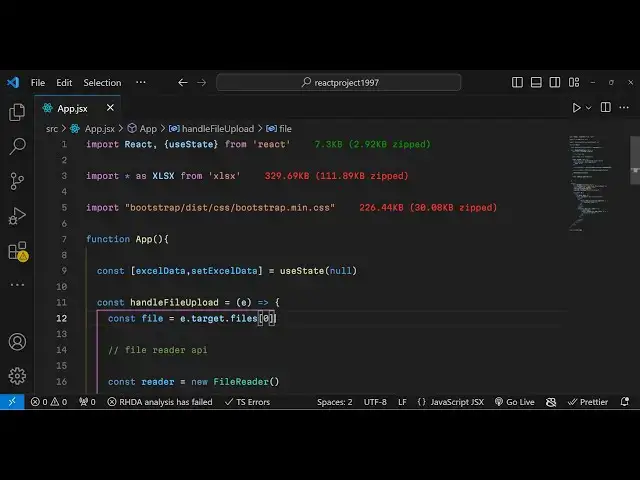
this as well at the very top handle file
3:04
upload e parameter will be passed
3:06
automatically because it's a onchange
3:08
event handler so in this function e
3:10
parameter is automatically passed so
3:14
which is event so we
3:17
basically using this e parameter e.
3:20
target. files zero so whatever file
3:24
selected by the user you will simply
3:26
select this and get access to it now we
3:29
need to use the file reader API to
3:32
actually read the file for doing this we
3:35
will be instantiating a new instance
3:38
of file reader
3:40
API and
3:43
uh at the very top we need to inst
3:46
import the packages first of all we need
3:49
to import the react base package and
3:51
also U State
3:56
Hook from the base react Chase package
3:59
and then we need to import the sheetjs
4:01
library import XLS from this package
4:06
XLS and then we also need to import the
4:10
bootstrap CSS file so it is located in
4:13
the disc folder CSS bootstrap main. CSS
4:18
in this way you can import your
4:20
bootstrap so right here after you can
4:23
simply use the file reader API for that
4:27
we just need to say reader Dot read as
4:30
array buffer and here you need to pass
4:33
the file and it does contain a method
4:35
which is onload this file reader API so
4:39
inside this e parameter is again passed
4:44
and we will read this using this uh
4:47
Constructor which is available
4:49
uint 8
4:51
array we'll read this file using this e.
4:55
target. result so after this after
4:59
reading the file we need to basically
5:02
use this Library sheetjs it contains a
5:05
read function so it will read your Excel
5:07
file we will pass the data and the
5:10
second parameter is an object which is
5:12
the type so it's the array file so now
5:15
we need to actually read the worksheet
5:17
of the Excel file so for this it
5:20
contains a function workbook do sheets
5:24
and here we need to Simply tell the
5:26
sheet number so here workbook
5:30
dot sheet names so you providing the
5:34
first sheet
5:35
number after that it means extracting
5:38
the Json data from the Excel file so
5:41
Excel is.
5:42
utils and IT contains this function
5:45
which is sheet to Json sheet to Json
5:50
this will actually convert your Excel
5:53
file to Json and here we'll be passing
5:56
the
5:58
worksheet and then we need to Simply say
6:01
set Excel we do need to create a
6:04
variable as well to just keep track of
6:07
which file the user has selected so we
6:10
simply create a variable Excel file
6:14
Excel
6:17
data set
6:19
Excel
6:21
data initial value will be null here we
6:25
are simply setting this Excel data and
6:29
pass it the Json data now we need to
6:32
show it in the browser so for showing it
6:36
we need to Simply after this uh div
6:43
section this input field we just need to
6:47
compare in a qu bracket if that Excel
6:51
data is there in that case only show
6:55
this JS just writing conditional jsx so
6:59
we we have a condition if Excel data
7:01
variable is set in that case we just
7:03
need to show our Excel data in a table
7:08
structure and we will have just use some
7:12
classes of bootstrap which is for the
7:15
table table table
7:19
bordered so inside this we have table
7:24
head table row and inside this we will
7:28
have
7:31
the we Loop through object
7:35
keys so Excel
7:38
data
7:43
zero use the map function to Loop
7:46
through
7:50
each
7:52
data so in this way Loop through and
7:55
we'll be giving the heading in the table
7:58
heading tag so key parameter you need to
8:00
provide this
8:01
key key so what happens now if you
8:06
refresh uh go to
8:11
the just select the Excel file and what
8:15
you see it's showing the key parameter
8:18
right here what so there are three keys
8:20
three columns
8:22
available so what we will say we do need
8:24
to actually show the actual key so curly
8:27
bracket and then key it will now
8:30
actually show the column name so if you
8:32
refresh
8:37
now so it will now actually show what
8:41
happened let me
8:44
see key is not defined sorry let me see
8:49
what is the problem key key
9:04
okay I think I made a typo mistake just
9:12
refresh so now you see the columns
9:14
appearing name AG country now we need to
9:17
actually show the
9:19
rowes so after table head we have the
9:22
table body tag and inside this we have
9:25
the Excel data again we use the map
9:28
function to look Mo through row index we
9:32
have two
9:33
variables to keep track of the keys and
9:37
the actual value we have a table R key
9:40
parameter giving it as
9:42
index and inside this we'll be
9:45
using again object keys
9:50
and we will be looping through the
9:54
row value I
9:59
having the table data and it will
10:03
actually be showing the
10:05
value giving a key parameter and this
10:08
will be the
10:10
I so in this way you can actually show
10:14
the R rows of the Excel file when you
10:17
select everything if you see name is
10:20
country
10:27
uh if the actual value
10:39
again
10:45
refresh I think I made a type of mistake
10:48
right here just
10:51
wait right
10:53
here past it
11:00
this needs to have this curly bracket I
11:04
I
11:05
think just make
11:08
sure select now your Excel file and you
11:12
will see the data is appearing in a
11:15
table structure we have the column name
11:17
then the rows of data we are showing it
11:19
in the Excel file reading it using
11:22
sheetjs in react CH so it's a complete
11:25
example that I showed you guys step by
11:27
step in this way you can read your Excel
11:29
file in react CHS using sheetjs so thank
11:33
you very much for watching this video
11:34
and do check out my website guys free
11:37
mediat tools.com which contains free
11:40
tools regarding audio video and image
11:43
and I will be seeing you guys in the
11:45
next video
#Programming