Up next in 10

React.js react-transition-group Library Example to Animate Objects in HTML Using JSX
Jan 9, 2025

Buy the full source code of application here:
Show More Show Less View Video Transcript
0:00
uh hello guys welcome to this video so
0:02
in this video I will show you one other
0:06
react transition CSS animations Library
0:10
so if you do if you want to do some
0:13
small little animations in something
0:15
like transitions fade in Fade
0:17
Out inside your react I will show you a
0:21
very simple package so in your screen we
0:23
can toggle this fade in and Fade Out
0:25
animation something like this you can do
0:28
it on any HTML element the library name
0:32
is react transition group so if you go
0:34
to npmjs.com Just SE search for this
0:38
package which is react transition group
0:43
so if you just write this the very first
0:46
link which
0:47
appears so this is actually the package
0:51
the command is very simple
0:53
npmi react transition
0:56
group almost 14 million weekly download
1:00
there it's a pretty popular
1:02
package so it's specifically for react
1:05
CH and
1:07
uh I think they have their own official
1:11
website as well you can go to this I
1:14
will show you a very simple CSS
1:17
transition of fade in and fade out and
1:19
just make a simple functional component
1:22
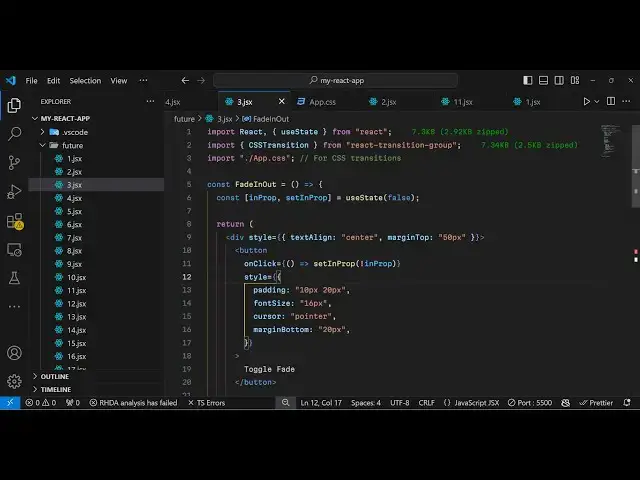
and right at the very top we need to
1:24
import this module so you'll say CSS
1:28
transition which will be coming
1:30
from react transition
1:38
group so this CSS transition we need to
1:41
bind it on an HTML element so for this
1:44
we need to first of all declare a state
1:46
variable which will be
1:48
inop so this will be just be required
1:52
for animating the element so initial
1:55
value will be false we will not be
1:57
animating the element so
2:00
this will be a Boolean parameter now in
2:02
the
2:03
js6 we just need to animate a simple div
2:06
so what I will do I will just give it a
2:09
style
2:10
property the Box will appear in the
2:12
center position so text align will be
2:15
Center and I will just give it a margin
2:17
from the top position which is 50 pixel
2:20
and inside this we
2:23
will have a
2:26
button so when we click the button we
2:28
need to animate the element so will
2:30
simply have a toggle button to fade out
2:33
and fade in animation so I will just
2:36
have give these style parameters I will
2:40
just paste
2:41
it so if you refresh your browser you
2:44
will see a simple button
2:46
appearing so we just need to bind an
2:49
onclick event handler to this button so
2:51
when we click this button what should
2:54
happen we need to change this set in
2:56
prop to whatever is the
3:01
if it is true then we need to change to
3:02
false we need to just toggle it we are
3:05
just changing this
3:07
variable if it is false then it true if
3:10
it is true then we are changing it to
3:12
false so now we need to animate
3:15
this element so now for animating this
3:18
we'll be using this component which is
3:20
CSS
3:22
transition and we will be binding this
3:25
CSS transition to whatever element that
3:27
we want to animate in this case we need
3:30
to Simply animate a simple div element
3:33
which I give all these
3:37
properties simple CSS property so it
3:40
will be a simple div you will see we
3:43
will animate this on button click so
3:46
this is actually the div section so I
3:49
will just give it a inside this anh2
3:54
which is I am
4:03
a fading
4:07
box so like this so now when we click
4:10
the button first of all need to
4:13
configure some properties of this so
4:15
first property is take is
4:18
the Boolean parameters so if it is true
4:22
then it will show if it is false then it
4:23
will not show so we are using this
4:25
property right here that we used we're
4:28
toggling it on but button click so we
4:30
are just attaching it to this in
4:32
property then the second it takes the
4:36
time out how much time the animation
4:38
should took so I will just attaching 500
4:41
millisecond which is half of a
4:43
second it will be quick and then we need
4:46
to attach some class names so the
4:48
buil-in class names are fade so it will
4:51
be a fade in animation Fade Out
4:54
animation and then
4:56
unmount exit you just need to attach
4:59
this
5:00
to clear all animations so these are the
5:03
four properties it takes and now we can
5:06
write
5:09
our that's all the application is
5:12
complete so if I click toggle
5:21
fate time out was
5:24
500 class names is fed
5:35
Let me refresh
5:39
it go to console I think some error is
5:43
taking place the animation
6:00
okay we actually need to attach these
6:03
classes which
6:08
is okay these classes we need to write
6:12
that's why it will animate so what I
6:14
will do I will import the
6:19
classes the CSS file so now it will
6:23
animate so you will see as I'm clicking
6:26
the button it is toggling the animation
6:30
so in this way you can
6:32
animate your HTML elements using this
6:35
package of react CHS simple transition
6:39
of fade in and Fade
6:41
Out so thank you very much for watching
6:43
this video and do check out my website
6:45
as well free mediat tools.com which
6:48
contains thousands of tools regarding
6:50
audio video and MH and I will be seeing
6:53
you in the next video
#Development Tools
#Other