Up next in 10


Buy the full source code of application here:
Show More Show Less View Video Transcript
0:00
uh hello guys welcome to this video so
0:03
in this video I will introduce to one
0:04
other react animated uh framework which
0:08
is called as react motion so on your
0:11
screen we have a button right here you
0:12
will see you can toggle out this
0:15
bouncing animation of this ball so when
0:17
I click the button you will see the B uh
0:19
the ball will move upwards in an
0:22
animated way and once again if I click
0:24
the button it will fall down so it's a
0:27
very simple bouncing animation Library
0:29
which which is specifically there for
0:31
react CHS and the command is very simple
0:34
if you go to npmjs.com just search for
0:37
this package which is react D
0:40
motion the very first link which
0:43
appears this is actually your package
0:46
here react motion the command is very
0:49
simple this is actually the command npmi
0:52
react Das motion almost 420,000 weekly
0:56
downloads are present uh I will show you
0:58
very simple example
1:00
I've already installed it so just make a
1:03
simple functional component and using
1:06
the import statement we just need to
1:08
import the
1:09
module and it contains two methods
1:11
motion and
1:13
spring you just need to import this from
1:16
react
1:21
motion so in this way you can import
1:23
this at the very top so after importing
1:26
it it's very easy to use it so first of
1:29
of all I will just declare some State
1:31
variables so first of all for a Boolean
1:36
parameter this is useful for keeping
1:39
track of whether the animation has
1:40
started or not so we'll be using the UST
1:42
State hook initial value will be true so
1:47
it's a Boolean parameter if the ball is
1:49
bouncing or not so if I load the page we
1:52
will be bouncing the ball so that's why
1:54
it is set to
1:56
true and then we need to initialize the
1:58
library which is the spring we need to
2:02
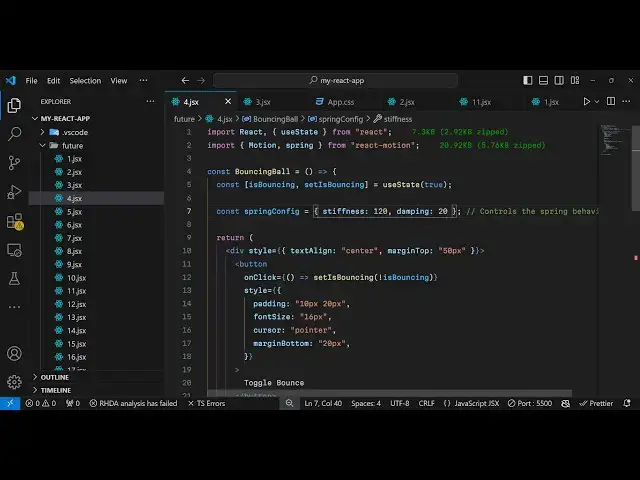
configure the animated Library so this
2:05
will be a simple object uh it will
2:07
contain some properties for the
2:09
stiffness of the animation which is
2:11
actually a integer value where you
2:13
control the how much time the animation
2:16
took so I'm just attaching 120 you can
2:19
give any value of your choice and then
2:22
the second property is damping once
2:24
again it's integer value uh I am just
2:27
giving it 20 this all refers to the
2:30
quality of the animation so you can
2:32
experiment with this two parameters now
2:35
coming to the jsx we just need to have a
2:38
div element and inside this we will be
2:41
aligning the ball in the center
2:43
positions so I will just align this in
2:46
the center and then give it a margin
2:49
from the top 50
2:52
pixel and inside this we will have a
2:55
simple
2:56
button on button click we will animate
3:02
our ball so this will be a simple button
3:05
uh I'm just giving some CSS properties
3:07
to it so if you refresh and go to the
3:10
browser you will see the simple button
3:13
appearing and then to animate this we
3:17
will simply use the
3:20
motion uh component and right here
3:23
inside the motion we are just using this
3:26
you will
3:28
see and inside this
3:30
motion we will declare whatever element
3:33
that you want to animate so in this way
3:36
in this case we are animating a simple
3:38
div
3:38
element which is actually a simple
3:45
ball so I've just attached some CSS
3:48
properties to it the width height
3:50
background color border radius margin
3:52
top and the transition
4:03
so it is saying that style is not
4:05
defined
4:16
uh okay this motion uh component takes
4:20
some options so first of all we need to
4:21
declare these options this animated
4:25
component first of all we need to
4:27
provide the default default styling of
4:30
the element that you want to animate so
4:33
y will be zero y coordinate is zero and
4:37
then you provide the
4:40
styling and here we'll be using the
4:42
spring which we imported early
4:45
on
4:47
so we will provide this Boolean
4:52
parameter if the ball is bouncing in
4:54
that case the y coordinate should be 200
4:57
if it is not bouncing then it should be
4:59
zero so we we conditionally changing
5:00
these coordinates and also we are
5:03
providing the spring config which is the
5:05
options that we configured yeah simply
5:08
passing it
5:10
so after that it actually takes these uh
5:15
style
5:16
parameter automatically inside this we
5:19
can import
5:21
this and we need to transfer everything
5:25
in between these brackets
5:32
so just make this change now the style
5:34
parameter is now available so if you
5:37
refresh now the ball will appearing if
5:39
you
5:40
see so it is animating from top to down
5:44
because we have set the coordinate to be
5:46
200 because the ball is bouncing the
5:49
variable is true that's why it is
5:52
appearing from top to bottom now if I
5:55
click the button as you will see the
5:57
ball will again bounce up again if I
6:00
click down it will go down again if I
6:02
click the button it will go up and again
6:04
if I click button it will go down so in
6:07
this way you can toggle the animation of
6:09
ball bouncing from top to bottom so you
6:13
can see the animation is very
6:17
smooth so in this way you can animate
6:20
any HTML element using this framework
6:22
which is react motion it's specifically
6:25
built for react CHS applications so
6:29
you can also let's suppose if you also
6:32
want to change the x coordinate you can
6:35
even do that as well
6:45
so so if I see
6:52
again so in this way you can also change
6:55
multiple properties
7:01
so thank you very much for watching this
7:03
video and do check out my website as
7:06
well free media tools.com which contains
7:09
thousands of tools regarding audio video
7:11
and
7:12
image and I will be seeing you in the
7:15
next video
#Development Tools
#Open Source
#Other