Up next in 10

React.js react-hook-form Example to Make Form Validation & Show Loading Bar on Form Submit
Jan 9, 2025

Buy the full source code of application here:
Show More Show Less View Video Transcript
0:00
uh hello guys welcome to this video so
0:02
in this video we will look at a react GS
0:05
Library which allows you to do two
0:07
things at one time which is form
0:09
validation and also at the same time it
0:12
will show you a loading progress bar or
0:14
spinner after you submit the form so we
0:17
have a simple form inside react chairs
0:19
if you see we have two Fields out there
0:22
first is the name and secondly is the
0:24
email address and then we have a simple
0:26
button so now if I
0:28
write if I don't write any anything and
0:30
click the button you will see the error
0:31
messages will pop in name is required
0:34
email is required so if I write the name
0:37
but don't write the email once again the
0:38
message will
0:41
stay and then if I submit by entering
0:44
the name and the email you'll see this
0:46
loading progress part which will show
0:49
and then you will see form submitted
0:50
successfully so there is a specific
0:52
library inside react chairs which allows
0:55
you to do this which is react hook
1:01
form this is actually the name of the
1:03
library basically it's a
1:06
hook custom hook it's almost very
1:09
popular Library almost 6 million weekly
1:13
downloads it's used for various purposes
1:15
this is the command here npmi react hook
1:18
form I've already installed it
1:22
so basically I will show you step by
1:24
step how to do this so just make a
1:27
simple functional component in react CHS
1:33
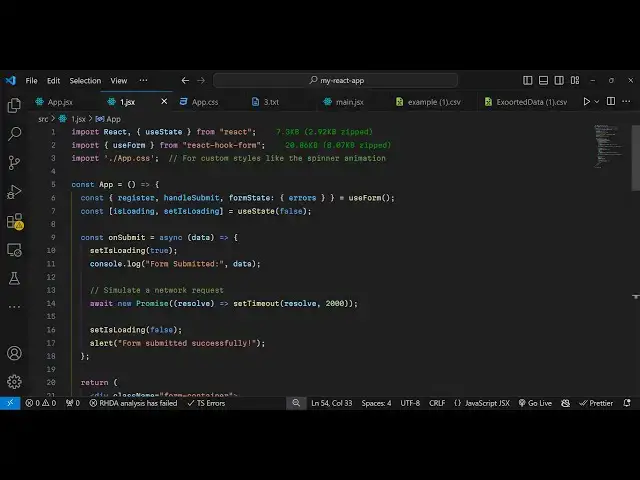
so right here at the very top we will
1:35
first of all import the library so there
1:38
is actually you need to import the use
1:41
form hook which will be available from
1:44
react hook form so this hook we will use
1:47
it so first of all we need to
1:52
actually extract all the methods which
1:54
are available in this hook which is your
1:58
use form hook
2:01
so there are various functions first
2:03
function is
2:05
register the second one is handle submit
2:08
which actually executes whenever you
2:10
submit your form and then actually your
2:12
form State what is the form State and it
2:16
will actually be will interested in the
2:18
errors so validation errors if user
2:21
doesn't write anything then these errors
2:23
are
2:24
pre-built so now to use this first of
2:27
all we also need to keep track of the
2:29
loading bar loading progress part for
2:31
that we need to declare a Boolean
2:34
parameter which is loading set is
2:37
loading initial value will be false so
2:40
you'll be using the UST State
2:42
hook so initially when you load the page
2:45
the progress B will not be shown so now
2:47
when you submit the form then you will
2:49
change this value from false to
2:51
true so right here we need inside your
2:54
jsx we will actually have a div so I
2:58
have just written custom CS CSS which in
3:00
my app
3:02
do CSS file so I will just import
3:06
that so we have written some custom
3:09
Styles here so this video is not about
3:12
CSS so all the source code is given in
3:14
the description so in the jsx I will
3:16
just give these custom classes form
3:20
container so inside this we will have an
3:23
H2 heading which will say react hook
3:26
form with spinner
3:30
and then you'll be having a simple form
3:31
right here and giving a attribute which
3:34
is on submit this attribute will execute
3:37
whenever you submit the form and we will
3:39
actually execute this function which is
3:41
handle submit that we are
3:44
getting and it's actually a function and
3:47
here we will provide our own custom
3:49
function which we will Define so right
3:52
at the very top we need to Define this
3:54
function on submit
4:01
so right here this makes just make this
4:03
function as
4:04
async and your data will be available to
4:07
you by default in this function so this
4:10
data will
4:12
be actually containing information about
4:14
the form so whenever you submit this so
4:16
right in the form itself we will have a
4:20
two input
4:21
Fields we'll WB this inside this class
4:25
group form group and
4:30
we have a simple
4:35
label we will have the name field and
4:40
uh input type text and give it an ID
4:44
here to
4:45
this and we'll basically be registering
4:48
this using the register method dot dot
4:51
dot register and here you need to give
4:54
it the name properties so I'm just
4:56
giving it as
4:58
name and the second second property it
5:00
takes in this is your required what
5:03
validation message that you want to show
5:05
if the user doesn't write this field so
5:06
I will just say name is required this is
5:09
we are just registering this inside if
5:12
you see we are using this function
5:13
register from this use form hook so
5:16
registering this input
5:18
field and there is this error message if
5:21
the user doesn't write it will not show
5:24
this validation message so we are doing
5:26
the two things at one time and then we
5:29
we need to also give it a class name of
5:31
form
5:32
input and same thing uh if you want to
5:35
show error messages right here if the
5:38
user doesn't write this so we will show
5:41
these error messages coming from errors
5:43
dot
5:45
name then we will inside your
5:48
paragraph give it a class name which is
5:52
all these classes we have defined in the
5:54
CSS so it will dynamically be giving the
5:57
errors. name. message so these errors
6:00
are coming from the form state if you
6:02
see so all this is pre-built inside this
6:05
Library react hook form which makes it
6:07
easy to do the form validation as well
6:10
so now after this we will keep repeat
6:14
this for the email field so I will just
6:17
copy this and paste it and here I will
6:19
replace
6:23
email so input type here will be email
6:26
ID will be email
6:29
register here will be
6:37
email and that's all that we need to
6:44
do uh after this error start this is
6:48
your email because the name parameter
6:51
here you've given is email so that's why
6:53
we need to replace
6:55
it uh then after that we will have a
6:57
simple button
7:00
so this button basically will be
7:02
responsible for submitting the
7:05
form so button type submit and giving a
7:09
class name to it of
7:12
submit
7:14
BTN and disabled attribute I will give
7:18
which is actually your Boolean parameter
7:20
so depending upon the value of is
7:24
loading
7:29
sorry this is
7:33
your this is loading so I will just put
7:36
the whatever is the value depending upon
7:39
the button will be
7:41
disabled so now here the text of the
7:43
button will also change so if the value
7:47
of the loading parameter which is a
7:49
Boolean is true in that case we need
7:53
to show the value we need to show the
7:57
spinner so here we'll simply give it a
8:00
class name which is
8:04
Spinner and if the value is false in
8:07
that case we need to show the value
8:09
which is sub
8:13
submit that's all conditionally we are
8:15
rendering the spinner right here if you
8:17
see loading progress bar if the value is
8:19
true in that case we need to show the
8:21
progress bar so if you uh open your
8:25
application you will see it is saying
8:28
unexpected token
8:32
uh just
8:34
wait I think this
8:37
is a register so this parenthesis is not
8:42
required here and it will require
8:53
here also make this change right here
9:00
so now if you don't write anything click
9:03
the submit button you will see the
9:04
errors will pop in name is required
9:07
email is required if you write the name
9:10
the error message will go and then if
9:12
you click
9:15
submit the progress bar uh loading bar
9:23
if if you click submit
9:32
span tag
9:34
I think for the spinner yeah for the
9:37
spinner uh when you click the submit
9:39
button this function executes because we
9:41
are binding this handle submit if you
9:43
see for showing the spinner this
9:46
function will execute and first of all
9:48
we need to set the value of set is
9:50
loading from false to true and then we
9:54
need to Simply console log the message
9:56
that form is submitted and we'll get
9:59
this data when you submit the form and
10:02
then you'll be Simply
10:04
Be executing this function you have a
10:08
new promise you'll use a set timeout
10:11
function and we'll after two seconds we
10:14
will just resolve the
10:18
promise so this is
10:22
resolve and here put a comma and then it
10:24
takes the time period so after 2,000
10:27
millisecond which is after 2 second it
10:29
will show the progress part so again we
10:31
will be set is loading to
10:34
false and will simply be saying alert
10:38
form submitted successfully so this
10:40
means that for 2 seconds we are showing
10:42
the progress bar after 2 seconds then
10:45
this alert statement will show that form
10:47
submitted successfully so if you refresh
10:50
if you don't write anything you will get
10:51
this error messages for form
10:53
validation if you write
10:55
something for 2 seconds the progress bar
10:58
will show and then you will see form
11:00
submitted successfully so in the console
11:03
you will also get the information that
11:06
you submitted which is an object which
11:08
contains both these informations what is
11:10
the name and the email address so it's a
11:14
very handy Library when it comes to
11:16
forms in any application you can use
11:18
this library of react hook form
11:20
specifically for react CHS applications
11:23
if you are working with forms it can do
11:26
a lot of things it can show your
11:27
progress bar it can do form validation
11:30
show these error
11:31
messages and it's very handy to use very
11:34
easy to configure as you see in this
11:36
video so thank you very much for
11:39
watching this video please hit that like
11:41
button subscribe the channel and do
11:43
check out my website as well free medat
11:45
tools.com which contains thousand tools
11:47
regarding audio video and MH and I will
11:51
be seeing you in the next video