Up next in 10

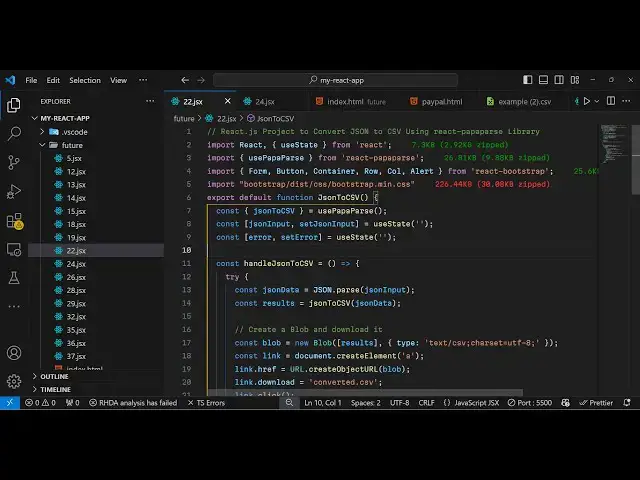
React.js Papaparse Project to Parse & Convert JSON to CSV Using react-papaparse Library
Jan 9, 2025

Get the full source code of application here:
https://gist.github.com/gauti123456/c8f97c2e1822a4035f42fb16c7cbbb01
Show More Show Less View Video Transcript
0:00
uh hello guys welcome to this video so
0:02
in this video I will show you a package
0:05
which converts Json into CSV inside
0:08
react chairs so this is actually the
0:11
application we will be building where we
0:13
allow the user to paste the Json raw
0:15
Json and then we have the button to
0:18
convert to CSV file which is comma
0:20
separated value file so once the user
0:23
pasts the Json you will see let me paste
0:27
the Json here this is sample Json right
0:29
here
0:30
it can be anything it can come from API
0:33
as well so I have this Json so let me
0:37
copy everything here and paste it inside
0:40
this text area so it needs to be valid
0:43
Json so you can see it's a array of
0:45
objects of
0:46
users so I click this button so you will
0:49
see it will convert this into a CSV file
0:52
so I can just open this CSV file it's
0:54
comma separated value so you can see
0:57
these are the column names these are the
1:00
number of rows so it converted the Json
1:02
into CSV and uh the package that we are
1:07
using which is Papa
1:09
pars
1:11
uh basically you have known this Library
1:14
which is a very famous powerful CSV
1:17
parser for JavaScript it do offers
1:20
a specific package for react chairs
1:23
which is called as react Papa bars
1:26
package and we'll be using this package
1:29
I I've already installed it this is
1:31
actually the command almost it has
1:34
129,000 weekly downloads so it has its
1:36
own website as well this is the
1:39
website and uh it's specifically made
1:41
for react Chas and I will show you this
1:45
complete example and just make a simple
1:49
functional component and for building
1:52
the UI we are simply using some
1:53
bootstrap so I will just paste the
1:57
bootstrap right here so all the source
1:59
code is given in the description so we
2:01
are using react bootstrap for building
2:03
the UI and these are the pre-made
2:05
components which are available inside
2:08
this and we are also including the CSS
2:10
file as
2:12
well so
2:15
now for this application we do
2:19
require some State variables so we need
2:24
this uh function which is Json 2 CSV
2:29
which is available
2:30
inside this hook which we have use Papa
2:34
bars so it will be imported from this
2:37
package if you see react Papa so it
2:39
offers this hook which contains this
2:41
function which directly converts your
2:43
Json into CSV and we also need a
2:46
variable for keeping track of the Json
2:49
pasted by the
2:52
user so we'll be using the UST State
2:55
hook for
2:57
this and also we'll be having having
3:00
this error variable as well or keeping
3:03
track of the
3:11
errors so these are all the variables
3:13
which are needed for this application
3:15
now we'll be constructing a very simple
3:19
form we'll use the container element of
3:21
react bootstrap and give it a class
3:27
name and inside this we'll have have an
3:30
H1 heading I will align this heading in
3:32
the center position and just say Json to
3:36
CSV
3:40
converter and we'll have this rad
3:43
hack and we'll just align this into
3:45
Center positions so justify content
3:49
Center
3:51
and call
3:55
md8 so inside this we'll have the
3:59
actual
4:08
form so basically give give it an ID
4:11
here control ID which will be Json input
4:14
so here the user
4:16
will I just give it a label
4:21
here paste your Json
4:25
here so here the user will paste the
4:28
Json and for this we do have we'll be
4:32
having a text area where the user can
4:35
paste so we have the form
4:38
control and this will be as text
4:44
area and rows will be
4:48
eight uh we'll give it a
4:52
placeholder which will be saying enter
4:55
raw Json data
4:59
I'll give it a value here which will
5:02
be Json input the actual variable we are
5:06
binding it
5:08
so and then we will also be binding an
5:11
onchain so when we paste the Json we do
5:14
need to execute this function call back
5:17
function and we will set the Json input
5:20
we use the hook function so whatever is
5:22
the
5:24
value and that's all if you refresh now
5:28
you will see this input field appearing
5:30
where the text area where the user can
5:32
paste the Json and after this we just
5:35
need the button to submit the form so
5:39
we'll be rering a simple button this
5:42
button will say
5:44
convert to CSV and
5:48
download I will basically bind an on
5:52
click listener to this button I will
5:54
handle the Json to CSV this function we
5:57
will Define I will give give it a class
6:00
name
6:04
of and the variant of the button will be
6:08
primary and just Define this function
6:10
handle Json to CSV so once we click the
6:16
button so right here uh if you see we'll
6:19
have this button so we just need to
6:21
Define this on click listener so we
6:23
first of all need to get the we need to
6:26
pass the Json
6:30
and convert to
6:31
CSV so for this we'll be creating a
6:34
variable Json data and passing the Json
6:37
by using json. pars
6:40
and after this we will use the papa par
6:44
package which contain this function Json
6:46
to CSV and we'll pass the
6:49
Json and then we'll create a blob and
6:52
download this creating the blob you'll
6:54
create the blob
6:56
Constructor and pass the results
7:01
like this and the second parameter is
7:02
actually the MIM type so for CSV it is
7:06
Tex / CSV semicolon the correct set you
7:10
need to specify which is
7:13
utf8 like this after this we just need
7:17
to download this file so for downloading
7:19
this we will create anchor tag and just
7:23
download
7:26
this like this we created this link tag
7:29
and then we put a file name and
7:32
dynamically click it so this completes
7:35
the application and if I try to
7:37
basically paste the
7:40
Json
7:44
so click on that and you'll see it will
7:47
download the CSV
7:49
file and it has converted the Json into
7:52
CSV so in this way you can use the papa
7:54
pars react package for converting the
7:57
Json into CSV
8:00
and thank you very much for watching
8:01
this video and do check out my website
8:03
as well free mediat tools.com which
8:06
contains thousands of tools regarding
8:08
audio video and image and I will be
8:11
seeing you in the next video