Up next in 10

React.js framer-motion Library Example to Animate HTML Elements in Browser Using JSX
Jan 9, 2025

Buy the full source code of application here:
Show More Show Less View Video Transcript
0:00
uh hello guys welcome to this video so
0:02
in this video I will show you one other
0:05
reactjs animation Library so when I tap
0:09
on this div here you will see it will
0:11
animate if I hover onto this it will
0:13
also animate if I click it it will also
0:16
animate so the library name is framer
0:19
motion so if you go to npmjs.com just
0:22
search for this package framer Das
0:25
motion so the very first link which
0:28
appears this is actually the package
0:30
simple and Powerful JavaScript animation
0:32
library and it is also available for
0:34
react CHS you can simply install this
0:37
Library npmi framer motion I've already
0:40
installed it so almost it is having 5
0:44
million weekly downloads a very popular
0:47
package they have their own website as
0:50
well motion. Dev you can uh go to
0:54
this it's a completely free open-source
0:57
library and now I will show you a very
0:59
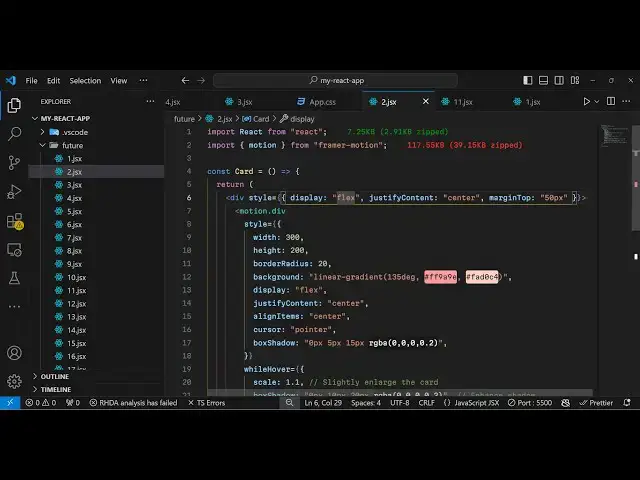
big basic example so just make a simple
1:02
functional component and right at the
1:05
very top we can import this uh package
1:08
import motion from framer motion so we
1:11
have uh instantiated the
1:13
library like this using the import
1:16
statement and now to actually do the
1:18
animation part we will initialize the
1:21
div so I'm just taking a very simple
1:23
example you can do this with any HTML
1:25
element it can be heading it can be
1:27
paragraph it can be image as well so I
1:31
will just give it a display property to
1:34
flex just make it in the center position
1:37
so justify content
1:39
Center and margin
1:42
top will be 50 pixels
1:45
so inside this we will have our motion
1:50
we will be using this motion and we'll
1:52
be animating the
1:53
div so we are using this motion property
1:56
right here and we are animating the div
1:59
that that's why we have written div
2:01
right here and first of all I will just
2:04
give some CSS properties to it so
2:08
style we'll give it a width of 300 pixel
2:12
and a height of 200 pixel border
2:17
radius of around 20 and we will just
2:21
give it a
2:23
simple background color this will be a
2:26
simple
2:28
gradient so so let me just paste these
2:31
CSS properties this is not about
2:33
CSS so we have this box appearing if you
2:37
see if I refresh you have this box
2:39
appearing it is not
2:41
animating now to animate this it's very
2:45
simple they have various built-in
2:47
properties which are there which I like
2:49
about this framework so one such
2:52
property is while you hover so very
2:56
simple syntax so this is actually a
2:58
property while you hover cover onto this
3:00
element what you want to do so we want
3:03
to animate this element we need to
3:05
change the scale property from 1 to
3:10
1.5 so what you will see as I hover onto
3:14
this the size of the element will
3:16
increase from 1 to 1.5 so while you are
3:21
hovering I'm not clicking it I am
3:22
hovering onto the element simply
3:25
pointing the mouse on this
3:27
element you can change any property we
3:30
can even change the background color as
3:32
well if I want to if I change to
3:34
red so the color will change to light
3:38
red to dark red so in this
3:42
way if I want it to I can change to
3:45
Green as well so now it changeed to
3:47
Green so in this way you can perform
3:50
these animations any CSS value CSS
3:53
property you can animate it let's
3:55
suppose if I want to add some box Shadow
3:58
I can even do that as well so
4:02
so you can see it add some box
4:07
Shadow so the next property is when you
4:10
click it so when I click it nothing
4:12
happens so when I click it there is
4:15
again a property which is
4:17
while tap tap is equal to clicking so
4:21
when you click it what should happen so
4:23
we want to scale it down so I will say
4:26
0.1 so now what happens if I click this
4:31
you will see it will scale it down to
4:33
this
4:36
one and then I want to change the
4:39
background color to
4:47
Black so now if I click this element you
4:50
will see the background color will
4:51
change to black and it will be scaling
4:53
as well scaling
4:55
down so in this way you can see you can
4:58
animate on different different events
5:01
which is while hover while tap this is a
5:03
great thing about this framework and you
5:06
can easily bind animations on elements
5:09
using this and also you can also have we
5:13
have also have a transition property
5:15
which actually controls the amount of
5:18
Animation that you do so there are
5:21
various types of animations one such
5:23
type is spring and you can even control
5:26
the stiffness by providing this integer
5:29
value which is
5:31
300 stiffness actually refers to
5:35
the time taken by animation to happen
5:38
such as the quality of the animation if
5:40
you provide a higher value it will take
5:42
a longer time to do the animation but if
5:46
you provide a shorter time then you will
5:48
see it only takes uh 300 millisecond to
5:51
do the animation so it is very smooth so
5:54
you can control the amount of time taken
5:57
by the stiffness property
6:00
and uh we can even show a heading in
6:04
this div
6:07
simply right
6:12
here so we just have a heading appearing
6:15
in the center of the
6:18
div so in this way you can animate any
6:21
element using this package framer motion
6:23
which is you can use it with any
6:25
framework not specifically for react you
6:27
can you use it simply in vanilla
6:30
JavaScript or VJs or any sort of front
6:33
end framework I'm just showing you very
6:35
simple example how to use it in react CH
6:39
so thank you very much for watching this
6:41
video and do check out my website as
6:43
well free mediat tools.com which
6:45
contains thousands of tools regarding
6:47
audio video and image and I will be
6:50
seeing you in the next video
#Online Media
#Clip Art & Animated GIFs
#Animated Films
#Educational Software
#Computer Education